


Warning
Harness Work: Harness work is in lite-harness. Please use lite-harness for new development.
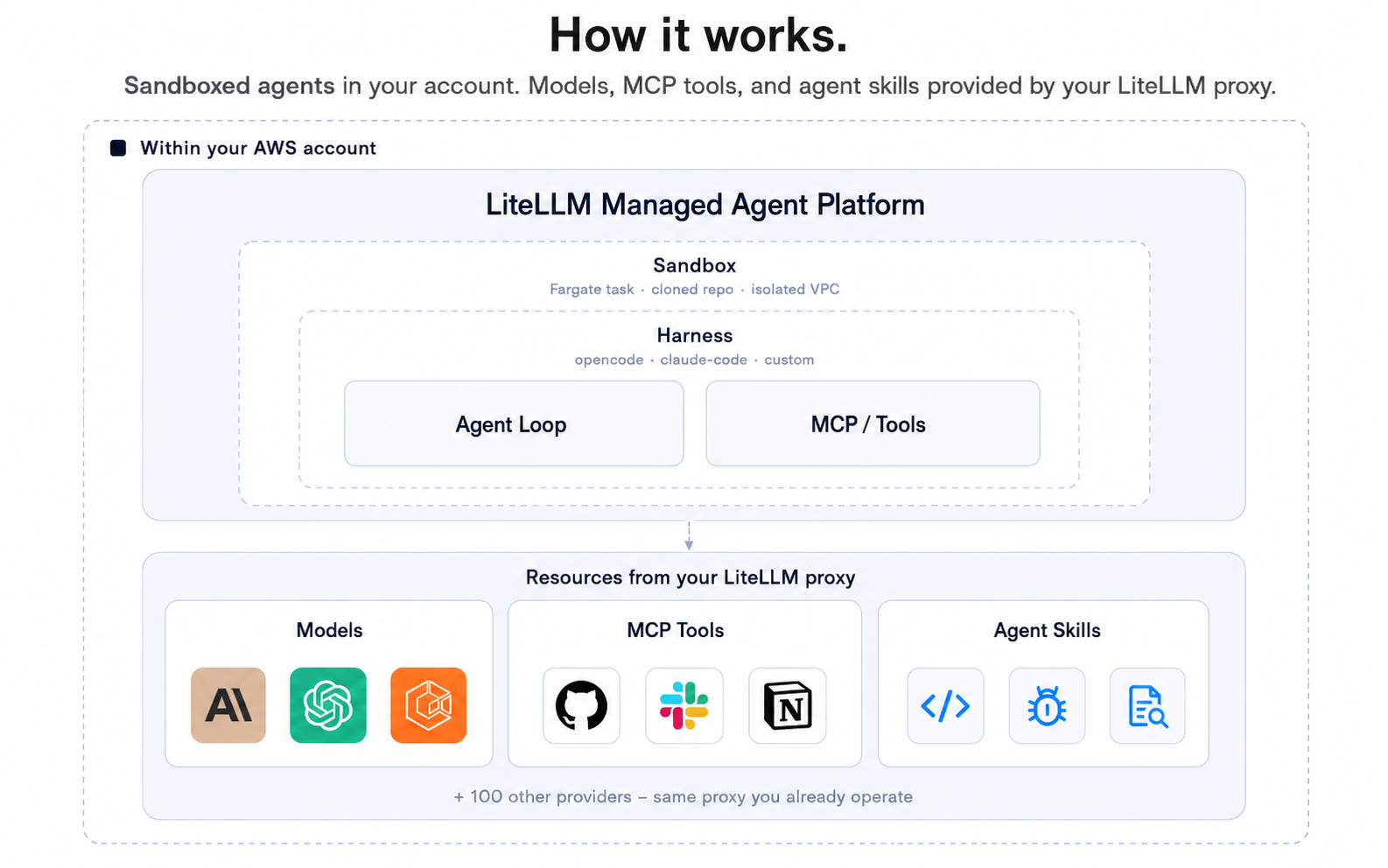
LiteLLM Agent Platform is self-hosted infrastructure for running coding agents — Claude Code, Codex, Hermes anything — inside isolated sandboxes with a credential vault, so agents can run with bypass-permissions on without ever seeing your real keys. Use it from the lap CLI in your terminal, the web UI, or call the API directly.
Learn more in the docs.

Note
The lap CLI talks to a running instance of LiteLLM Agent Platform. To self-host the platform itself, jump to Self-hosting.
-
Install the
lapCLI:git clone https://github.com/BerriAI/litellm-agent-platform.git cd litellm-agent-platform/cli && npm install ln -sf "$PWD/bin/lap.mjs" ~/.local/bin/lap
-
Point it at your platform:
lap login
-
Open a sandbox:
lap claude-code-cli1
That spins up a fresh Kubernetes pod running Claude Code, attaches your local terminal to its TTY over a WebSocket, and drops you straight into the agent. The pod's env contains only stub credentials (e.g. GITHUB_TOKEN=stub_github_a8f1); the vault swaps them for real keys on every outbound TLS connection. Press Ctrl-D to detach; the session stays alive for 24h. See docs/lap-cli.md for the full CLI.
▶ Demo: setting up codex and claude-code sandboxes · ~5 min
End-to-end walkthrough: create an agent, open a sandbox from the lap CLI, attach a local terminal, run codex / claude-code inside.
| Harness | Quickstart |
|---|---|
| Claude Code | docs.litellm-agent-platform.ai/quickstart/claude-code |
| Codex | docs.litellm-agent-platform.ai/quickstart/codex |
| Hermes | docs.litellm-agent-platform.ai/quickstart/hermes |
Sandboxes run on Kubernetes via the kubernetes-sigs/agent-sandbox CRD. Local dev uses kind.
Prereqs: Docker Desktop, kind, kubectl, helm, a LiteLLM gateway URL (or run the bundled one — see below).
bin/kind-up.sh
docker compose up
bin/kind-up.sh is idempotent — provisions a kind cluster agent-sbx, installs the agent-sandbox controller, and loads the harness image. docker compose up boots Postgres, runs the schema migration, and starts web (:3000) + worker.
Open localhost:3000 to create an agent. Then point lap at it and run through the steps above.
If you don't already have a LiteLLM proxy you can route through, the repo ships an optional compose service that runs one locally. Copy the example config, fill in your provider key(s), and bring it up alongside the platform:
cp litellm-config.yaml.example litellm-config.yaml
# Edit litellm-config.yaml to enable the models you need
echo "ANTHROPIC_API_KEY=sk-ant-..." >> .env

docker compose -f docker-compose.yml -f docker-compose.litellm.yml up
The proxy listens on :4000. Point the platform at it via .env:
# kind sandbox backend (the default self-hosting path): the harness pods run
# in the kind cluster, on a separate Docker network from this compose project,
# and reach the host-published proxy port via host.docker.internal.
LITELLM_API_BASE=http://host.docker.internal:4000
LITELLM_API_KEY=sk-litellm-local-master  # must match master_key in litellm-config.yaml
Note
LITELLM_API_BASE is injected into the sandbox harness pods, not just the
compose web/worker containers. With the kind backend, use
http://host.docker.internal:4000 — the pods live on the kind Docker
network and cannot resolve the litellm compose service name. Only if you
run without kind (e.g. LOCAL_SANDBOX_URL or the brain-inline harness,
where everything stays inside this compose project) can you use the more
direct http://litellm:4000.
Architecture and tuning: docs/k8s-backend.md.
Recommended path: AWS EKS for the sandbox cluster, Render for web + worker. See deploy/ — bin/eks-up.sh provisions the cluster, the Render Blueprint at the top of deploy/render/README.md is one click.
Create an agent, open a session, send a message, read the reply — directly with curl. See docs/spawn-task-agent.md and src/server/DEVELOPER.md.
MIT — see LICENSE.