camera file system geolocation google auth
io.plugn.dashboard
#before app publish, please config following plugins
https://ionicframework.com/docs/native/onesignal
#ios build
need to remove
ios from capacitor in plugn-device/package.json
keytool -genkey -v -keystore android-release.keystore -alias release -keyalg RSA -keysize 2048 -validity 10000
Bawes@231!
keytool -list -v -keystore D:\xampp\htdocs\plugn-dashboard-ionic\android-release.keystore
65:61:CD:01:87:BB:88:54:19:73:4B:F7:8A:55:38:92:D5:01:33:E1:C3:E9:96:18:27:58:D8:8D:20:5A:F0:F6
keytool -list -v -keystore ~/.android/debug.keystore
storage to preference
camera service not working
check for todo comments
jira issues
update circleci config to fix circleci error
platform.ready not working
browserpageloaded event not getting fired on payment success from android
test on android
publish to android store
** Slack circleci config
SLACK_ACCESS_TOKEN=xoxb-47737144055-4606269551878-bOLPfBq1x0ZvfC4OHbj7WgRP
https://plugn-io.slack.com/archives/C01FNR0K2H0
*** run on linux
circleci local execute build_for_dev_server -e SLACK_ACCESS_TOKEN=xoxb-47737144055-4606269551878-bOLPfBq1x0ZvfC4OHbj7WgRP
*** run on mac
circleci local execute --job deploy_on_dev_server -e SLACK_ACCESS_TOKEN=xoxb-47737144055-4606269551878-bOLPfBq1x0ZvfC4OHbj7WgRP
** Docker
To run in container
docker compose up
** Build and Deploy using Dockerfile
To build a Docker Image, we have to run the following command in our terminal:
docker build -t plugn-dashboard:latest .
To run the built docker image, use the following command:
docker run -d --publish 3000:80 --name plugn-dashboard --network <your local ip> plugn-dashboard:latest
To run container
docker run -d --publish 3000:80 plugn-dashboard
To access in browser
http://localhost:3000/login
For ionic serve command, replace port 3000 with 8100
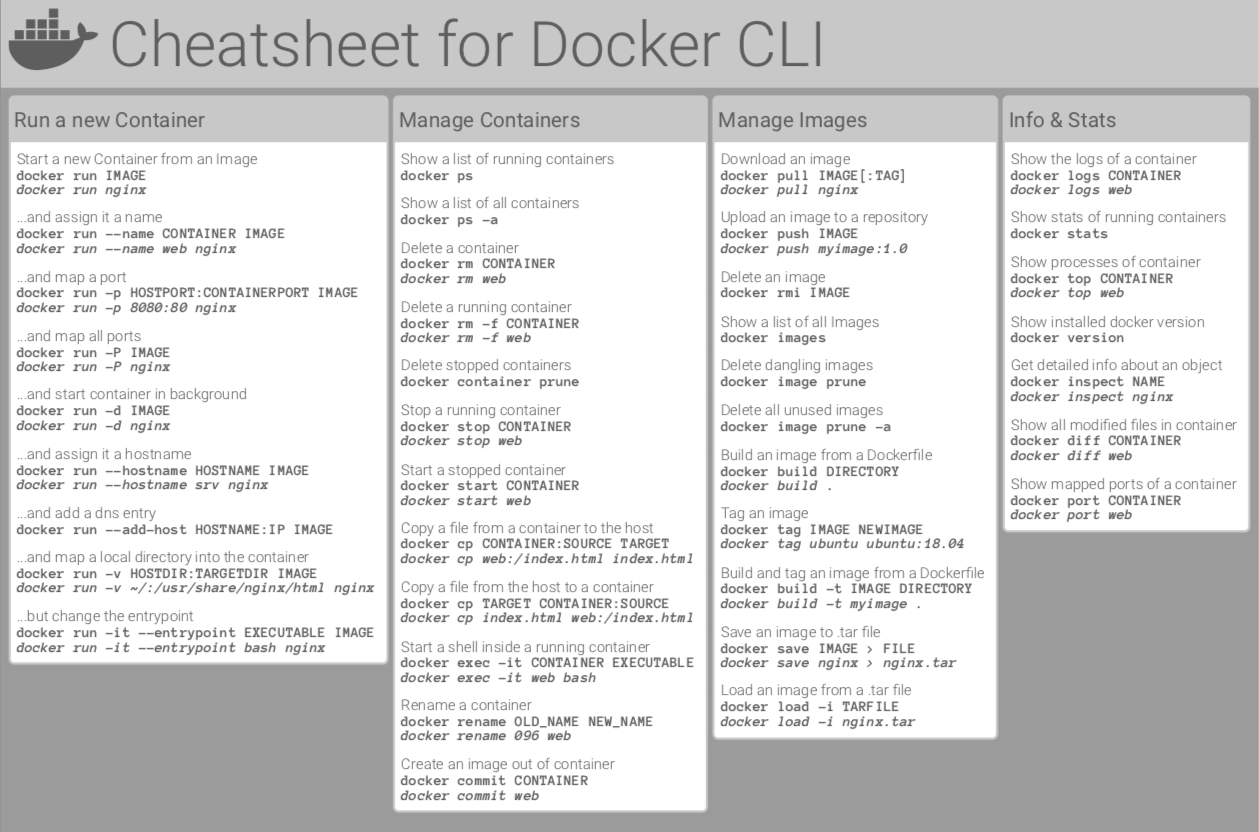
For more commands follow the link
https://raw.githubusercontent.com/sangam14/dockercheatsheets/master/dockercheatsheet8.png
https://developers.tap.company/reference/testing-cards https://developers.tap.company/reference/business
http://jselements.tap.company/tapdocumentation/public/
https://tappayments.api-docs.io/2.0/users-beta/the-user-object https://tappayments.api-docs.io/2.0/tokens/the-token-model https://tappayments.api-docs.io/2.0/cards/card-request-model
http://localhost:8888/bawes/plugn/agent/web/v1/plans/price?currency=USD https://agent.plugn.io/v1/plans/price?currency=
Issues need to check
- arabic + functionality + placeholders + css in landing pages
- test in mobile safari
- test in big screen
- test in mozila
- test in chrome
TODO
- need to specify/ append kuwait timezone in date pipes and convert kuwait time to local time
CodetrixStudio/CapacitorGoogleAuth#61
https://www.npmjs.com/package/@codetrix-studio/capacitor-google-auth https://www.npmjs.com/package/@capacitor-community/apple-sign-in?activeTab=readme
https://docs.mixpanel.com/docs/tracking-methods/sdks/javascript