
A free, privacy-focused Email
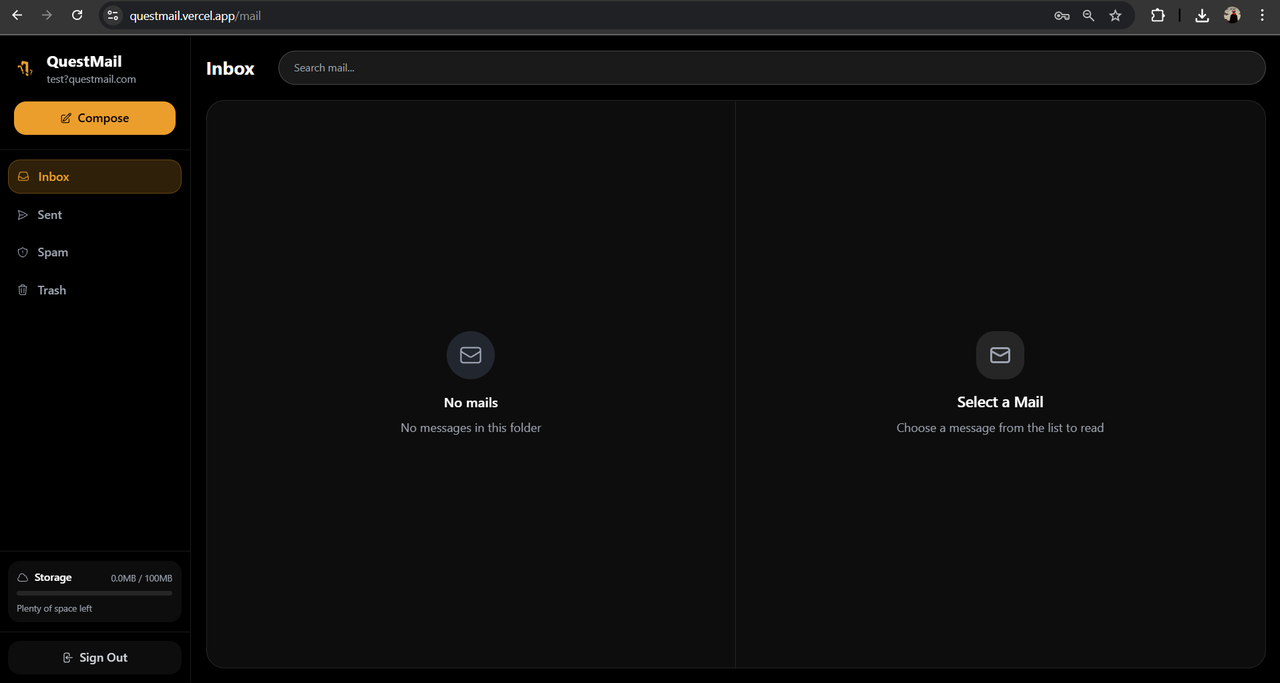
QuestMail is a modern, open-source email platform inspired by Gmail and TwoBlade, built for privacy lovers. It features a beautiful, dark, minimalist UI, one-time read mails, large attachments, and a focus on user control. Powered by Next.js, Tailwind CSS, and Supabase.
- Privacy-First: No tracking, no ads, no spam. Your emails are yours alone.
- One-Time Read: Send self-destructing emails that vanish after being read.
- Big Attachments: Send files up to 25MB each, with 100MB total storage per user.
- HTML & Media: Send and view beautiful HTML emails, including images and rich formatting.
- Threaded Conversations: Reply and view emails as threads, just like Gmail.
- Real-time Chat: Live chat feature for users to communicate in real-time.
- Folders: Inbox, Sent, Spam, Chat, Trash, and custom folders.
- Draggable, Resizable Sidebar: Customizable mail view for productivity.
- Live Storage Usage: See your storage usage in real time.
- Modern UI/UX: Inspired by TwoBlade, with a dark, monochrome, highly rounded, and minimal design.
- Supabase Auth: Secure email/password authentication with custom domain display.
- Mobile Responsive: Works great on all devices.
- Frontend: Next.js, React, Tailwind CSS
- Backend: Supabase (Auth, Database, Storage, Real-time)
- Icons: Heroicons
- HTML Sanitization: dompurify
git clone https://github.com/yourusername/questmail.git
cd questmail/frontendnpm install
# or
yarn install- Create a Supabase project for your main mail functionality
- Set up your database schema for emails, attachments, etc.
- Create a separate Supabase project for chat functionality
- Run these SQL commands in your chat project:
-- Chat messages table
CREATE TABLE chat_messages (
  id UUID DEFAULT gen_random_uuid() PRIMARY KEY,
  user_id TEXT NOT NULL,
  username TEXT NOT NULL,
  email TEXT NOT NULL,
  message TEXT NOT NULL,
  created_at TIMESTAMP WITH TIME ZONE DEFAULT NOW()
);

-- Online users tracking
CREATE TABLE online_users (
  id UUID DEFAULT gen_random_uuid() PRIMARY KEY,
  user_id TEXT NOT NULL,
  username TEXT NOT NULL,
  email TEXT NOT NULL,
  last_seen TIMESTAMP WITH TIME ZONE DEFAULT NOW(),
  is_online BOOLEAN DEFAULT true
);

-- Enable RLS
ALTER TABLE chat_messages ENABLE ROW LEVEL SECURITY;
ALTER TABLE online_users ENABLE ROW LEVEL SECURITY;

-- Allow all authenticated users to read/write chat messages
CREATE POLICY "Allow all users to read chat messages" ON chat_messages
  FOR ALL USING (true);

CREATE POLICY "Allow all users to write chat messages" ON chat_messages
  FOR INSERT WITH CHECK (true);

-- Allow all users to manage online status
CREATE POLICY "Allow all users to manage online status" ON online_users
  FOR ALL USING (true);

-- Add unique constraint to prevent duplicate users
ALTER TABLE online_users ADD CONSTRAINT unique_user_id UNIQUE (user_id);

-- Function to clean up old chat messages when count exceeds 50
CREATE OR REPLACE FUNCTION cleanup_chat_messages()
RETURNS TRIGGER AS $$
BEGIN
  DELETE FROM chat_messages
  WHERE id NOT IN (
    SELECT id FROM chat_messages
    ORDER BY created_at DESC
    LIMIT 50
  );
  RETURN NEW;
END;
$$ LANGUAGE plpgsql;

-- Create trigger to run cleanup after each insert
CREATE TRIGGER trigger_cleanup_chat_messages
  AFTER INSERT ON chat_messages
  FOR EACH ROW
EXECUTE FUNCTION cleanup_chat_messages();- Enable Real-time in your chat Supabase project:
- Go to Database → Replication
- Enable real-time for both
chat_messagesandonline_userstables
Create a .env.local file in the frontend directory:
# Main mail system
NEXT_PUBLIC_SUPABASE_URL=your-mail-supabase-url
NEXT_PUBLIC_SUPABASE_PUBLISHABLE_DEFAULT_KEY=your-mail-supabase-anon-key

# Chat system (separate project)
NEXT_PUBLIC_CHAT_SUPABASE_URL=your-chat-supabase-url
NEXT_PUBLIC_CHAT_SUPABASE_ANON_KEY=your-chat-supabase-anon-keynpm run dev
# or
yarn devVisit http://localhost:3000 to view the app.
Deploy for Free with Vercel:
- Push your code to GitHub/GitLab/Bitbucket.
- Import your repo into Vercel and select the
frontenddirectory. - Set the environment variables in the Vercel dashboard:
NEXT_PUBLIC_SUPABASE_URLNEXT_PUBLIC_SUPABASE_PUBLISHABLE_DEFAULT_KEYNEXT_PUBLIC_CHAT_SUPABASE_URLNEXT_PUBLIC_CHAT_SUPABASE_ANON_KEY
- Click Deploy. Your site will be live on a
.vercel.appdomain!
Supabase is fully managed in the cloud. No backend deployment needed.
NEXT_PUBLIC_SUPABASE_URL– Your main Supabase project URLNEXT_PUBLIC_SUPABASE_PUBLISHABLE_DEFAULT_KEY– Your main Supabase anon/public key
NEXT_PUBLIC_CHAT_SUPABASE_URL– Your chat Supabase project URLNEXT_PUBLIC_CHAT_SUPABASE_ANON_KEY– Your chat Supabase anon/public key
Never commit secrets or service role keys!
The chat feature provides real-time messaging for QuestMail users:
- Real-time messaging with instant message delivery
- Online users tracking with live user count
- 50-message limit with automatic cleanup of oldest messages
- User avatars with initials in circles
- Typing indicators when users are composing messages
- Separate database from mail system for security
- Click on "Chat" in the sidebar (located under Spam)
- Chat interface opens in the main content area
- Real-time updates across all connected users
- Uses separate Supabase project for isolation
- Real-time subscriptions for live updates
- Automatic user presence tracking
- Server-side message cleanup
- Founder: Avighna Basak
- Tech: Next.js, Supabase, Tailwind CSS, Heroicons, DOMPurify