en dev plugin platform adapter
AstrBot supports integrating platform adapters in plugin form, allowing you to connect platforms that AstrBot does not natively support — such as Lark, DingTalk, Bilibili private messages, or even Minecraft.
We will use a platform called FakePlatform as an example.
First, add fake_platform_adapter.py and fake_platform_event.py to your plugin directory. The former handles the platform adapter implementation, while the latter defines the platform event.
Assume FakePlatform's client SDK looks like this:
import asyncio

class FakeClient():
    '''Simulates a messaging platform that sends a message every 5 seconds'''
    def __init__(self, token: str, username: str):
        self.token = token
        self.username = username
        # ...

    async def start_polling(self):
        while True:
            await asyncio.sleep(5)
            await getattr(self, 'on_message_received')({
                'bot_id': '123',
                'content': 'new message',
                'username': 'zhangsan',
                'userid': '123',
                'message_id': 'asdhoashd',
                'group_id': 'group123',
            })

    async def send_text(self, to: str, message: str):
        print('Message sent:', to, message)

    async def send_image(self, to: str, image_path: str):
        print('Image sent:', to, image_path)
Now create fake_platform_adapter.py:
import asyncio

from astrbot.api.platform import Platform, AstrBotMessage, MessageMember, PlatformMetadata, MessageType
from astrbot.api.event import MessageChain
from astrbot.api.message_components import Plain, Image, Record # Message chain components, import as needed
from astrbot.core.platform.message_session import MessageSesion
from astrbot.api.platform import register_platform_adapter
from astrbot import logger
from .client import FakeClient
from .fake_platform_event import FakePlatformEvent

# Register the platform adapter. First param: platform name, second: description, third: default config.
@register_platform_adapter("fake", "fake adapter", default_config_tmpl={
    "token": "your_token",
    "username": "bot_username"
})
class FakePlatformAdapter(Platform):

    def __init__(self, platform_config: dict, platform_settings: dict, event_queue: asyncio.Queue) -> None:
        super().__init__(event_queue)
        self.config = platform_config # The default config above; filled in by the user and passed here
        self.settings = platform_settings # platform_settings: platform settings

    async def send_by_session(self, session: MessageSesion, message_chain: MessageChain):
        # Must be implemented
        await super().send_by_session(session, message_chain)

    def meta(self) -> PlatformMetadata:
        # Must be implemented. Simply return as shown below.
        return PlatformMetadata(
            "fake",
            "fake adapter",
        )

    async def run(self):
        # Must be implemented. This is the main logic.

        # FakeClient is defined by us — this is just an example. This is its callback function.
        async def on_received(data):
            logger.info(data)
            abm = await self.convert_message(data=data) # Convert to AstrBotMessage
            await self.handle_msg(abm)

        # Initialize FakeClient
        self.client = FakeClient(self.config['token'], self.config['username'])
        self.client.on_message_received = on_received
        await self.client.start_polling() # Continuously listens for messages; this is a blocking call.

    async def convert_message(self, data: dict) -> AstrBotMessage:
        # Convert the platform message to AstrBotMessage.
        # The degree of adaptation is reflected here. Different platforms have different message
        # structures; convert accordingly.
        abm = AstrBotMessage()
        abm.type = MessageType.GROUP_MESSAGE # Also friend_message for private chats. Analyze per platform. Important!
        abm.group_id = data['group_id'] # Can be omitted for private chats
        abm.message_str = data['content'] # Plain text message. Important!
        abm.sender = MessageMember(user_id=data['userid'], nickname=data['username']) # Sender. Important!
        abm.message = [Plain(text=data['content'])] # Message chain. Append other message types as needed. Important!
        abm.raw_message = data # Raw message.
        abm.self_id = data['bot_id']
        abm.session_id = data['userid'] # Session ID. Important!
        abm.message_id = data['message_id'] # Message ID.

        return abm

    async def handle_msg(self, message: AstrBotMessage):
        # Handle the message
        message_event = FakePlatformEvent(
            message_str=message.message_str,
            message_obj=message,
            platform_meta=self.meta(),
            session_id=message.session_id,
            client=self.client
        )
self.commit_event(message_event) # Submit the event to the event queue. Don't forget this!fake_platform_event.py:
from astrbot.api.event import AstrMessageEvent, MessageChain
from astrbot.api.platform import AstrBotMessage, PlatformMetadata
from astrbot.api.message_components import Plain, Image
from .client import FakeClient
from astrbot.core.utils.io import download_image_by_url

class FakePlatformEvent(AstrMessageEvent):
    def __init__(self, message_str: str, message_obj: AstrBotMessage, platform_meta: PlatformMetadata, session_id: str, client: FakeClient):
        super().__init__(message_str, message_obj, platform_meta, session_id)
        self.client = client

    async def send(self, message: MessageChain):
        for i in message.chain: # Iterate over the message chain
            if isinstance(i, Plain): # If it's a text message
                await self.client.send_text(to=self.get_sender_id(), message=i.text)
            elif isinstance(i, Image): # If it's an image
                img_url = i.file
                img_path = ""
                # The three conditions below can be used as a reference.
                if img_url.startswith("file:///"):
                    img_path = img_url[8:]
                elif i.file and i.file.startswith("http"):
                    img_path = await download_image_by_url(i.file)
                else:
                    img_path = img_url

                # Make good use of debugging!

                await self.client.send_image(to=self.get_sender_id(), image_path=img_path)

        await super().send(message) # Must be called at the end to invoke the parent class's send method.
Finally, in main.py, simply import the fake_platform_adapter module during initialization. The decorator will handle registration automatically.
from astrbot.api.star import Context, Star

class MyPlugin(Star):
    def __init__(self, context: Context):
        from .fake_platform_adapter import FakePlatformAdapter # noqa
Once set up, run AstrBot:
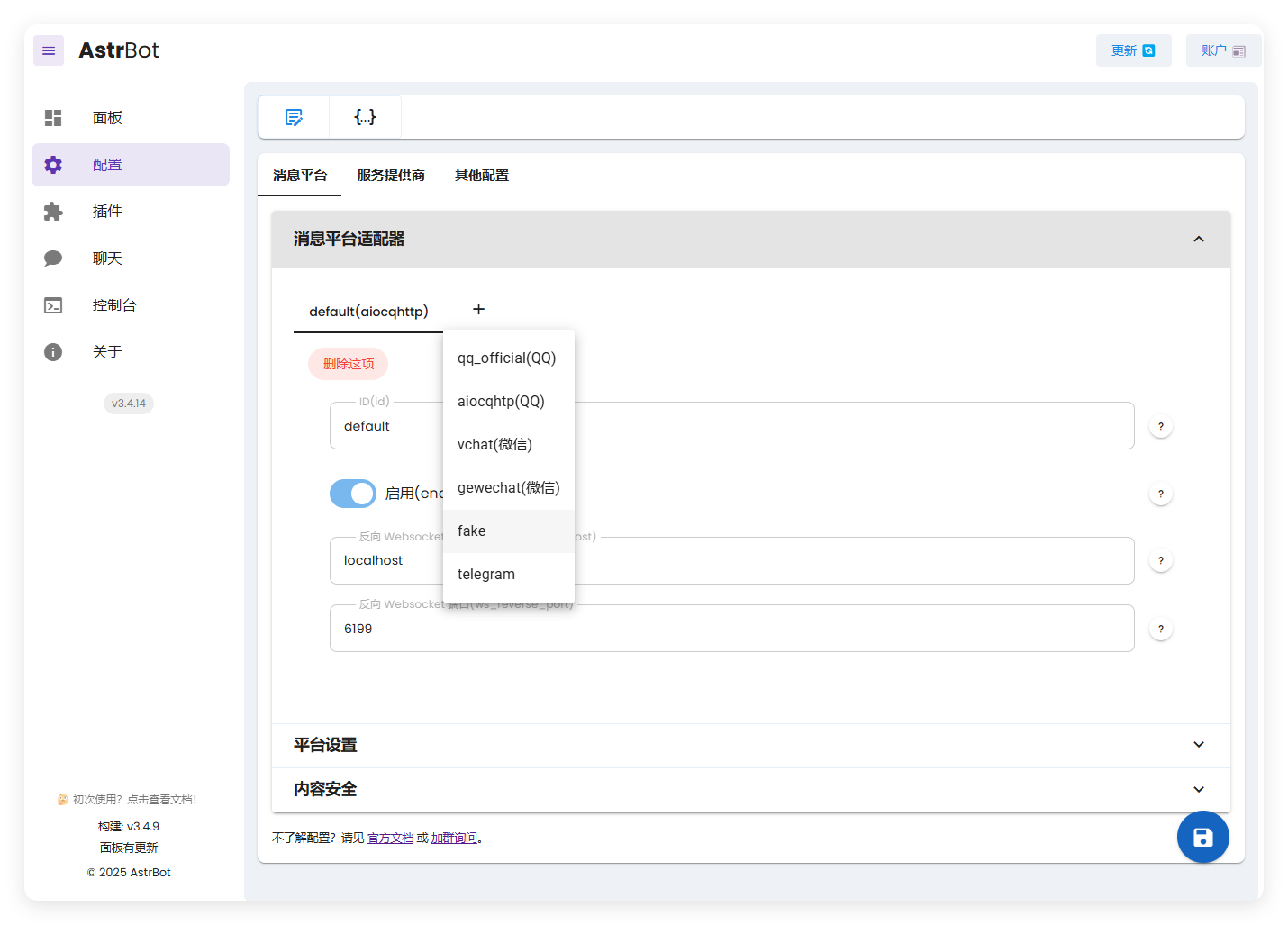
The fake adapter we created now appears here.
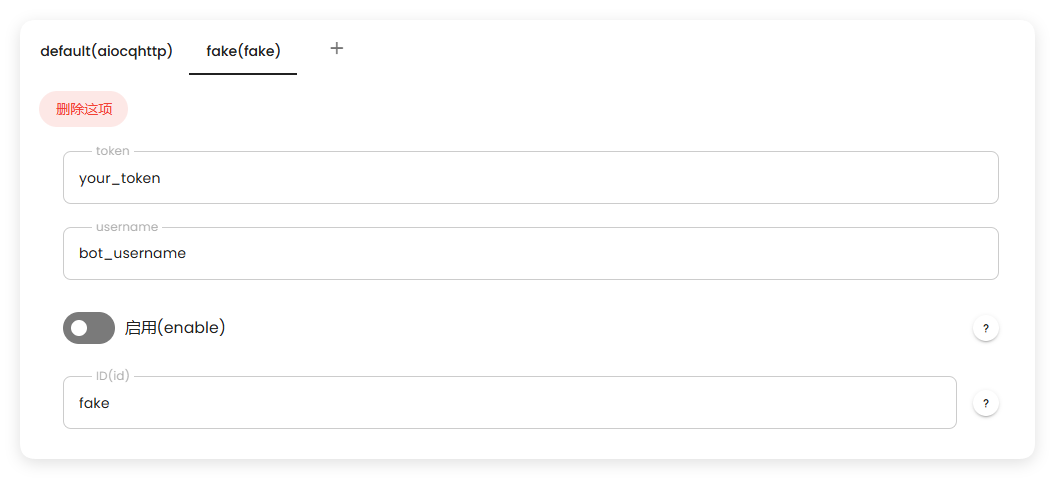
After starting, you can see it working correctly:

If you have any questions, feel free to join the community group and ask~