While this package is provided, as is, for free, we develop and maintain professionally created solutions used by thousands of developers. We invite you to check our current projects, and to join our growing Discord Community.
Amplify Shader Editor - Award-winning node-based shader creation tool
Amplify Impostors - 1-Click Impostor Creator
Amplify LUT Pack - 200+ LUTs for Amplify Color and Unity PPS
Amplify Bloom brought high-end professional post-process bloom effects to the Asset Store. It was packed with high-quality features and was even nominated for the Unite Awards 2016 in for Asset Store Award and Golden Cube categories.

This solution was based on a technique commonly used in AAA games, focused on reducing flickering/firefly artifacts and broad performance scalability, across mobile, consoles and PC platforms.

In addition to high-quality Bloom, the package includes a comprehensive collection of extra features such as Flexible Temporal Filtering, Procedural Pseudo-Flares, Bokeh Filter, Anamorphic Glare, Lens Dirt and Starburst.

It was suitable for 3D and 2D applications, and the ideal fast performing solution for nearly any kind of project.

It employed industry-grade techniques to mitigate flickering like sub-pixel sampling estimation and temporal filtering:
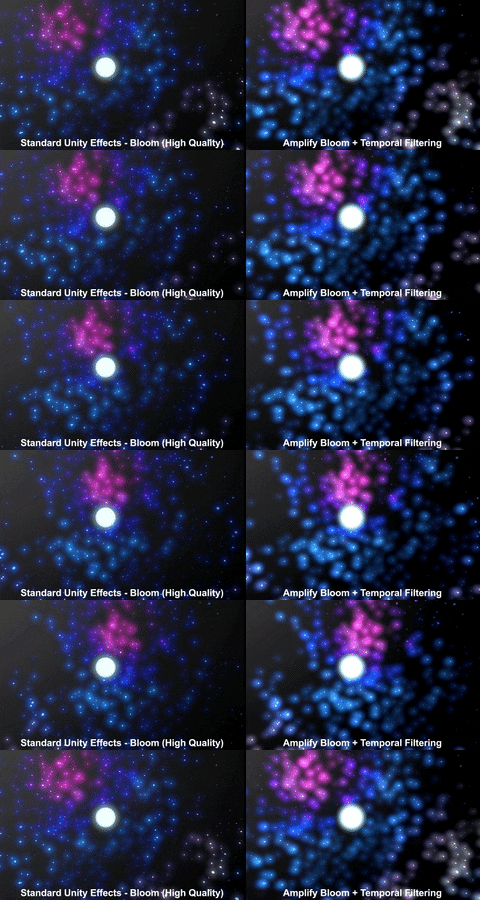
This package was for sale on the Unity Asset Store between 2016 and 2019 with an average rating of 5 stars. It is now deprecated and we no longer support it, so we are releasing it to open-source world under the MIT License.
Amplify Bloom brings industry-level post-process bloom effects into your project. Packed with high quality features that can be turned on/off and completely tweaked to fulfil your project needs.
- High-quality
- High-performance
- Highly tweakable
- Bokeh filtering
- Pseudo Lens Flare with Ghosts and Halos
- Anamorphic Glare
- Lens Dirt
- Lens Starburst
- Temporal filtering
- Flickering mitigation
All platforms
Unity 2021.3 LTS, or higher
Amplify Bloom can be easily set on your project by selecting your game camera object and doing one of the following steps:
-
Go to 'Component/Image Effects' menu and select the 'Amplify Bloom' option. Note that you need to have a game object selected with a camera component, if not present it will create one
-
Hit 'Add Component' on the camera Inspector View, type 'Amplify Bloom' on the search box and select the result
Please refer to the following website for an up-to-date online manual:
http://amplify.pt/unity/amplify-occlusion/manual
Originally developed by the talented Ricardo Aguiar:
https://www.linkedin.com/in/ricardoaguiar/
This project awas based on previous work by Victor Martins:
http://pixelnerve.com/v/
HDR Cubemap from No Emotion HDRs website:
http://noemotionhdrs.net/