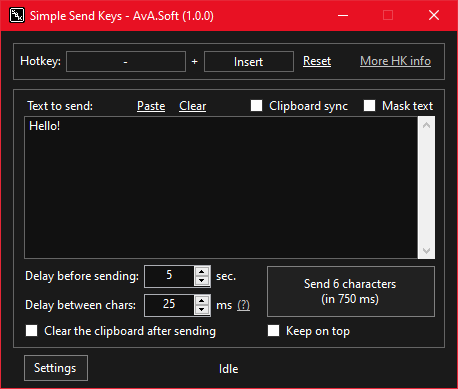
Have you ever found yourself in a situation where you can't use the copy-paste functionality? Eg. some RDP connections (or apps) have it disabled. You can copy but you can't paste. And it sucks!
SSK tries to solve this by allowing you to set a text payload (or it can sync to your keyboard - see the "recommended use" section below) and send each character as if you typed it.
These are the recommended settings:
- Run on startup = on
- Minimize to tray = on
- Clipboard sync = on
This way, the app will run in the background at startup (accessible via the system tray icon) and everything you have in the clipboard will be ready to be inserted just by using the hotkey. You can apply these settings by pressing the "Apply the recommended settings" button from the settings panel.
Go to the releases page and choose from the last version, one of the following options:
- Setup (recommended) - one executable file, the classic installation that we all know and love.
- Portable - one 7zip file. Please be aware that if you are using a portable version and you enable the "Run on startup" setting, you must not change the app's location/path. If you do change it, make sure that you open the app and disable then enable the setting again.
The currently available command arguments are:
- minimized - will start the app minimized in the system tray.
- send - will start to send the characters (only if the app is already running, otherwise it will just start the app).
You don't have to use any dashes for the arguments (eg. -send or --send).
Example: you can use the send argument when calling the SSK's executable file, to integrate SSK with other APPs. If you have a Stream Deck you can set it up as follows:
"INSTALLATION_PATH\SimpleSendKeys.exe" send

- .NET Desktop Runtime 8.0.4 - if you use the recommended setup version, you will be asked if you want to install it automatically (if you don't have it already installed).
- Newtonsoft.Json - no need to download this yourself, it will be included in the release (both versions, setup and portable).
Free to use.
If you like this app, please support it by giving it a star on GitHub. Thanks!
The setup is built with Advanced Installer. You can find the project file in the Assets folder.
You can adjust the app's transparency by scrolling over the status bar (where it says "Idle").
Implement 'Block hotkey propagation' option/setting.(done)Implement 'send' argument for other integrations.(done)Implement 'Keep on top' option/setting.(done)Implement 'Transparency' feature.(done)- Adding the possibility to send modifiers key.
- Fix the UI size bug for the hotkey user controls.