Releases: AdguardTeam/AdguardForWindows
8.0 beta 6

Disclaimer AdGuard for Windows is not an open-source project. We use Github as an open bug tracker for users to see what developers are working on.
Beta 6 focuses on squashing bugs and optimizing performance, bringing us another step closer to the official v8.0 release.
A huge thank you to everyone sending in bug reports — your feedback is exactly what helps us polish the app.
Changelog
Fixes
- The settings screen is blank after updating from v7.22.6 to a beta or nightly version #5920
- High CPU and memory usage #5754
- App crashes while scrolling through the Protection section #5878
- The Adguard service causes high CPU usage and writes huge data into logs #5902
- Block trackers and Remove tracking parameters from URLs toggles stay disabled after reenabling Tracking protection #5713
- After updating to the latest Nightly build, the Safe Browsing database cannot be updated #5972
- Browser Assistant shows Edge as the default browser instead of Firefox #5867
- The UI exhibits instability when managing rules in a long scrollable list #5638
- Custom DNS servers do not show up in the custom servers list after reinstalling the app and importing settings #5874
- AdGuard causes excessive disk writes #5781
- SockFilter driver prevents traffic filtering on websites #5935
- Language-specific filters don’t activate automatically when language-specific ad blocking is enabled #5890
- User rules cannot be deleted and duplicates are created #5882
- AdGuard 8 Nightly crashes with an AccessViolationException during system shutdown via Alt+F4 #5941
- Changelog is not displayed during the update #5901
- Update fails with exit code 1638 #5886
- Language-specific ad blocking filters disable randomly #5811
- AdGuard duplicates user rules multiple times #5800
Sciter (UI engine)
- Sciter updated to v1.0.1150 #5959
CoreLibs (filtering engine)
- CoreLibs updated to v1.21.38 #5956
Improvements
- The Do Not Track feature no longer injects DNT headers into browsers that do not support them #1982
- AdGuard intercepts local.adguard.org queries locally to prevent leaking #1854
- HTTP/3 filtering is enabled by default for stable versions #2015
Fixes
- High latency (~400ms) in QUIC/HTTP/3 filtering causing protocol fallback to HTTP/2 #2062
Scriptlets (JavaScript enhancement for filtering rules)
- Scriptlets updated to v2.2.16
Improvements
- Added a new
prevent-constructorscriptlet #461 - Added a new
prevent-navigationscriptlet #532 - Added a new
remove-request-query-parameterscriptlet #329 prevent-addEventListener— added a new optional parameter to controladdEventListeneroverriding #550prevent-xhr— setresponseURLon state 2 and skip first state ifonreadystatechangewas declared after open call #485trusted-create-element— added Trusted Types API support #507trusted-replace-xhr-responseandprevent-xhr— randomized internal properties of thisArg.shouldBePrevented #386- Added Trusted Types API support for Firefox #528
Fixes
set-constantandtrusted-set-constant— incorrect stack trace matching #500spoof-css— the mocked function is detected att.hi098123.com#422trusted-click-element— Cloudflare captcha is broken when the>>>combinator is used #491trusted-suppress-native-method— grouping in the Regexp matcher does not work correctly #473xml-prune,trusted-replace-fetch-response,trusted-replace-xhr-response— improper XHR credentials and event handling #486
AdGuard for Windows direct download links:
8.0 beta 5
Disclaimer AdGuard for Windows is not an open-source project. We use Github as an open bug tracker for users to see what developers are working on.
We have news: one good and one almost good (if you’re looking on the bright side).
A new network driver
Old drivers had issues: WFP could sometimes show instability for some users, and TDI is outdated and could occasionally cause filtering problems in browsers. That’s why we’ve added a new network driver — SockFilter.
What the new driver brings
SockFilter is still experimental, but it’s designed to bring real improvements over older drivers:
-
Better compatibility with network apps: VPNs, firewalls, and antivirus software work together more smoothly, reducing conflicts.
-
Lower risk of crashes: Operates in a safer part of Windows networking, helping prevent BSODs and other system errors.
-
More stability overall: Handles traffic closer to how apps normally use the network, reducing complexity and making AdGuard more reliable day to day.
You can enable SockFilter in Settings → App settings → Network → Network driver. You can also switch back to WFP or TDI at any time. Feedback is welcome — it helps us make it better.
Windows 8 and 8.1 support ends
Starting with this beta, we’re dropping support for Windows 8 and 8.1. Why now?
These versions are no longer updated by Microsoft itself. Many libraries, development tools, and security technologies now target more modern operating systems. Continuing to support Windows 8 and 8.1 would prevent us from fully using them. By focusing on the latest Windows versions, we can speed up development and make AdGuard more stable overall.
If you need to stay on Windows 8 or 8.1, you can still use AdGuard. Download the last compatible Nightly version. Please be aware that as a Nightly build, it may be unstable and contain bugs. Additionally, it will not receive further feature updates or security patches.
Changelog
Improvements
- Dropped support for Windows 8 and 8.1 #5880
- Implemented automatic update check for filters after they are enabled #5748
- Added support for the SockFilter driver #5780
Fixes
- UI crash when clicking the Ad blocking icon on the main page #5892
- Incorrect notification behavior when updating filters without a network connection #5860
- Incorrect filter update time displayed in the tray icon tooltip #5688
- Infinite loading in the Update tab after reconnecting to the Internet #5861
Sciter (UI engine)
- Sciter updated to v1.0.1106 #5899
AdGuard for Windows direct download links:
8.0 beta 4
Disclaimer AdGuard for Windows is not an open-source project. We use Github as an open bug tracker for users to see what developers are working on.
Beta number four is all about smoother setup and better control over network drivers.
In the previous beta, we added an improved setup wizard. It had some bugs that we quickly fixed, so now the onboarding process will be smooth.
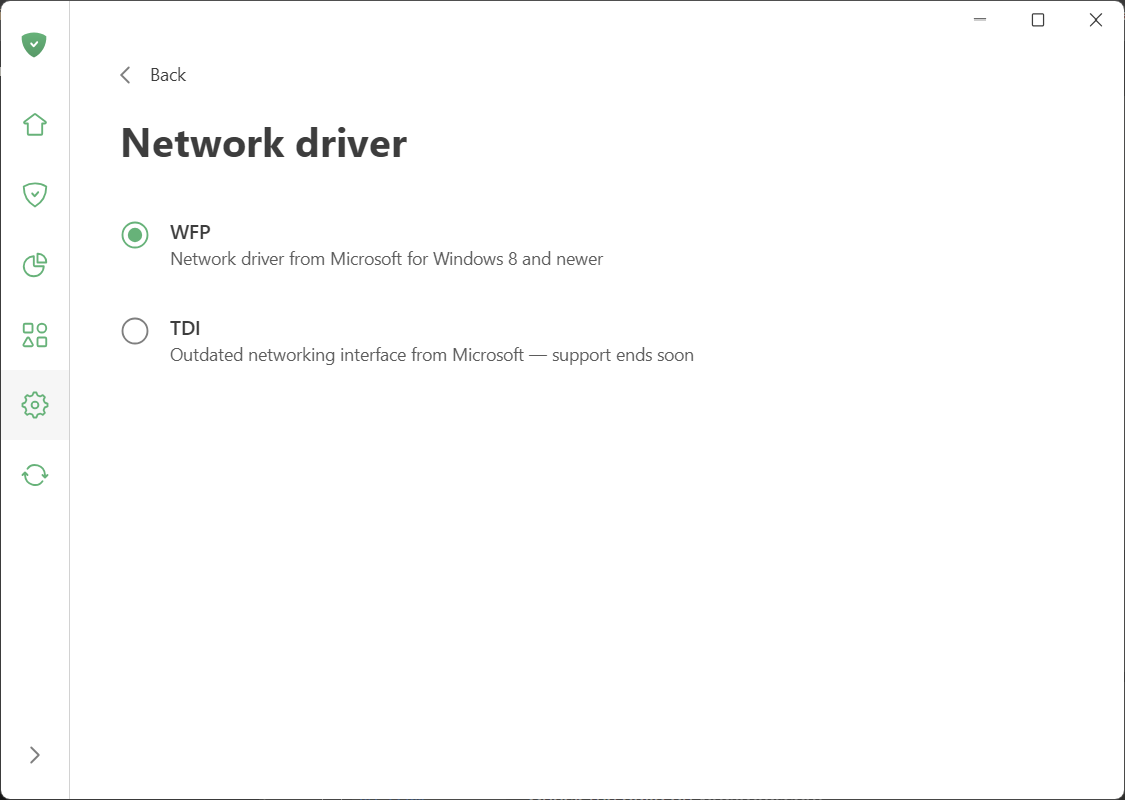
We’ve also updated the network settings. The Use WFP driver radio button is now replaced with a dedicated screen where you can choose the driver you need. By default, we recommend WFP, as it’s more modern, reliable, and fully compatible with the latest Chromium-based browsers, which no longer work well with TDI.
You can select the driver in Settings → App settings → Network.
Changelog
Improvements
- Added support for the Helium browser #5834
Fixes
- Statistics are displayed incorrectly #5726
- The license verification error persists even after reconnecting to the Internet #5684
- Disabling the Disable Windows Recall option doesn’t recover the original DWORD value #5700
- The connection drops when protection is restarted #5812
CoreLibs (Filtering engine)
- CoreLibs updated to v1.20.88 #5813
Improvements
- The Do Not Track feature sends both DNT and GPC even in browsers that don’t support them #1982
DnsLibs (DNS filtering engine)
- DnsLibs updated to v2.8.24
Improvements
- Added ability to update the upstream list without reloading filters #248
AdGuard for Windows direct download links:
8.0 beta 3
Disclaimer AdGuard for Windows is not an open-source project. We use Github as an open bug tracker for users to see what developers are working on.
Some things in life are more complicated than they should be. App onboarding is one example. Digging through AdGuard’s settings just to make it block the right stuff is another.
We decided to turn that pain into convenience. Meet the wizard — a simple, few-click setup that gets AdGuard working exactly the way you want, right from the start.
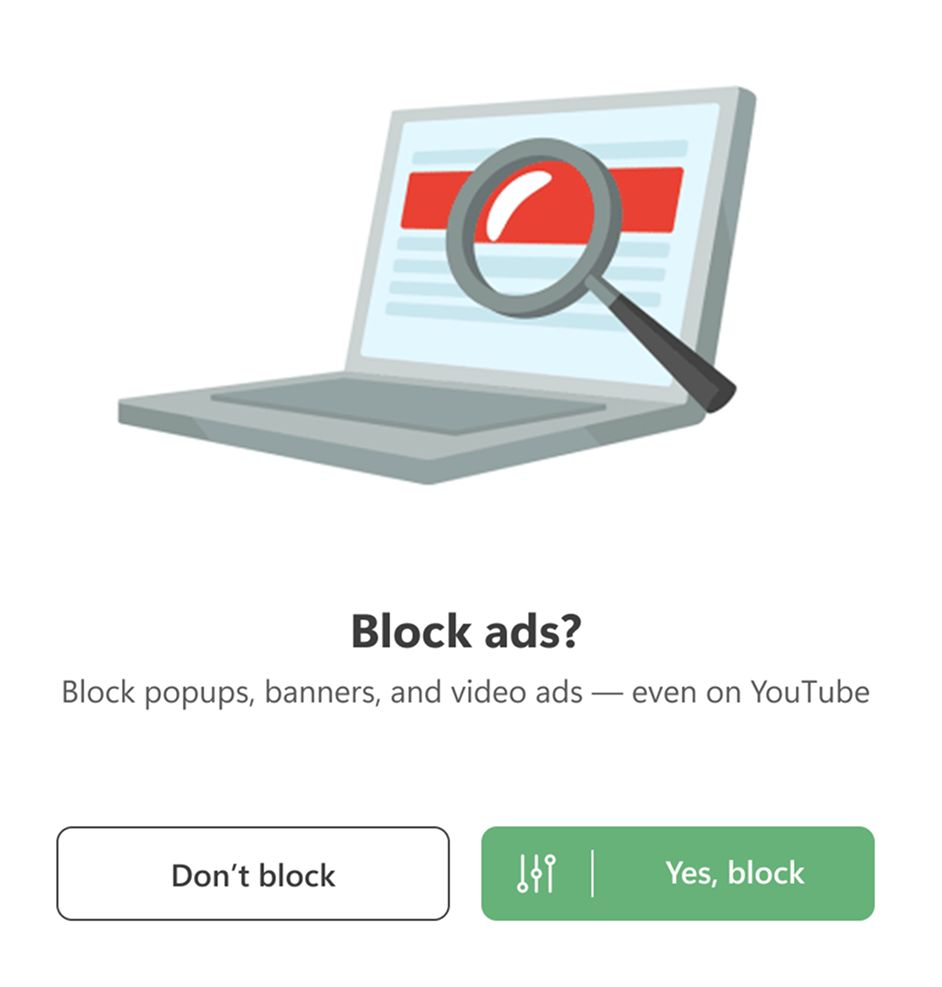
Quickly click through the options to:
-
Block ads in your language and remove intrusive website self-promotions;
-
Choose your tracker protection level — hardcore or just enough to stay comfy;
-
Hide popups and widgets (if you prefer the Internet without them);
-
Enable phishing protection to block dangerous websites;
-
Turn on HTTPS filtering — essential for effective ad blocking on modern websites.
Want to fine-tune things later or explore advanced settings? Go for it. Our Knowledge Base shows exactly where everything lives.
The full release is already on the horizon. For now, this beta focuses on improvements and bug fixes. Check the changelog for details.
Changelog
Improvements
- Filter List Manager updated to v2.3.5 #5718
Fixes
- Launch AdGuard at system startup and Enable filtering at system startup options don’t work properly #5702
- Duplicate domains and missing company logos in the Companies section on the Statistics tab #5749
- The Block search ads and self-promotion option doesn’t work #5772
- The Report the website option in AdGuard Legacy Assistant doesn’t work #5732
- Not all filters are updated on the first attempt when updating them manually #5704
- Incorrect certificate serial number marshalling causes false-positive CRLite matches #5793
CoreLibs (Filtering engine)
- CoreLibs updated to v1.20.88 #5813
Improvements
- Added an option to decode URLs in
$urltransform#1915 - Enabled HTTP/3 filtering by default in AdGuard beta/nightly versions #2014
- Added support for the
$reasonmodifier #1986 - Added CRLite as an alternative to OCSP #1997
Fixes
- The AdGuard certificate is missing when the Check websites’ certificate transparency advanced option is enabled #2046
@connectdoesn’t work as expected #1985- HAR file is not fully compiled #2002
- In Request details, the destination address is shown as 127.0.0.1 when AdGuard VPN integration is enabled #2021
- Incorrect handling of HTTP 10x status codes in HTTP/1.1 #2013
- Userscripts can’t be added because of BOM (Byte Order Mark) #2009
- The userscript runner doesn’t add a source map #1984
- When using FakeDNS option in proxy settings, AdGuard injections are broken #2017
- Localhost is unreachable in manual proxy mode in v1.19 #2019
Scriptlets (JavaScript enhancement for filtering rules) updated to v2.2.14
Improvements
- Added the new
prevent-innerHTMLscriptlet #488 - Added support for window.Fingerprint in
fingerprintjs2#541 trusted-click-element— added a parameter to extend the scriptlet execution time #400
UserscriptsWrapper (Userscripts and user styles support library) updated to v2.2.0
- GM.xmlHttpRequest and GM_xmlhttpRequest are implemented incorrectly #1983
AdGuard for Windows direct download links:
8.0 beta 2
Disclaimer AdGuard for Windows is not an open-source project. We use Github as an open bug tracker for users to see what developers are working on.
Work on version 8.0 is in full swing — and this beta brings a cleaner Extensions section, better userscript compatibility, and a fix for a pesky issue some Windows users encountered. As usual, we’ve updated our libraries — CoreLibs and DnsLibs — as well as drivers, fixed a bunch of bugs, and fine-tuned quite a few things along the way.
Extensions: А clearer home for your userscripts
We’ve renamed the Userscripts section to Extensions — a term far more familiar to anyone who has ever used browser extensions and knows they’re meant to… well, extend functionality. It’s also the name used in version 7, so the transition should feel more natural.
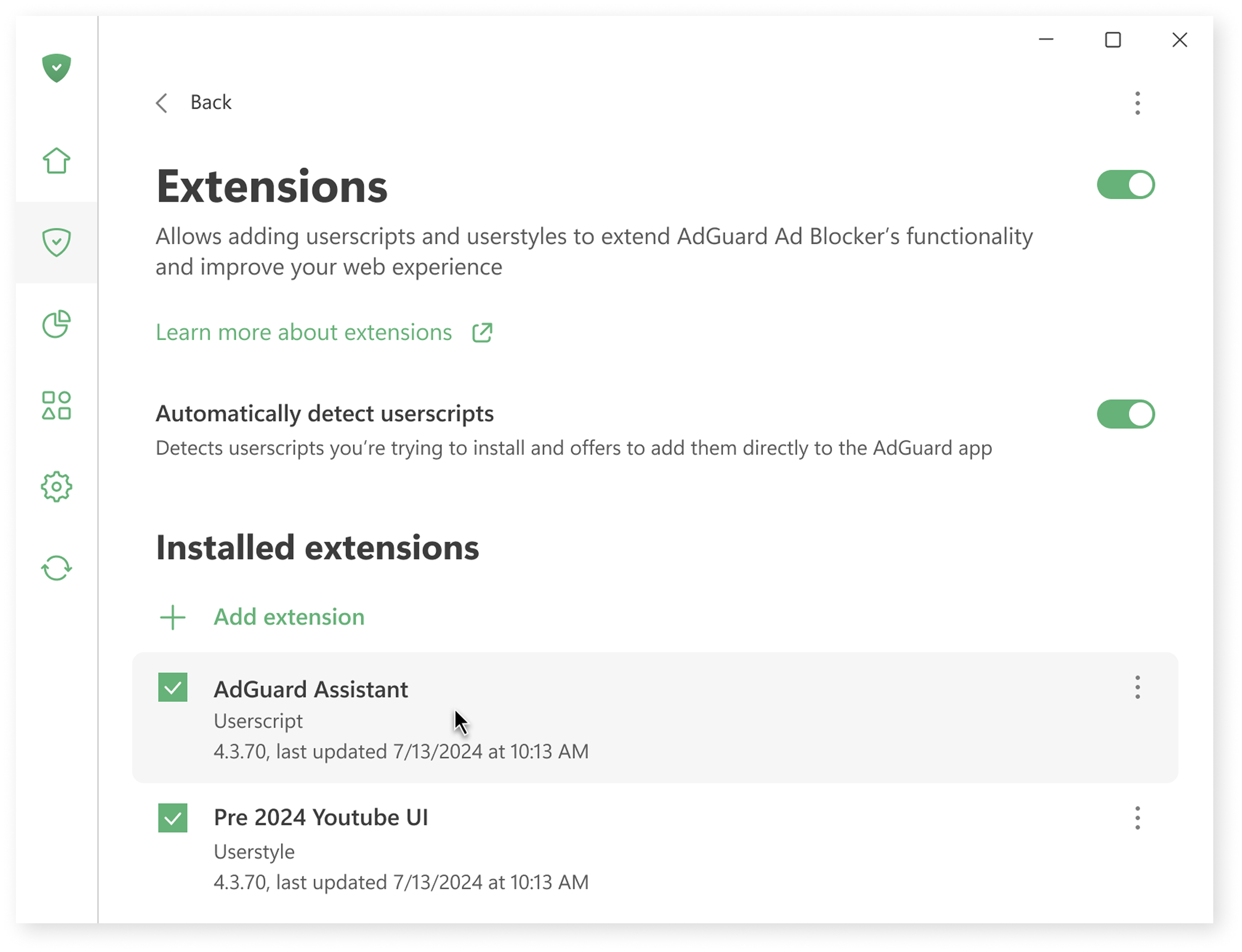
In this section, you can add custom scripts and styles — perfect if you want to add a dark mode on a website, download YouTube videos, or hide distracting elements on X (formerly Twitter).
You can now see all installed extensions at a glance, visit their official pages (if available), reinstall them to reset them to their original versions, or remove them entirely. Editing will also be available in the release version.
If you don’t write scripts or styles yourself, you can safely download them from trusted sources like GreasyFork.
Better compatibility with single-page application scripts
Many userscripts are designed for single-page applications (SPAs) like YouTube. Until now, such scripts often didn’t run correctly: for example, opening YouTube’s homepage first could prevent the script from loading and staying active when navigating to other pages within the site.
This update fixes that limitation by ensuring these scripts execute properly across SPA websites, making AdGuard even more flexible for advanced customization.
This also means we can confidently recommend tools like SponsorBlock, which automatically skips sponsored segments in YouTube videos.
How to try SponsorBlock:
- Go to https://mchangrh.github.io/sb.js/.
- Click Generate link.
- Copy the link that appears.
- Open AdGuard and go to Extensions → Add extension → Import from file or URL.
- Paste the copied link and confirm.
Important bug fixes
Among other issues, there were two that were significant enough to mention.
After releasing AdGuard for Windows 7.22, some users experienced occasional page loading issues in their browsers. While the issue was quickly resolved for Chrome, it lingered longer in Firefox because the bug was rare, hard to reproduce, and triggered by a very specific combination of factors that slipped past our testing. You can read more about the incident in our post-mortem
Another issue, related to the HTTP proxy port setting, has been fixed in release version 7.22.2.
We’ve made sure to include these fixes in this beta version as well.
Thank you for testing
Everyone who tests and uses the beta — you’re amazing. Your reports help a lot, and thanks to you we’ve already fixed a bunch of bugs. This brings us closer to delivering a polished and powerful AdGuard for Windows v8.0.
AdGuard for Windows direct download links:
8.0 beta 1
Disclaimer AdGuard for Windows is not an open-source project. We use Github as an open bug tracker for users to see what developers are working on.
The wait is almost over. After a period of intense testing in our nightly channel, we’re glad to invite you to the next major step: AdGuard for Windows v8.0 beta 1 is now available for everyone to try!
What’s new in v8.0
Instead of packing in a dozen new features, we dedicated ourselves to perfecting the core of AdGuard. The goal was to give the app better speed, stability, and simplicity.
Here’s what you’ll notice from the moment you start using the beta:
- Faster startup: AdGuard now launches almost instantly, so it’s ready to protect you right when you need it.
- More reliable filtering: We’ve improved how AdGuard processes requests to ensure consistent, uninterrupted protection against ads and trackers.
- Quiet performance: AdGuard v8.0 works efficiently in the background, letting you focus on what matters — whether you’re working, gaming, or just browsing.
That’s not all — we’ve made other improvements, including enhancements in the Statistics and App management sections and the UI. If you’re curious about the details, you can read about them in our nightly build article and in the version history.
Ready to try?
If you’re as excited as we are to experience a faster, more stable, and more reliable AdGuard, now is the time to jump in. Download AdGuard for Windows v8.0 beta now.
Install it, use it as you normally would, and let us know what you think. Together, we can make the v8.0 release truly spectacular!
AdGuard for Windows direct download links:
7.22.7

Disclaimer AdGuard for Windows is not an open-source project. We use Github as an open bug tracker for users to see what developers are working on.
Here’s an additional technical update following the previous one. In it, we’ve fixed bugs and kept working on the app stability.
AdGuard for Windows direct download links:
7.22.6
Disclaimer AdGuard for Windows is not an open-source project. We use Github as an open bug tracker for users to see what developers are working on.
Your feedback helps us improve faster. This patch addresses issues reported during the use of the experimental SockFilter driver introduced in v7.22.4, including BSOD reports on GitHub and problems affecting Discord. We’ve also updated the WFP driver to improve overall stability and performance.
Changelog
Fixes
- BSOD occurrences when using the SockFilter driver
- Issues with Discord voice and video calls when SockFilter is enabled
Improvements
- Updated the WFP driver
AdGuard for Windows direct download links:
7.22.5
Disclaimer AdGuard for Windows is not an open-source project. We use Github as an open bug tracker for users to see what developers are working on.
Have you ever noticed how the app crashes even when you have a freshly updated version? Well, notice no more! This hotfix solves that problem. From now on, just pure ad blocking all the way.
AdGuard for Windows direct download links:
7.22.4
Disclaimer AdGuard for Windows is not an open-source project. We use Github as an open bug tracker for users to see what developers are working on.
This is one of those moments where a patch deserves the same attention as a full release:
v7.22.4 introduces SockFilter, a new, experimental lightweight network driver for AdGuard for Windows. While still far from perfect (you will probably find a few bugs here and there), we’re confident in its potential to make AdGuard better in the future.
Why introduce a new driver at all?
Until now, AdGuard for Windows relied mostly on a WFP driver. WFP is powerful, but it also comes with complexity, compatibility challenges, and stability issues.
The TDI driver used to be an alternative, and while it is still available, it’s an outdated solution and may lead to filtering issues in some versions of Google Chrome. A temporary workaround exists, but it’s not a reliable long-term solution.
The conclusion was simple: it was time for a change. That’s why we’re introducing SockFilter — it brings a different approach that works especially well for ad blocking, plus it’s the solution we’ve been waiting for to finally put these problems behind us.
The advantages of SockFilter
When fully tested and implemented, SockFilter has the potential to bring several advantages over other drivers. Right now, it’s still experimental and unstable, so you might not see all the benefits yet. But here’s a look at what’s possible in the future:
-
Better interaction with other network apps: SockFilter is designed to cooperate smoothly with VPNs, firewalls, and antivirus software. By avoiding clashes over network control, it can help prevent connection issues and make everything work together more reliably.
-
Lower risk of system crashes: SockFilter works in a safer part of Windows networking, which can help it avoid deep system errors that can sometimes cause sudden blue-screen crashes. In practice, this can result in better stability and fewer chances of your system unexpectedly crashing while AdGuard is running.
-
On track for better stability: SockFilter works closer to how apps normally use the Internet, instead of dealing with low-level network data, resulting in the potential to reduce complexity behind the scenes and making AdGuard more reliable in everyday use.
Known issues
So far, a small number of users have reported an issue with SockFilter: the new driver appears to interfere with voice and video calls on Discord. The problem was described on GitHub.
Our QA team has successfully reproduced the issue and is actively working on a fix. If you notice any related problems or have additional details to share, please let us know. Your feedback helps us resolve this faster.
How to start using it
Other issues may appear when using SockFilter, after all, Experimental mode means that it’s ready for testing and that there may be bugs. We’d love your help in finding them!
To test it, go to Settings → Network → Traffic filtering, enable traffic filtering, and select SockFilter (Experimental) from the list of available options. If you notice anything unusual, unexpected, or just plain broken, you can switch back to TDI or WFP at any time. In that case, please report the issue on GitHub — your feedback directly helps shape the future of AdGuard for Windows.
Changelog
Improvements
- Added SockFilter driver #5780
AdGuard for Windows direct download links: