This example shows how to add global exception handling to your ASNA Visual RPG ASP.NET Web app.
If an unhandled exception occurs an error page is displayed. This page is shown with ASP.NET's Server.Transfer method so that url continues to reflect the page that caused the error.
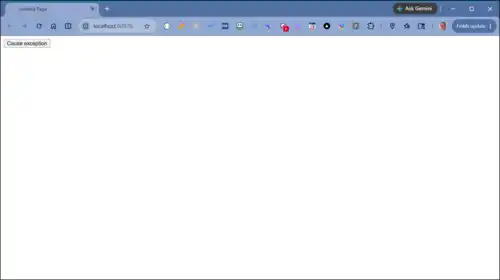
Click "Cause exception" to cause an unhandled divide by zero error:
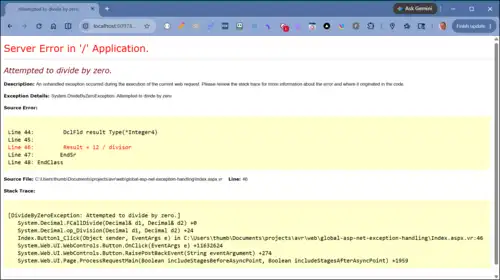
Without global exception error handling, the user sees the ASP.NET yellow screen of death:
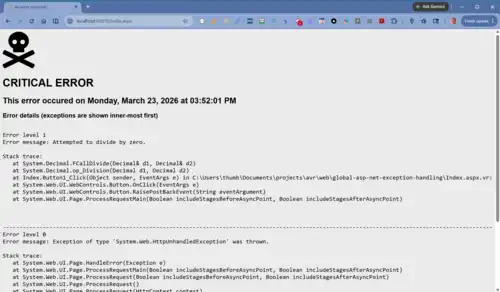
With global error handling, the user sees a screen like:
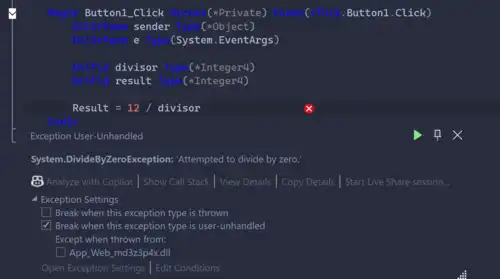
If you are testing this in Visual Studio, the exception will is raised in Visual Studio. If this occurs, press F5 to show the error page.


This example uses the Nuget NLog package to log errors. An example of the log is shown below. See this GitHub repo for configuring NLog.
2026-03-23 13:22:31.7949 | ERROR | Error | An error occurred. Error details (all exceptions):

Error level 1
Error message: Attempted to divide by zero.

Stack trace:
   at System.Decimal.FCallDivide(Decimal& d1, Decimal& d2)
   at System.Decimal.op_Division(Decimal d1, Decimal d2)
   at Index.Button1_Click(Object sender, EventArgs e) in C:\Users\thumb\Documents\projects\avr\web\global-asp-net-exception-handling\Index.aspx.vr:line 46
   at System.Web.UI.WebControls.Button.OnClick(EventArgs e)
   at System.Web.UI.WebControls.Button.RaisePostBackEvent(String eventArgument)
   at System.Web.UI.Page.ProcessRequestMain(Boolean includeStagesBeforeAsyncPoint, Boolean includeStagesAfterAsyncPoint)

-----------------------------------------------------------------------------------------------------------------------------------
Error level 0
Error message: Exception of type 'System.Web.HttpUnhandledException' was thrown.

Stack trace:
   at System.Web.UI.Page.HandleError(Exception e)
   at System.Web.UI.Page.ProcessRequestMain(Boolean includeStagesBeforeAsyncPoint, Boolean includeStagesAfterAsyncPoint)
   at System.Web.UI.Page.ProcessRequest(Boolean includeStagesBeforeAsyncPoint, Boolean includeStagesAfterAsyncPoint)
   at System.Web.UI.Page.ProcessRequest()
   at System.Web.UI.Page.ProcessRequest(HttpContext context)
   at ASP.index_aspx.ProcessRequest(HttpContext context) in C:\Users\thumb\AppData\Local\Temp\Temporary ASP.NET Files\vs\71c959ba\6c587e5e\App_Web_nmto2m0n.0.vr:line 345
   at System.Web.HttpApplication.CallHandlerExecutionStep.System.Web.HttpApplication.IExecutionStep.Execute()
   at System.Web.HttpApplication.ExecuteStepImpl(IExecutionStep step)
   at System.Web.HttpApplication.ExecuteStep(IExecutionStep step, Boolean& completedSynchronously)
The global.asax's Application_Error provides the jumping-off place to globally handle any otherwise unhandled application exceptions.
To persist the unhandled exception (so its details can be shown on the error.aspx page) that exception is stored in a session variable.
If the unhandled error is an HTTP exception that throws a page not found 404 error, control is passed to the 404.aspx page. Otherwise, the error.aspx page is shown.
BegSr Application_Error
    DclSrParm sender Type(*Object)
    DclSrParm e Type(EventArgs)

    // Code that runs when an unhandled error occurs
    DclFld Error Type(System.Exception)
    DclFld HttpStatusCode Type(*Integer4)
    DclFld PERSIST_CONTEXT Type(*Boolean) Inz(*True)

    Error = Server.GetLastError()
    Server.ClearError()

    If Error *Is HttpException
        HttpStatusCode = (Error *As HttpException).GetHttpCode()
        If (HttpStatusCode = 404)
            Server.TransferRequest('/404.aspx', PERSIST_CONTEXT)
        EndIf
    EndIf

    Session['LastError'] = Error
    Server.TransferRequest('/Error.aspx', PERSIST_CONTEXT)
EndSr
The error.aspx markup is shown below. It uses the free FontAwesome 'skull-crossbones' icon. error.aspx is in the project's root.
This page assumes an error folder is your project's root. This page doesn't include any links for the user to recover control of the application. You may want to consider adding such links. It's possible back button would let the user recover control, but an explicit link is probably better.
The error.aspx.vr code behind is shown below:
Using System
Using System.Collections.Specialized
Using System.IO

BegClass Error Partial(*Yes) Access(*Public) Extends(System.Web.UI.Page)

    DclConst CRLF  Value( U'000D000A' )  Access( *Public )

    BegSr Page_Load Access(*Private) Event(*This.Load)
        DclSrParm sender Type(*Object)
        DclSrParm e Type(System.EventArgs)

        DclFld Error   Type( System.Exception )
        DclFld ErrorKey Type(*String)
        DclFld ErrorText Type(*String)

		DclFld Log Type(NLog.Logger)

        Log = NLog.LogManager.GetCurrentClassLogger()

        *This.Title = "An error occurred"

        If (NOT Page.IsPostBack)
            // Fetch last error from Session object.
            Error = Session['LastError'] *As System.Exception

            // Clean up session
            Session.Remove(ErrorKey)

            If Error <> *Nothing
                // Show error details.
                ErrorText = GetErrorDetails(Error, CRLF)
                literalErrorDetail.Text = ErrorText

                Log.Error(Error, "An error occurred. Error details (all exceptions): {0}", CRLF + CRLF + ErrorText)
                //Log.Error(Error, "An error occurred. Error details:(top-level exception only) {0}", CRLF + CRLF + Error.Message)
            EndIf
        EndIf
    EndSr

   BegFunc GetErrorDetails Type( *String )  Access( *Public )
        //
        // Get all error message and stack trace info for a given error.
        //
        DclSrParm Error    Type( System.Exception )
        DclSrParm NewLine  Type( *String  )

        // NewLine provides the way new lines should be formed. When the
        // text is used inside a multi-line textbox, a CRLF should be used
        // as a newline. When the text is sent as a formatted email (as
        // an HTML document) the <br> tag should be used.

        DclFld ErrorDetails Type( System.Text.StringBuilder ) New( 512 )
        DclFld NestedDetails Type(StringCollection) New()
        DclFld Counter Type(*Integer4)

        DclFld Level        Type( *Integer4 )
        DclFld Now          Type( DateTime )
        DclFld MsgMask Type(*String)
        DclFld Index Type(*Integer4)

        MsgMask = 'This error occured on {0} at {1}M{2}'

        Now = DateTime.Now
        labelErrorHeading.Text = String.Format(MsgMask, Now.ToString( "dddd, MMMM dd, yyyy" ), Now.ToString( "hh:mm:ss t" ), NewLine + NewLine)

        CollectNestedErrorDetail(Error, NestedDetails, Level, NewLine )

        Error = Error.InnerException
        DoWhile ( Error <> *Nothing )
            Level = Level + 1
            CollectNestedErrorDetail(Error, NestedDetails, Level, NewLine )
            Error = Error.InnerException
        EndDo

        For Index(Counter = NestedDetails.Count -1) DownTo(0)
            ErrorDetails.Append(NestedDetails[Counter])
            If Counter <> 0
                ErrorDetails.Append(*New System.String('-' *As *OneChar, 150) + NewLine)
            EndIf
        EndFor

        //LogError(ErrorDetails.ToString())

        LeaveSr ErrorDetails.ToString()
    EndFunc

    BegSr CollectNestedErrorDetail
        DclSrParm Error         Type( System.Exception )
        DclSrParm NestedDetails Type(StringCollection)
        DclSrParm Level         Type( *Integer4 )
        DclSrParm NewLine       Type( *String  )

        DclFld ErrorDetails  Type( System.Text.StringBuilder ) New()

        ErrorDetails.Append( "Error level " + Level.ToString() + NewLine )
        ErrorDetails.Append( "Error message: " )
        ErrorDetails.Append( Error.Message + NewLine + NewLine )
        ErrorDetails.Append( "Stack trace:" + NewLine )
        ErrorDetails.Append( Error.StackTrace + NewLine + NewLine + NewLine + NewLine )

        NestedDetails.Add(ErrorDetails.ToString())
    EndSr

    BegSr LogError
        DclSrParm ErrorDetails Type(*String)

        DclFld ErrorsFolderPath Type(*String)
        DclFld Filename Type(*String)
        DclFld FullFilename Type(*String)

        ErrorsFolderPath  = Server.MapPath('/errors')
        FileName = DateTime.Now.ToString('yyyy-MM-dd-HH-mm-ss')
        FullFilename = String.Format('{0}\{1}.log', ErrorsFolderPath, Filename)

        File.WriteAllText(FullFilename, ErrorDetails)
    EndSr

EndClass
The code above collects the top level exception and its chain of inner exceptions to create a list of error messages. The error is also logged to NLog.