Advanced AI-Powered Coding Assistant with Real-time Analysis & Git Integration
Created by Meet Solanki (AIML Student)



-
🎨 Rich CLI: Real-time streaming, beautiful panels, markdown/code rendering
-
🤖 Multi-Provider AI: OpenAI, Groq, Anthropic, Google, Ollama
-
📁 AI File Analysis:
file-search <filepath>for code/data/doc files -
🔐 Secure API Key Management: Local encrypted storage in
C:/Users/<username>/.maahelper/ -
💬 Interactive Chat: Persistent conversation history, context-aware
-
🚀 Async Performance: Fast streaming, low memory, instant startup
-
📊 Live Stats: Session, file, and model metrics
-
🤖 Custom Agent Prompts (Vibecoding): Specialized AI workflows for coding tasks
-
🔍 Dynamic Model Discovery: Auto-fetch latest models from all providers
-
📊 Real-time Code Analysis: Live error detection and suggestions
-
🔧 Smart Git Integration: AI-powered commit messages and branch suggestions
-
⚡ Enhanced Performance: Rate limiting, memory management, and caching
pip install maahelper
NEW: Interactive Jupyter notebook with step-by-step guide!
# Download and run the complete tutorial

jupyter notebook MaaHelper_Getting_Started.ipynb
The notebook covers:
-
✅ Installation & API key setup
-
✅ Basic to advanced usage
-
✅ All new v0.0.5 features
-
✅ Pro tips and workflows
# Start the CLI

maahelper


# Try new v0.0.5 commands

> prompts             # 🆕 List custom AI agent prompts

> code-review         # 🆕 AI-powered code review

> bug-analysis        # 🆕 Deep bug analysis

> discover-models     # Auto-discover latest AI models

> analyze-start       # Start real-time code analysis

> git-commit          # AI-powered smart commits


# Or run via Python

python -m maahelper.cli.modern_enhanced_cli
On first run, you'll be prompted to enter API keys for Groq, OpenAI, etc. These are securely stored in:
C:/Users/<username>/.maahelper/config.json
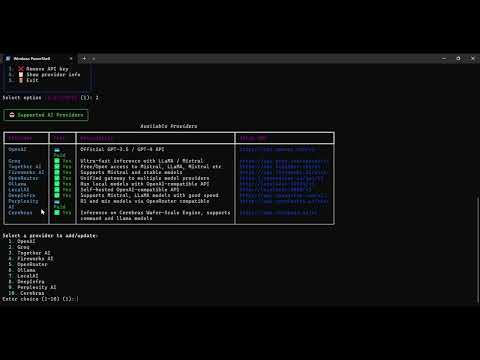
You can manage, edit, or delete keys via the Rich UI manager:
maahelper-keys
-
help— Show help -
exit,quit,bye— Exit -
clear— Clear history -
status— Show config
-
file-search <filepath>— AI file analysis -
files— Show files -
dir— Show directory
-
providers— List providers -
models— List models
| Provider | Models | Notes |
|---|---|---|
| Groq | Llama 3.1, Llama 3.2, Mixtral, Gemma | ⚡ Fastest & Free |
| OpenAI | GPT-4, GPT-3.5-turbo | 🧠 Most capable |
| Anthropic | Claude 3, Claude 2 | 📝 Great for analysis |
| Gemini Pro, Gemini Flash | 🔍 Multimodal support | |
| Ollama | Local models | 🏠 Privacy-focused |
You: file-search src/main.py


🤖 AI Assistant

Analyzing your Python file...


File Analysis: src/main.py


File Type: Python Source Code

Size: 1.2KB

Language: Python 3.8+


### Key Components:

- Main Function: Entry point with argument parsing

- Error Handling: Comprehensive try-catch blocks

- Dependencies: requests, json, argparse


### Code Quality:

✅ Good Clean structure and readable code

⚠️ Suggestion: Add type hints for better maintainability

⚠️ Suggestion: Consider adding docstrings


### Recommendations:

1. Add input validation for user arguments

2. Implement logging for better debugging

3. Consider async/await for API calls-
Live Streaming: See AI responses in real-time
-
Syntax Highlighting: Code blocks with proper formatting
-
Progress Indicators: Visual feedback for operations
-
Interactive Menus: Beautiful provider and model selection
-
Error Handling: Elegant error messages with helpful suggestions
MaaHelper uses a secure local configuration system:
C:\Users\{username}\.maahelper\

├── config.json          # Encrypted API keys

├── conversation_history/ # Chat sessions

└── logs/                # Application logs
# Recommended method

export GROQ_API_KEY="gsk_..."

export OPENAI_API_KEY="sk-..."

export ANTHROPIC_API_KEY="sk-ant-..."

export GOOGLE_API_KEY="AIza..."
-
Streaming Speed: Up to 500+ tokens/second with Groq
-
Memory Usage: < 50MB typical usage
-
Startup Time: < 2 seconds cold start
-
File Analysis: Processes files up to 10MB
-
Python 3.8+
-
Rich >= 13.0.0
-
OpenAI >= 1.0.0
-
Cryptography >= 3.4.0
git clone https://github.com/AIMLDev726/maahelper.git

cd maahelper

pip install -e .
You: Explain async/await in Python


🤖 AI Assistant

# Async/Await in Python


**Async/await** is Python's way of handling asynchronous programming...
You: file-search requirements.txt


🤖 AI Assistant

## Dependency Analysis


Your project has **12 dependencies**:

- **Core**: openai, rich, cryptography

- **Optional**: anthropic, google-generativeai

- **Development**: pytest, black, flake8
You: Review this function for bugs


🤖 AI Assistant

## Code Review Results


✅ **Good Practices**:

- Clear function naming

- Proper error handling


⚠️ **Issues Found**:

- Missing input validation on line 15

- Potential memory leak in loop (line 23)
-
MaaHelper_Getting_Started.ipynb - Complete interactive tutorial
-
FEATURES_v0.0.5.md - Detailed feature documentation
-
CHANGELOG.md - Version history and changes
-
CODE_STRUCTURE.md - Complete architecture documentation
-
CLEANUP_REPORT.md - Code quality improvements
Contributions are welcome! Please feel free to submit a Pull Request.
-
Fork the repository
-
Create your feature branch (
git checkout -b feature/AmazingFeature) -
Commit your changes (
git commit -m 'Add some AmazingFeature') -
Push to the branch (
git push origin feature/AmazingFeature) -
Open a Pull Request
# Clone the repository

git clone https://github.com/AIMLDev726/maahelper.git

cd maahelper


# Install in development mode

pip install -e .


# Run tests

pytest tests/


# Check code structure

cat CODE_STRUCTURE.md
This project is licensed under the MIT License - see the LICENSE file for details.
Created by Meet Solanki (AIML Student)
-
GitHub: @AIMLDev726
-
Email: aistudentlearn4@gmail.com
-
Built with Rich for beautiful CLI
-
Powered by OpenAI and multiple AI providers
-
Thanks to the open-source Python community
⭐ Star this repository if you find it helpful!