The native macOS system monitor + cleanup utility purpose-built for Claude Code, Cursor with MCP servers, ollama, Docker, and other agentic AI development workflows.
Download Lite (free, notarized) · Product page · Pro upgrade ($15/yr, was $30 — 50% off launch)
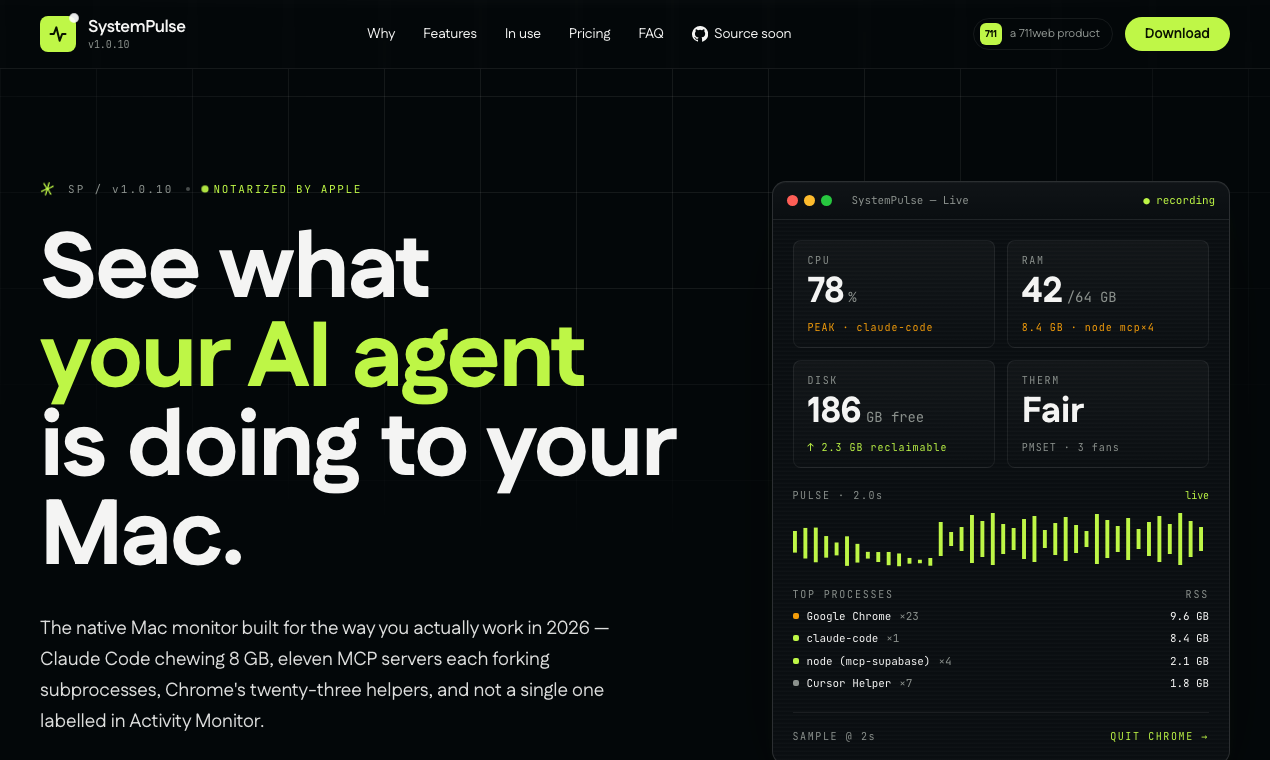
Activity Monitor was designed in 2009. It still shows every process as node, python, or Cursor Helper #7. When you run agentic dev workflows in 2026 — Claude Code chewing 8 GB, eleven MCP servers each forking subprocesses, Chrome's twenty-three renderer helpers — you can't tell which one is actually leaking. You can't see that one specific @modelcontextprotocol/server-X is misbehaving. You can't bulk-quit Chrome's helpers without 23 per-tab dialogs.
SystemPulse names everything.
| Lite (free, MIT) | Pro ($15/yr, 50% off launch · was $30) | |
|---|---|---|
| Live CPU / RAM / disk / thermal tiles | ✓ | ✓ |
| Menu-bar live number | ✓ | ✓ |
| Floating widget | ✓ | ✓ |
| Process list (read-only) | ✓ | ✓ |
| Notarized DMG + (Sparkle) auto-update | ✓ | ✓ |
| Per-PID kill / graceful per-app quit | — | ✓ |
| Cache + build-artefact cleanup with audit log | — | ✓ |
| MCP server inspector (the moat) | — | ✓ |
Free RAM via memory_pressure + targeted SIGTERM |
— | ✓ |
| Deep purge (sudo) with admin prompt | — | ✓ |
| Claude Code session detector | — | ✓ |
| Action history viewer + audit log + CSV export | — | ✓ |
| Two Macs per licence · 7-day free trial | — | ✓ |
The fastest path is the notarized DMG — drag the app to Applications and you're done:
curl -fL https://systempulse.711web.com/downloads/SystemPulse-Lite-1.0.10.dmg -o /tmp/sp-lite.dmg
hdiutil attach /tmp/sp-lite.dmg -nobrowse
cp -R "/Volumes/SystemPulse Lite/SystemPulseLite.app" /Applications/
hdiutil detach "/Volumes/SystemPulse Lite"
open "/Applications/SystemPulseLite.app"
First launch auto-registers SystemPulse as a Login Item (configurable in Settings → General), so it boots to the menu bar on every restart.
| Latest version | v1.0.10 |
| Stack | Swift 6.3, SwiftUI, AppKit, SwiftPM |
| Architecture | Universal binary (Apple Silicon arm64 + Intel x86_64) since v1.0.8 |
| Minimum macOS | 13.0 Ventura |
| Distribution | Direct download (notarized DMG). Not on the Mac App Store — sandboxing prohibits the kill / clean features. |
| File size | ~3.8 MB per variant |
| Self footprint at runtime | ~50 MB RAM, 3–5% CPU at the default 2-second poll interval |
| Signing | Developer ID Application: Mohammad Rizwan (L97K8Z344A), valid through 2031-05-27 |
| Hardened runtime | Yes, secure timestamped + notarized + stapled |
| Telemetry | Lite: zero. Pro: one daily licence-validation request, plus Sparkle update checks if opted in. |
| Auto-launch on login | On by default (Settings → General to disable) |
This repository will host the Lite-buildable source alongside upcoming releases. Today it's a public-launch placeholder while the source extraction lands in v1.0.11.
Tracked here:
- v1.0.11 — Extract Lite-only source files into this repo (drop Cleaner / MCPInspector / AutoOptimizer / kill-clean UI; keep Sampler / Models / process grouping / read-only views / menu bar / widget)
- v1.0.11 — Compile-time
#if !LITE_BUILDstripping of Cleaner methods in the upstream private repo - v1.1 — License validator (Ed25519 signed keys) + 7-day trial gate
- v1.1 — Lemon Squeezy storefront → license-key issuance
- v1.1 — Sparkle auto-update (EdDSA-signed appcast hosted on this repo)
- v1.2 — Per-MCP-server history (RAM over time, call-rate)
- v1.2 — AI workload cost card (rough $/hour estimate of running Claude Code + MCP)
- v1.2 — Claude Code session detector (active session count + token-spend ballpark)
Have a request? Open an issue.
- vs. Activity Monitor — SystemPulse names MCP servers and Claude Code's children. Activity Monitor shows them all as
node/python. - vs. iStat Menus — SystemPulse focuses on agentic AI workloads with the MCP inspector + named-process grouping. iStat Menus is a generic system-stats menu bar.
- vs. Stats — SystemPulse adds cleanup actions, graceful bulk-quit, and named-process grouping. Stats is monitoring-only.
- vs. MenuMeters — SystemPulse is a full app with cleanup + process management; MenuMeters is menu bar only.
- vs. htop — SystemPulse is a native macOS GUI with the MCP inspector and Mac-aware grouping; htop is a terminal tool.
For transparency, here's exactly what the running app does each tick:
host_statistics64(HOST_VM_INFO64)— system memory pressurehost_processor_info(PROCESSOR_CPU_LOAD_INFO)— per-core CPU ticks (aggregated to overall %)proc_listallpids+proc_pidinfo— per-process CPU/RAM/threads with cached static metadatasysctl KERN_PROCARGS2— argv parsing for naming (this is how it knows thatnodeis actually@modelcontextprotocol/server-postgres)statfs("/")— disk free / totalProcessInfo.thermalState— thermal pressure (debounced 30s to avoid false alarms on Intel MBPs under sustained load)
All read-only. The Pro-only Cleaner shells out for the few write actions (/bin/rm, /usr/bin/memory_pressure, /usr/sbin/purge, osascript tell app to quit), and every action is appended to ~/Library/Logs/SystemPulse/actions.log in TSV format with timestamps and freed bytes.
The eventual Lite source in this repository will be MIT-licensed — fork, study, modify, and redistribute freely. The Pro-only modules (Cleaner, MCPInspector, AutoOptimizer, the Optimize and Cleanup tabs, the Pro-side license validator) ship in a separate closed-source binary distributed through https://systempulse.711web.com.
711 Web Services LLP — independent software, India-registered. Refunds: refund@711web.com. General: hello@711web.com.
If SystemPulse saves you a single afternoon of "why is my Mac suddenly slow" → Pro is $15/yr and pays for one developer to keep building it.