Code Execution (JDoodle vs CodeX-API) #10

Description

Code Execution (JDoodle vs CodeX-API)
Once the front end makes a POST request to
/execute, we have to run the script and give the user feedback (test case pass/fail or highlight any errors in their code).
JDoodle
Since the beginning we have been planning on using the JDoodle API to run and execute our code. However, it seems that the documentation for JDoodle is overly complicated/poorly written.
CodeX-API (Alternative)
CodeX-API is an open-source alternative to JDoodle. For the most part, it is in very early stages of development; nevertheless, it is quite easy to use and executes code pretty quickly.
-
For now, we can probably get away with using the CodeX API. Once we have everything settled, we could dig more into the JDoodle API and scalability.
-
Documentation: CodeX
Usage
Running a simple program
To run code on the CodeX API:
- make a POST request to
https://codex-api.herokuapp.com/ - Pass it the header
"Content-Type": "application/x-www-form-urlencoded" - Pass it the data parameters:
"code","language"and"input"
Once the request is made, the API will give a json response:
- In the case of no compile errors ("success" is true):
res = res.json() = {
'success': True,
'timestamp': '2022-10-16T21:35:56.068Z',
'output': 'hi\n',
'language': 'py',
'version': '3.10.4'
}
We can extract the output of running the program as
res.json()["output"]
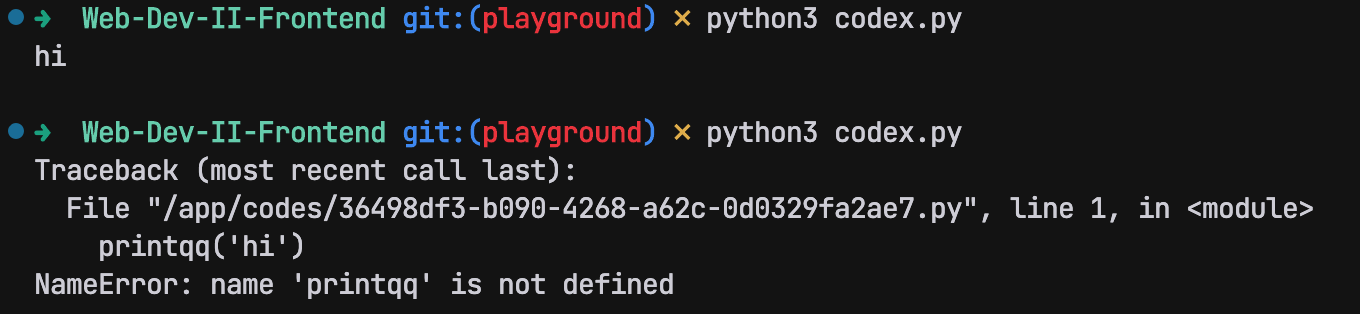
- Error ("success" is false):
res = res.json() = {
'success': False,
'timestamp': '2022-10-16T21:37:30.324Z',
'error': 'Traceback (most recent call last):\n  File "/app/codes/d2a01069-3628-4dee-9c4e-2f0793cb8a36.py", line 1, in <module>\n    printqqq(\'hi\')\nNameError: name \'printqqq\' is not defined\n',
'language': 'py',
'version': '3.10.4'
}
We can extract the error as
res.json()["error"]
Simple Test Script
import requests
import sys

url = "https://codex-api.herokuapp.com/"

headers = {
    "Content-Type": "application/x-www-form-urlencoded"
}

data = {
    "code": "print('hi')", # script to be executed
    "language": "py", # supports: py, java, js, c, cpp, cs, go
    "input": "" # any command line input needed
}

res = requests.post(url, data, headers) # make the post request

if not res.ok: # error code
    print("An error has ocurred!")
    print(f"Status code: {res.status_code}")
    sys.exit()

res = res.json() # parse the response as json

if res["success"]:
    print(res["output"])
else:
    print(res["error"])
Possible Outputs