Recommendations on a RS485-Wifi server/gateway #833

Replies: 7 comments 22 replies

-
|
Lets start with I don't use any of the mentioned adapters. From the brief read over of most of them, they are the same concept. Including the EW11. The device itself is a TCP server running on an assigned port that relays the RS485 data over the socket. This is the way all of them work and there is no adapter in the pi for its use. |
Beta Was this translation helpful? Give feedback.

-
|
The EW11 was great for me when I was using njsPC as a front-end to my EasyTouch. I had njsPC running in a VM on my PC in the house, and the EW11 sending RS485 signals over Wifi. Sounds like what you want to do too. If you start getting into a full Nixie build, however, you're gonna need a RPi at the pool equipment pad. There are a lot of wires that need to be connected to the RPi, not just the RS485 bus. I am in Phoenix and have the same heat problem as you - I'm currently exploring enclosures and fans to keep the thing cool. My write up is here if you are interested in this path. |
Beta Was this translation helpful? Give feedback.

-
|
Thanks for the quick replies gents, @rstrouse, it looks like I might be doing some experimenting on some of those units (hooray for Amazon's 30 day return policy, lol) and see what works. Btw, I might have messed up on the terminology as I thought Nixie was the new name for NJSPC. @CodeSlinger69 Thanks for the suggestions, I'll certainly be following your fan/cooling adventures as my current ESP setup may need some help if the summers keep getting hotter. I'll share my thoughts in your discussion. Just for some some background, my pool adventures started at a rental house where a) I could only do minimally invasive changes which needed to be fully reversible+removable when we eventually bought our own place. As the rental was equipped with a noisy singlespeed 1kW pump, I bought my own Intelliflow VS and plumbed it in with pipe unions, so I could put the old clunker back when we eventually moved post-Covid. I've been on Home Assistant for years, building my own custom dashboards, ESP32 devices and all the smarts of the house is in NodeRed, including pump, lights and valve actuator controls for the pool. While the capabilities of NJSPC indeed are impressive, I never had clorinators or any proprietary pool control panel - I guess I didn't know what I was missing. Long story short, I've only been using NJSPC to control my VS pump for a long time and the ESP based controller I built on the side just ran the relays and a DS18B20 stainless temperature probe mounted inside the pump basket. A quick note on the last item, the pentair pumps feature those threaded drain plugs on the side of the pump basket, I bought a spare plug here, drilled a hole through it and pressure mounted the sensor in it, no sealant required. |
Beta Was this translation helpful? Give feedback.

-
|
Well, so that didn't work ... :) For my curiosity and your reading entertainment, I ordered one of these kwang-bong brand RS485-wifi servers on Amazon, as I wanted per the thread above to explore alternatives to the Pi-Zero/SoCat route.
What made me pull the trigger on the purchase was it has a transparent-mode, where supposedly all traffic is relayed to a IP port on either UDP or TCP, dealer's choice. Seamed like a good match with NJSPC While the setup documentation reads like the lovechild between a Mandarin toaster-oven manual and a migraine attack, I managed to get the device onto my network and configurable via it's web interface. Hooked it up to a powersupply and the pump's data port, configured the UART:
Configured the network side of the gadget, seems straight forward: On the NJSPC side, I configured a RS485 network port matching the settings on the gadget: I got as far as it actually connected and NJSPC says the port is open as shown above, yet no data comes through. I know from experience using cable previously, that once there's comms are established, the pump display blanks out with a DISPLAY INACTIVE message, locking out local control. That does unfortunately not happen. I've tried some of the other modes the serial server offers, yet none of them yields any different result:
So, hands down I think I've given this server the time of day, to reasonably determine if it might work with NJSPC. While I think I'm at the end of the rope with this thing and about to return it next week, I would appreciate a note if you think there's something obvious I might have missed. Alternatively if there's other industrial hardware out there known to be Socat compatible, i.e. NJSPC can speak to it - I would not mind giving it a try. |


Beta Was this translation helpful? Give feedback.
-
|
I still don't understand what you are trying to do here. If all you want to do is run njsPC on a box inside your house, as a front end to the OCP, then get an EW11. Its proven and works. |
Beta Was this translation helpful? Give feedback.
-
|
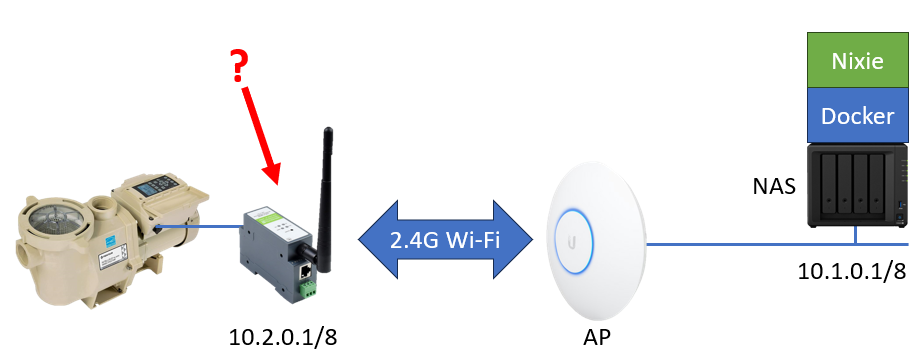
@rstrouse, correct - that's exactly what I did, yet so far no love with this cursed device. I got as far today as the pump display went into DISPLAY INACTIVE state, so it must have received something, however nothing is coming back the other way. I'll need to doublecheck wiring etc. @CodeSlinger69, thank you - yet correct me if I am wrong, the EW11 needs a transceiver device in both ends, right? I am attempting to avoid that setup, as my end-state goal is to run NJSPC inside docker on my NAS, which runs a few other critical systems. See graphic in post above. As I can't attach a RS485 transceiver to my NAS, I'm leaning towards a network server such as the one I gave a shot above. If you're telling me that the EW11 is able to do that, run a socat server in one end, I'm all ears. |
Beta Was this translation helpful? Give feedback.
-
The EW11 is a bridge between your RS485 bus and your WiFi network. Its exactly the thing you describe in the title of this thread. One end of the EW11 has 4 wires that you connect to the RS485 bus on your OCP. The other end of the EW11 has an antenna - you configure the EW11 to connect to your WiFi network. From there, the OCP's RS485 bus is addressable over your local network, and njsPC natively supports this kind of connection. |
Beta Was this translation helpful? Give feedback.
-
|
Okay, great - initially when I had a look at it, it only seemed as it was a hardware-hardware bridge, meaning it needed something in both ends, yet if it's not the case I'll give it a go. Thanks for clarifying! |
Beta Was this translation helpful? Give feedback.

-
|
You do not need two devices for the EW11. |
Beta Was this translation helpful? Give feedback.
-
|
Yes, I found a cheaper kit with only one EW11A device on Amazon. It was super quick to set up and worked immediately. This accomplishes what I set out to do; getting wireless comms up and getting NJSPC off the Pi and onto the NAS. The only snafu I ran into, was getting the paths right in the docker-compose.yaml file, for running on top of my Synology NAS. If others are interested in going the same route, look here for the nitty-gritty, but here's what my file looks like. Before uploading the compose file, I SAMBA'ed into the Pi, grabbed the /data folder and copied it into the docker file structure using the Synology Filestation:
And here is what the final setup looks like; now I just need to stick it all in a nice outdoor box ;) |


Beta Was this translation helpful? Give feedback.

-
|
Well how about that. Thanks! |
Beta Was this translation helpful? Give feedback.

-
|
This is a very helpful discussion of some details on using WIFI to connect to RS485/Pentair Easytouch. But I can't find the EW11 on amazon anymore, so I bought a Waveshare RS232/485 to WiFi and Ethernet Converter Serial Server, Modbus Gateway, MQTT Gateway,Serial Port to HTTPD Client, that Allows Serial Port to WiFi, Serial Port to Ethernet, Ethernet to WiFi. I'll try to use the yaml script above to integrate, but was looking for any insight from anyone who has tried this with a different rs485 to wifi adapter. Thanks for the help in advance. |
Beta Was this translation helpful? Give feedback.

-
|
Looks like the EW11 is EOL and the EW11a is the current version. Newegg link |
Beta Was this translation helpful? Give feedback.
-
|
The waveshare is directly connected to the Screenlogic remote in my office. I'm getting an IP address and the lights on the device seem to be operating correctly. Not sure of the connections are correct but they match the connections on the Screenlogic connection between the interior device and the antenna. See attached image. In addition, my screenlogic device is identified in the file correctly with the Pentair ID and the correct password to access the data stream. I installed nodejs-poolController following the instructions in tagyoureit's github page. When I run npm install, I get the foillowing: Some issues need review, and may require choosing npm audit produces the following: "# npm audit report ip * minimatch <=3.1.3 4 high severity vulnerabilities 1 import http from "http"; Found 1 error in node_modules/socket.io/dist/index.d.ts:1" Installing nodejs-poolController-dashpanel produces errors and npm audit produces this report: ip * 3 high severity vulnerabilities Some issues need review, and may require choosing Another vulnerability that has no fix. I'm at a dead end. I'm still a NOOB so have no idea where to go next. Any help appreciated. |

Beta Was this translation helpful? Give feedback.
-
|
You don't want to have the screenlogic connected if you have direct RS485 connectivity. The Screenlogic is very limited compared to the direct bus. You want to have the comms port setup as NETWORK and nethost as RASPBERRYPI. 
You don't need to edit the config.json manually. Everything can be done through the UI. And never, never get the gremlins wet. I mean... never, never run any |
Beta Was this translation helpful? Give feedback.

-
|
Thanks for the response. I'm not running on RPi, but an ubuntu laptop.
The RS485 is connected to the screenlogic interior wifi connector and
has a local IP address. I addition the screenlogic wifi has it's own IP
address. I think this section needs to have a reference to a dev/tty ip
address instead of dev/tty/USB.Sorry for the unusual setup, but I"m
hoping to have the tablet for the household to use the dashboard in
homeassistant.
"comms": {
"type": "NETWORK",
"portId": 0,
"enabled": true,
"rs485Port": "/dev/ttyUSB0",
I tried looking up how to program this, but was unsuccessful. Any
additional help appreciated.
703-753-9978
703-906-1177 (C)
***@***.***
…On 3/26/2026 12:58 AM, tagyoureit wrote:
You don't want to have the screenlogic connected if you have direct
RS485 connectivity. The Screenlogic is very limited compared to the
direct bus.
You want to have the comms port setup as NETWORK and nethost as
RASPBERRYPI.
image.png (view on web)
<https://github.com/user-attachments/assets/49c4b72c-f50c-4dae-9853-5b6cac2071d6>
You don't need to edit the config.json manually. Everything can be
done through the UI.
And never, never get the gremlins wet. I mean... never, never run any
|npm audit| commands. It will lead you to a bad place.
—
Reply to this email directly, view it on GitHub
<#833?email_source=notifications&email_token=B22OSCQFFUMLPKI3EEMODJT4SS2HLA5CNFSNUABIM5UWIORPF5TWS5BNNB2WEL2ENFZWG5LTONUW63SDN5WW2ZLOOQXTCNRTGIYTCNRWUZZGKYLTN5XKOY3PNVWWK3TUUVSXMZLOOSWGM33PORSXEX3DNRUWG2Y#discussioncomment-16321166>,
or unsubscribe
<https://github.com/notifications/unsubscribe-auth/B22OSCTCF2ZPCYS3AW5JOED4SS2HLAVCNFSM6AAAAACVRQTAQCVHI2DSMVQWIX3LMV43URDJONRXK43TNFXW4Q3PNVWWK3TUHMYTMMZSGEYTMNQ>.
You are receiving this because you commented.Message ID:
***@***.***>
|
Beta Was this translation helpful? Give feedback.
-
|
You don’t use a /dev/tty* path for a network RS485 bridge. Those paths are only for a local USB/serial adapter on the machine running nodejs-poolController. For a Waveshare (or similar) serial server:
So: the IP goes in Host, not in a dev/tty string. If rs485Port still shows /dev/ttyUSB0 in config.json while you’re on network mode, that’s often a leftover label; the active connection is Host:Port once network mode is enabled. Prefer changing it in the UI so the config stays consistent. Important caveat about your wiring: nodejs-poolController’s full RS485 support assumes a transparent bridge to the real Pentair bus (same idea as an EW11 on the OCP bus). The link between the ScreenLogic indoor unit and the wireless antenna is not necessarily the same as “the whole panel bus,” and mixing ScreenLogic credentials in config with a network serial port pointed at a device wired only to ScreenLogic can be confusing. If the goal is “full” panel control, the usual approach is one serial server on the equipment RS485 bus, or use the ScreenLogic port type alone (no Waveshare in the middle) and accept the more limited ScreenLogic data model—as @tagyoureit noted. Separate issues you mentioned: npm audit noise is common and not a blocker for many installs. The socket.io / http default export TypeScript error usually means the Node/TypeScript toolchain doesn’t match what the project expects—worth opening a new issue with Node version, OS, and exact npm start output so someone can point you at the supported versions. |
Beta Was this translation helpful? Give feedback.
-
|
Thanks. Let me work through this. Sent from my Galaxy
-------- Original message --------From: tagyoureit ***@***.***> Date: 4/1/26 9:33 PM (GMT-05:00) To: tagyoureit/nodejs-poolController ***@***.***> Cc: dsarvadi ***@***.***>, Comment ***@***.***> Subject: Re: [tagyoureit/nodejs-poolController] Recommendations on a RS485-Wifi server/gateway (Discussion #833)
You don’t use a /dev/tty* path for a network RS485 bridge. Those paths are only for a local USB/serial adapter on the machine running nodejs-poolController.
For a Waveshare (or similar) serial server:
In the pool controller UI, set the RS485 port to the network / Socat-style connection (not ScreenLogic, not local serial).
Set Host to the Waveshare’s IP address (or a hostname that resolves to it). The default raspberrypi is just an example; on an Ubuntu laptop you’d use something like 192.168.1.xxx.
Set Port to the TCP port the Waveshare is using in transparent TCP server mode (whatever its web UI shows—must match exactly).
On the Waveshare, baud/data bits/parity/stop bits must match the Pentair side (often 9600 8N1 for classic gear—confirm against your equipment/Waveshare docs).
So: the IP goes in Host, not in a dev/tty string. If rs485Port still shows /dev/ttyUSB0 in config.json while you’re on network mode, that’s often a leftover label; the active connection is Host:Port once network mode is enabled. Prefer changing it in the UI so the config stays consistent.
Important caveat about your wiring: nodejs-poolController’s full RS485 support assumes a transparent bridge to the real Pentair bus (same idea as an EW11 on the OCP bus). The link between the ScreenLogic indoor unit and the wireless antenna is not necessarily the same as “the whole panel bus,” and mixing ScreenLogic credentials in config with a network serial port pointed at a device wired only to ScreenLogic can be confusing. If the goal is “full” panel control, the usual approach is one serial server on the equipment RS485 bus, or use the ScreenLogic port type alone (no Waveshare in the middle) and accept the more limited ScreenLogic data model—as @tagyoureit noted.
Separate issues you mentioned: npm audit noise is common and not a blocker for many installs. The socket.io / http default export TypeScript error usually means the Node/TypeScript toolchain doesn’t match what the project expects—worth opening a new issue with Node version, OS, and exact npm start output so someone can point you at the supported versions.
—Reply to this email directly, view it on GitHub, or unsubscribe.You are receiving this because you commented.Message ID: ***@***.***>
|
Beta Was this translation helpful? Give feedback.
-
|
Thanks so much for you help. I've got things running, but haven't quite
connected to the RS485. Dashpanel is running but no data of course, but
I haven't been able to figure out how to access the UI for NJSPC. I
have the localhost IP, but haven't been able to figure out which port to
access. Silly noob issue.
Here's the error message I get: "error: Net connect (socat) connection 0
error: Error: connect ECONNREFUSED 192.168.XXX.XXX:8899. Retry in 10
seconds
[4/4/2026, 1:26:08 PM] info: Net connect (socat) 0 closed due to error:
192.168.XXX.XXX:8899, I suspect it has something to do with the socat
error you mentioned below. but haven't had time to go research it.
Thoughts? Fixes?
Anyway, many thanks for the help. It's been a struggle but I feel like
I'm getting there.
David Sarvadi
28505 Azzili Way
Bonita Springs FL 34135
239-314-0305
703-753-9978
703-906-1177 (C)
***@***.***
…On 4/1/2026 9:33 PM, tagyoureit wrote:
You don’t use a /dev/tty* path for a network RS485 bridge. Those paths
are only for a local USB/serial adapter on the machine running
nodejs-poolController.
For a Waveshare (or similar) serial server:
1. In the pool controller UI, set the RS485 port to the network /
Socat-style connection (not ScreenLogic, not local serial).
2. Set Host to the Waveshare’s IP address (or a hostname that
resolves to it). The default raspberrypi is just an example; on an
Ubuntu laptop you’d use something like 192.168.1.xxx.
3. Set Port to the TCP port the Waveshare is using in transparent TCP
server mode (whatever its web UI shows—must match exactly).
4. On the Waveshare, baud/data bits/parity/stop bits must match the
Pentair side (often 9600 8N1 for classic gear—confirm against your
equipment/Waveshare docs).
So: the IP goes in Host, not in a dev/tty string. If rs485Port still
shows /dev/ttyUSB0 in config.json while you’re on network mode, that’s
often a leftover label; the active connection is Host:Port once
network mode is enabled. Prefer changing it in the UI so the config
stays consistent.
Important caveat about your wiring: nodejs-poolController’s full RS485
support assumes a transparent bridge to the real Pentair bus (same
idea as an EW11 on the OCP bus). The link between the ScreenLogic
indoor unit and the wireless antenna is not necessarily the same as
“the whole panel bus,” and mixing ScreenLogic credentials in config
with a network serial port pointed at a device wired only to
ScreenLogic can be confusing. If the goal is “full” panel control, the
usual approach is one serial server on the equipment RS485 bus, or use
the ScreenLogic port type alone (no Waveshare in the middle) and
accept the more limited ScreenLogic data model—as @tagyoureit
<https://github.com/tagyoureit> noted.
Separate issues you mentioned: npm audit noise is common and not a
blocker for many installs. The socket.io / http default export
TypeScript error usually means the Node/TypeScript toolchain doesn’t
match what the project expects—worth opening a new issue with Node
version, OS, and exact npm start output so someone can point you at
the supported versions.
—
Reply to this email directly, view it on GitHub
<#833?email_source=notifications&email_token=B22OSCTD6FOA5JASVRFOAM34TW7NTA5CNFSNUABIM5UWIORPF5TWS5BNNB2WEL2ENFZWG5LTONUW63SDN5WW2ZLOOQXTCNRUGE3DMMBYUZZGKYLTN5XKOY3PNVWWK3TUUVSXMZLOOSWGM33PORSXEX3DNRUWG2Y#discussioncomment-16416608>,
or unsubscribe
<https://github.com/notifications/unsubscribe-auth/B22OSCQF6EIPHJC23SXC2VT4TW7NTAVCNFSM6AAAAACVRQTAQCVHI2DSMVQWIX3LMV43URDJONRXK43TNFXW4Q3PNVWWK3TUHMYTMNBRGY3DAOA>.
You are receiving this because you commented.Message ID:
***@***.***>
|
Beta Was this translation helpful? Give feedback.
-
|
DashPanel is the UI for NJSPC. Follow these arrows to get to the network settings to connect to the waveshare. 

|
Beta Was this translation helpful? Give feedback.
-
|
Got it. Thanks.
David Sarvadi
28505 Azzili Way
Bonita Springs FL 34135
239-314-0305
703-753-9978
703-906-1177 (C)
***@***.***
…On 4/7/2026 8:47 PM, tagyoureit wrote:
DashPanel is the UI for NJSPC. Follow these arrows to get to the
network settings to connect to the waveshare.
2026-04-07_17-41-16.png (view on web)
<https://github.com/user-attachments/assets/4119fda2-8732-4365-9be1-cd8cc62c3ff9>
2026-04-07_17-41-50.png (view on web)
<https://github.com/user-attachments/assets/1f39509c-a2c7-4752-b1de-5f4a16d87c63>
—
Reply to this email directly, view it on GitHub
<#833 (reply in thread)>,
or unsubscribe
<https://github.com/notifications/unsubscribe-auth/B22OSCRJPSC5FLHVPHJPRPT4UWOQ5AVCNFSM6AAAAACVRQTAQCVHI2DSMVQWIX3LMV43URDJONRXK43TNFXW4Q3PNVWWK3TUHMYTMNBYGI3TKNI>.
You are receiving this because you commented.Message ID:
***@***.***>
|
Beta Was this translation helpful? Give feedback.


Uh oh!
There was an error while loading. Please reload this page.
-
Hi all,
TLDR question; Is there a readymade RS485-to-Wifi gateway/server (other than a pi-0) which is compatible with a Nixie RS485 network port? Is Nixie able to talk to anything non-SoCat over the network?
Background: I used a direct RS485 cable connection for Nixie/NJSPC at our old place, yet the layout of the new house does not lend itself well to cable, so I'm looking at wireless options.
As I have a good wifi-mesh covering the backyard, I would like to get a RS485-Wifi gateway known to work with Nixie's network port option. I understand one option is putting a Pi Zero by the pump, running SoCat, yet I've had outdoor Pi's die on me before, due to the seasonal hot weather here in southern Nevada.
For wireless RS485 in general, I can see there's been some discussion of the Elfin EW-11, however I'd like to avoid having RS485 hardware in the controller end, as end state goal is having Nixie running in a docker container on a Synlogic NAS, instead of on a Pi.
I was looking at equipment such as this one, or any of these others on Amazon, yet not sure if they are compatible with Nixie?
What caught my eye is that the Nixie port setup, where the description says 'Socat, ETC'

So I guess my question is, what's the ETC for? What else can Nixie talk to over the network. To illustrate what I'm hoping to do is this. Question is, what can I put in front of the pump?
PS: I suppose a slightly alternate option is one of these com-port servers where you install a virtual com port driver on the controller side, however if there's a way to avoid having to install anything driver-wise on the host-os of the NAS it would make me sleep better :)
Thoughts? Any hardware recommendations? Thank you!
Beta Was this translation helpful? Give feedback.
All reactions