Context API is easy to is use as it has a short learning curve. It requires less code, and because there's no need of extra libraries, bundle sizes are reduced. Redux on the other hand requires adding more libraries to the application bundle
To access a React context outside of the render function, we can use the useContext hook.
Context is primarily used when some data needs to be accessible by many components at different nesting levels
Context hell is the nasty code you get taking advantage of the React Context API.
-
global state : In the causal domain, a global state is a set of local states which are all concurrent with each other
-
global context : Global contexts provide a common language for powerful contextual learning, identifying specific settings, events or circumstances that provide more concrete perspectives for teaching and learning
-
provider : Overview. The Provider component makes the Redux store available to any nested components that need to access the Redux store. Since any React component in a React Redux app can be connected to the store, most applications will render a Provider at the top level, with the entire app's component tree inside of it.
-
consumer : The Consumer component allows a React component to subscribe to the context changes. The component makes the data available using a render prop
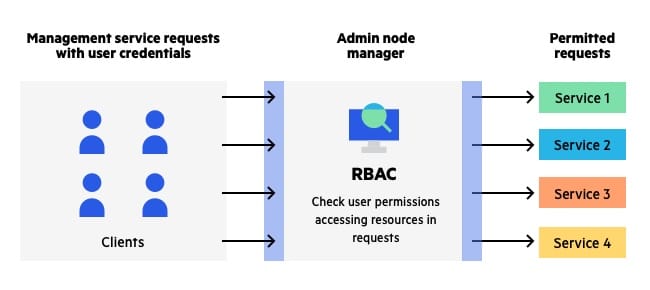
- Access control lists (ACL) — An ACL is a means of defining access rights by a given user or user group
Cookies, a mechanism for persisting data locally in a browser, can be incorporated into your React project in a matter of minutes. If you have React Router 4 and React Redux installed, some extra prop management is required to get your cookie object arriving at the correct Components.
- Install react-cookie
- Wrap with CookiesProvider
- SetCookie: React-cookie has some handy-dandy hooks that you can use to set, get and remove cookies. No matter which hook you'll be using, make sure you import useCookies as well as define cookies and your hook of choice