An object is a software bundle of related state(fields) and behavior(methods).
Benefits of bundling :
- Modularity: The source code for an object can be written and maintained independently of the source code for other objects. Once created, an object can be easily passed around inside the system.
- Information-hiding: The internal implementation of an Object remains hidden from the outside world.
- Code re-use: This allows specialists to implement/test/debug complex, task-specific objects, which you can then trust to run in your own code.
- Pluggability and debugging ease: If a particular object turns out to be problematic, you can simply remove it from your application and plug in a different object as its replacement.
- new keyword The new operator instantiates a class by dynamically allocating(run time) memory for a new object and returning a reference to that memory. This reference is then stored in the variable.
Object variable = new Object();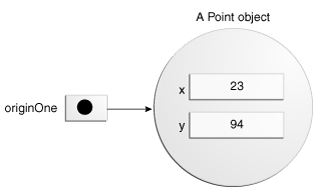
In Java, Array is treated as Object, so we use new keyword to create an Array e.g
int arr[] = new int[10];- class.forName()
public class Test {
    public static void main(String[] args) {
        class Animal {
            //Local inner class
        }
        try {
            //load the class dynamically
            Class<?> class1 = Class.forName("Animal");
            //create the object dynamically
            Object object = class1.newInstance();
        } catch (ClassNotFoundException | InstantiationException | IllegalAccessException e) {
            e.printStackTrace();
        }
    }
}- Class Loader and newInstance() Method
public class Test {
    public static void main(String[] args) {
        class Animal {
        }
        try {
            ClassLoader cl = Test.class.getClassLoader();
            Class class1 = cl.loadClass("Test");
            Object object = class1.newInstance();
        } catch (ClassNotFoundException | InstantiationException | IllegalAccessException e) {
            e.printStackTrace();
        }
    }
}- Object Deserialization
ObjectInputStream objStream = new ObjectInputStream(inputStream);
NewClass obj = (NewClass ) inStream.readObject();- clone() method The clone() method is used to create a copy of an existing object, in order to use clone() method the corresponding class should have implemented Cloneable interface a Marker Interface.
public class Test {
    class Animal implements Cloneable {
        // to avoid "The method clone() from the type Object is not visible"
        // error
        @Override
        protected Object clone() throws CloneNotSupportedException {
            return super.clone();
        }
    }

    public static void main(String[] args) {

        Test test = new Test();
        // To avoid "No enclosing instance of type Test is accessible." error
        Animal a1 = test.new Animal();
        try {
            Animal a2 = (Animal) a1.clone();
        } catch (CloneNotSupportedException e) {
            e.printStackTrace();
        }
    }
}| Methods | Description | Default Implementation |
|---|---|---|
| public int hashCode() | Returns the hashcode of the java object. | public native int hashCode(); |
| public boolean equals(Object obj) | Compares the given object to this object. | public boolean equals(Object obj){return (this == obj); } |
| protected Object clone() throws CloneNotSupportedException | Creates and returns the exact copy (clone) of this object. | |
| public String toString() | Returns the string representation of this object. | public String toString() {return getClass().getName() + "@" + Integer.toHexString(hashCode());} |
| public final Class getClass() | Returns the Class class object of the object. | public final native Class<?> getClass(); |
| public final void notify() | Wakes up a single thread that is waiting on this object’s monitor. | |
| public final void notifyAll() | Wakes up all threads that are waiting on this object’s monitor. | |
| public final void wait(long timeout)throws InterruptedException | Makes the current thread to wait for the specified milliseconds, until another thread notifies (invokes notify() or notifyAll() method). | |
| public final void wait(long timeout,int nanos)throws InterruptedException | Makes the current thread to wait for the specified miliseconds and nanoseconds, until another thread notifies (invokes notify() or notifyAll() method). | |
| public final void wait()throws InterruptedException | Makes the current thread to wait, until another thread notifies (invokes notify() or notifyAll() method). | |
| protected void finalize()throws Throwable | This method is invoked by the garbage collector before object is being garbage collected. |
hashCode() method is used to get a unique integer for given object. This integer is used for determining the bucket location, when this object needs to be stored in some HashTable like data structure. By default, Object’s hashCode() method returns and integer representation of memory address where object is stored. In case of Integer wrapper class, it retunrs primitive int value and in case of String class, returns s[0]*31^(n-1) + s[1]*31^(n-2) + ... + s[n-1]
equals() method, as name suggest, is used to simply verify the equality of two objects. Default implementation simply check the object references of two objects to verify their equality.
Consider Employee.class
public class Employee
{
  private Integer id;
  private String firstname;

  public Integer getId() {
      return id;
  }
  public void setId(Integer id) {
      this.id = id;
  }
  public String getFirstname() {
      return firstname;
  }
  public void setFirstname(String firstname) {
      this.firstname = firstname;
  }
}
public class EmployeeTest {
public static void main(String[] args) {
Employee e1 = new Employee();
Employee e2 = new Employee();
e1.setId(100);
e2.setId(100);
//Prints false in console
System.out.println(e1.equals(e2));
}
}For correct behaviour, we need to overrride equals()
public boolean equals(Object o) {
    if(o == null)
    {
        return false;
    }
    if (o == this)
    {
        return true;
    }
    if (getClass() != o.getClass())
    {
        return false;
    }

    Employee e = (Employee) o;
    return (this.getId() == e.getId());

}
Still we are not done yet, according to the contract: if you override equals() method then you must override hashCode() method.
        Set<Employee> employees = new HashSet<Employee>();
        employees.add(e1);
        employees.add(e2);

        //Prints two objects
        System.out.println(employees);
In order to correct this, we need to override hashCode() method also
@Override
public int hashCode()
{
   final int PRIME = 31;
   int result = 1;
   result = PRIME * result + getId();
   return result;
}Interfce with no fields and methods, usually helps the JVM compiler e. g. Cloneable, Serializable