The CSS align-content property sets the distribution of space between and around content items along a flexbox's cross-axis or a grid's block axis.
The interactive example below use Grid Layout to demonstrate some of the values of this property.
- start
- The items are packed flush to each other against the start edge of the alignment container in the cross axis.
- end
- The items are packed flush to each other against the end edge of the alignment container in the cross axis.
- flex-start
- The items are packed flush to each other against the edge of the alignment container depending on the flex container's cross-start side. This only applies to flex layout items. For items that are not children of a flex container, this value is treated like start.
- flex-end
- The items are packed flush to each other against the edge of the alignment container depending on the flex container's cross-end side. This only applies to flex layout items. For items that are not children of a flex container, this value is treated like end.
- center
- The items are packed flush to each other in the center of the alignment container along the cross axis.
- normal
- The items are packed in their default position as if no align-content value was set.
- baseline, first baseline, last baseline
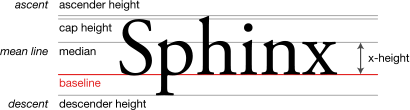
- The baseline is the line upon which most letters "sit" and below which descenders extend. Specifies participation in first- or last-baseline alignment: aligns the alignment baseline of the box’s first or last baseline set with the corresponding baseline in the shared first or last baseline set of all the boxes in its baseline-sharing group. The fallback alignment for first baseline is start, the one for last baseline is end.
- space-between
- The items are evenly distributed within the alignment container along the cross axis. The spacing between each pair of adjacent items is the same. The first item is flush with the start edge of the alignment container in the cross axis, and the last item is flush with the end edge of the alignment container in the cross axis.
- space-around
- The items are evenly distributed within the alignment container along the cross axis. The spacing between each pair of adjacent items is the same. The empty space before the first and after the last item equals half of the space between each pair of adjacent items.
- space-evenly
- The items are evenly distributed within the alignment container along the cross axis. The spacing between each pair of adjacent items, the start edge and the first item, and the end edge and the last item, are all exactly the same. stretch If the combined size of the items along the cross axis is less than the size of the alignment container, any auto-sized items have their size increased equally (not proportionally), while still respecting the constraints imposed by max-height/max-width (or equivalent functionality), so that the combined size exactly fills the alignment container along the cross axis.
- safe
- Used alongside an alignment keyword. If the chosen keyword means that the item overflows the alignment container causing data loss, the item is instead aligned as if the alignment mode were start.
- unsafe
- Used alongside an alignment keyword. Regardless of the relative sizes of the item and alignment container and whether overflow which causes data loss might happen, the given alignment value is honored.
align-content="center"
align-content="space-between"
align-content="flex-start"