

An opinionated Manim-based animation generator that converts natural language prompts into Manim scenes using LangChain/LangGraph agents, a RAG index and optional HTTP API.
Beautiful, reproducible animations—driven by LLMs + retrieval.
- Project summary
- Architecture
- Technologies used
- Deployment options
- Quickstart (local)
- Codebase overview
- Examples
- Troubleshooting & tips
- Contributing
- License
The app translates user prompts into Manim commands via an LLM-backed agent and RAG index, then renders animations with Manim. It is designed to be run as a local service (FastAPI) or deployed via LangGraph/Langsmith flows.
- Agent layer — LangChain / LangGraph agent composes, enhances and executes prompts. See
src/agent/. - Retrieval (RAG) — document chunking and vector indexing in
src/rag/to make Manim commands and docs searchable. - API — optional FastAPI endpoint at
src/api/main.py(commented by default; see Self-host section). - Renderer — Manim scenes and helpers live under
src/manim_docs/and are used to produce final video assets. - Storage / delivery — produced videos are uploaded (example: Cloudflare R2) and returned as URLs by the API.
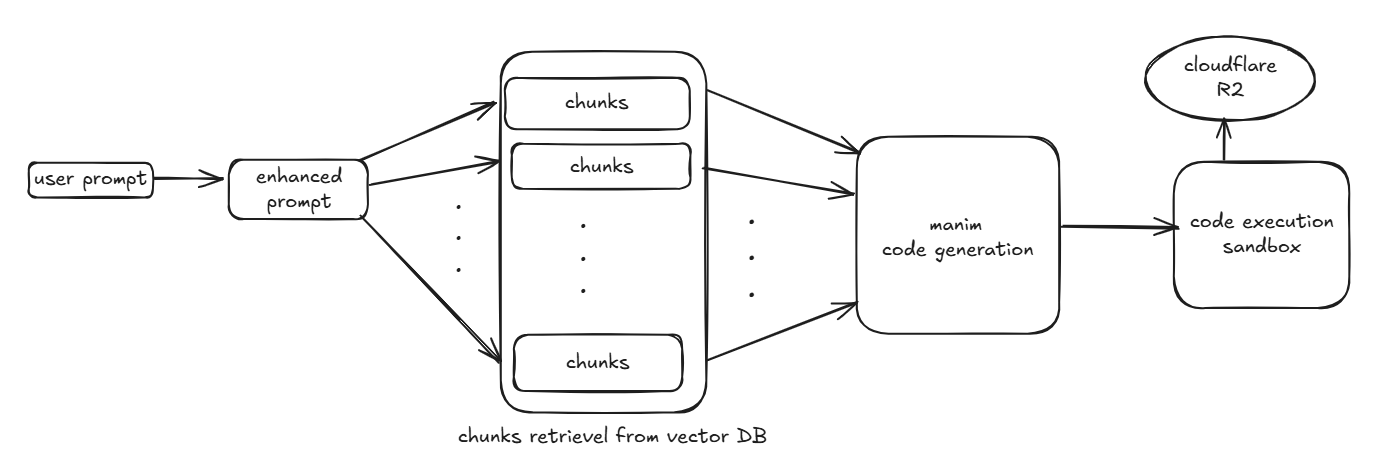
High-level flow
- User sends a natural language prompt to the agent.
- Agent enhances the prompt and issues RAG queries to the vector store.
- Agent produces a Manim script or workflow; rendering is performed by a worker running Manim.
- Rendered video is stored and the API returns a shareable URL or status.
NOTE- the code written in fe folder is not source of truth, the production frontend code is here - https://github.com/AnshBansalOfficial/v0-anim-ai
- Python 3.10+
- Manim library (rendering)
- LangChain / langchain_core (agent logic)
- LangGraph (workflow orchestration)
- Langsmith (for tracing & deployment)
- FastAPI (optional REST endpoint)
- Chroma or other vector store (RAG)
- Cloudflare R2
- e2b code interpreter for sandboxing the code execution
Key files: pyproject.toml, src/agent/, src/rag/, src/api/main.py.
- Use LangGraph to publish the workflow/graph; Langsmith can be used for tracing and CI-based deployments.
- Steps (high level):
- Get
LANGSMITH_API_KEYand set it in your CI or environment. - Confirm
langgraph.jsonor your graph module is up to date. - Use platform-specific CLI/CI to publish the graph (CI should set
LANGSMITH_API_KEYas secret and may setLANGSMITH_TRACING=true).
- Get
See langraph/project_langraph_platform/pyproject.toml for compatible package versions used in examples.
This project contains a commented FastAPI entrypoint at src/api/main.py (marked "MIGRATED TO LANGGRAPH API FOR DEPLOYEMENT"). To enable self-hosting:
- Open
manimation/manim-app/src/api/main.pyand uncomment the FastAPI app code. The endpoints provided are/run(POST) and/health(GET). - Ensure dependencies are installed (see Quickstart below).
- Run the app from the
manim-approot:
python -m uvicorn src.api.main:app --host 0.0.0.0 --port 8000 --reloadThe /run endpoint expects { "prompt": "..." } and will return a result (a video_url on success) and status.
Production notes: ensure PYTHONPATH includes the project root or use package-style imports. Replace permissive CORS with specific origins. Consider running the renderer as a background worker or container for heavier workloads.
- Clone and change directory
git clone https://github.com/pushpitkamboj/AnimAI
cd manimation/manim-app- Create and activate a venv
python -m venv .venv
source .venv/bin/activate- Install dependencies
pip install -e .
# or: poetry install- Environment variables (example)
export OPENAI_API_KEY=sk-...
export LANGSMITH_API_KEY=lsv2_...
export LANGSMITH_TRACING=true- Run unit tests
pytest -q- Start the optional API (if uncommented)
python -m uvicorn src.api.main:app --reloadsrc/agent/— agent code and prompt enhancement (enhance_prompt.py).src/rag/— chunking and indexing utilities for RAG.src/api/main.py— optional FastAPI endpoint (commented by default).src/manim_docs/— Manim helper modules and example scene code.pyproject.toml— dependencies and packaging metadata.langgraph.json— LangGraph workflow definition used for deployments.tests/— unit and integration tests.
- Call the API (if self-hosted)
POST /run
Request body:
{ "prompt": "Animate a circle turning into a square" }Response (success):
{ "result": "https://.../generated_video.mp4", "status": "success" }- Run a quick local render (example developer flow)
# Create a prompt payload and POST to /run, or call the agent runner directly from a script
python -c "from src.agent.enhance_prompt import enhance; print(enhance('Make a bouncing ball'))"- Rendering slow? Use a dedicated worker or scale compute for Manim tasks. Reduce resolution for testing.
- Langsmith tracing failing? Confirm
LANGSMITH_API_KEYandLANGSMITH_TRACING=true. - Import errors after enabling API? Ensure you run from repo root and
PYTHONPATHincludes project root or run withpython -m uvicorn src.api.main:app.
Contributions are welcome! Typical workflow:
- Fork the repo
- Create a feature branch
- Add tests and documentation
- Open a pull request
Please follow pep8 formatting and add unit tests for new features.
This project includes a LICENSE file in the repository root. Review it for licensing details.
If you'd like I can also:
- add a
docker-compose.ymlfor local testing (worker + API + vector DB), - create a
quickstart.mdwith screenshots and sample prompts, or - pin dependency versions and add
requirements-dev.txt.
Special thanks to the Manim community for their beautiful documentation, examples, and continuous support — their work greatly inspired this project. See the official docs: https://docs.manim.community/en/stable/index.html Note: Manim library and Manim Community edition are different, refer manim community docs for more details.