Design: Consistent edit content/edit metadata/rename/delete icons
Design for making the icons in the bookshelf and toc consistent, functional, and efficient. Most of this issue should be implemented in bookish, and the text for the book parts in github-bookeditor.
Goals
- Pick bootstrap icons to use
- Have just two icons show up on each item.
- Make the behavior consistent and predictable.
- Make common activities doable with one click.
a. Unfolding books and chapters to see inside them by clicking on the title.
b. Opening books, chapters, and modules for editing by clicking on the arrow ->.
- Provide a way to edit module and book metadata
Basic Design
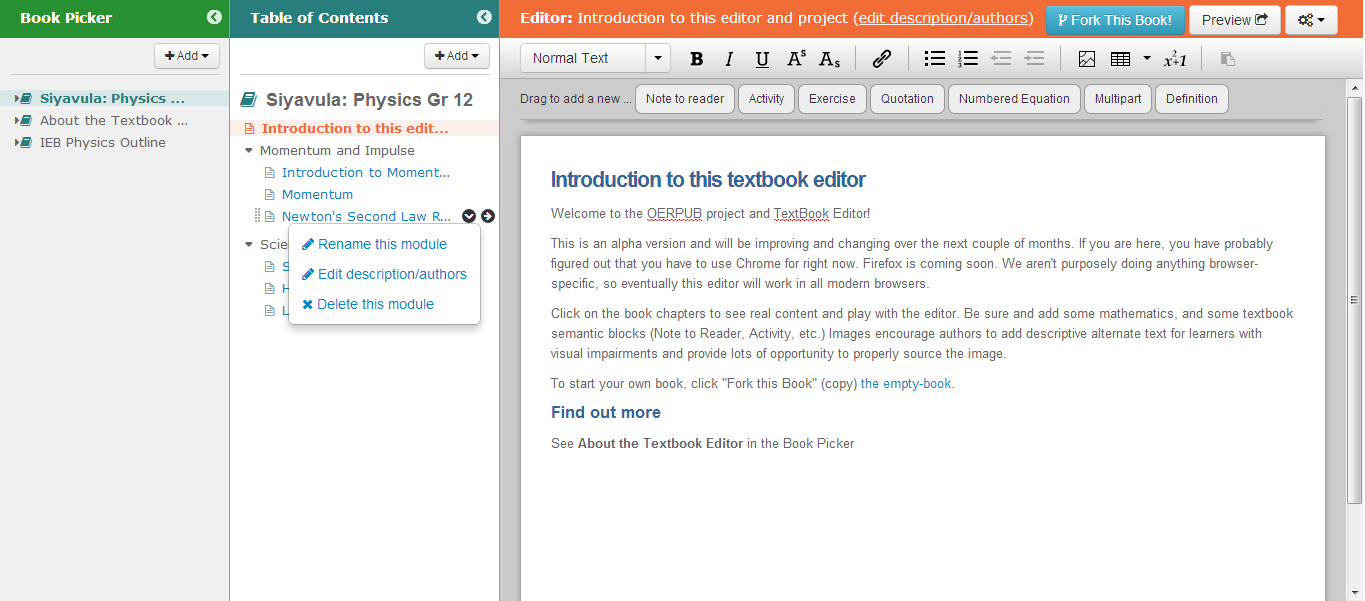
Note that the mockup isn't exactly like the current editor. The shelf is called the picker in the mockups and various other differences. Anything unrelated to the icons should be ignored.
Step 1. Global design and variations checklist
Step 2. Book icons behavior
Step 3. Book division / folder icons behavior
Step 4. Module icons behavior

Design: Consistent edit content/edit metadata/rename/delete icons
Design for making the icons in the bookshelf and toc consistent, functional, and efficient. Most of this issue should be implemented in bookish, and the text for the book parts in github-bookeditor.
Goals
a. Unfolding books and chapters to see inside them by clicking on the title.
b. Opening books, chapters, and modules for editing by clicking on the arrow ->.
Basic Design
Note that the mockup isn't exactly like the current editor. The shelf is called the picker in the mockups and various other differences. Anything unrelated to the icons should be ignored.
Step 1. Global design and variations checklist
Step 2. Book icons behavior
Step 3. Book division / folder icons behavior
Step 4. Module icons behavior