

-
|
Hi `sensor:
but it doesn't work. [homeassistant.helpers.template] Template variable warning: 'list object' has no attribute 'id' when rendering '{{ value_json.id }}' and not any info in the sensor.iopool . Trying wthh the "full" JSON (value_json) appears a message about >255 characters :( Thank you in advance for your help |
Beta Was this translation helpful? Give feedback.
Replies: 15 comments 55 replies

-
|
Hello, thanks for your interest in the iopool public api. If you want to get only one pool. You should get all your pools and get the id of the pool you're interested in. Then make a call to the route Hope it helps. |
Beta Was this translation helpful? Give feedback.

-
|
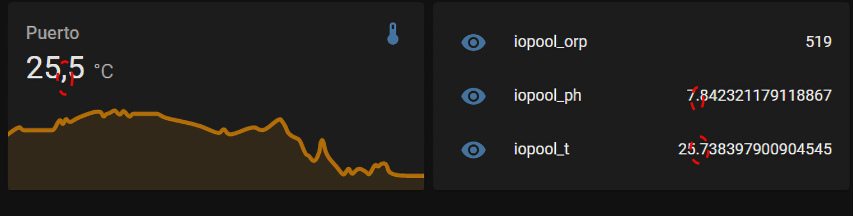
Thank you With the attached code works `sensor:
`
|
Beta Was this translation helpful? Give feedback.

-
|
I'm glad that it works for you now. Unfortunately I've never used HomeAssistant so I won't be able to help you with this. |
Beta Was this translation helpful? Give feedback.

-
|
Here is how you can format the decimal places (and units). - platform: rest
name: iopool_temperature
resource: https://api.iopool.com/v1/pools
unit_of_measurement: '°F'
value_template: "{{ (value_json[0].latestMeasure.temperature * 9 / 5 + 32) | int }} "
headers:
x-api-key: !secret iopool_api_key
- platform: rest
name: iopool_ph
resource: https://api.iopool.com/v1/pools
unit_of_measurement: 'pH'
value_template: "{{'%0.1f' | format(value_json[0].latestMeasure.ph) }} "
headers:
x-api-key: !secret iopool_api_key
- platform: rest
name: iopool_orp
resource: https://api.iopool.com/v1/pools
unit_of_measurement: 'mV'
value_template: "{{ value_json[0].latestMeasure.orp }} "
headers:
x-api-key: !secret iopool_api_key |
Beta Was this translation helpful? Give feedback.

-
|
Maybe you need to ask thisto Home Assistant community 😉
Le mer. 24 août 2022, 19:21, Pharizna ***@***.***> a écrit :
… Thank you
With the attached code works
`sensor:
-
platform: rest
name: iopool_t
resource: https://api.iopool.com/v1/pools
value_template: "{{ value_json[0].latestMeasure.temperature }} "
headers:
x-api-key: {myAPI}
-
platform: rest
name: iopool_ph
resource: https://api.iopool.com/v1/pools
value_template: "{{ value_json[0].latestMeasure.ph }} "
headers:
x-api-key: {myAPI}
-
platform: rest
name: iopool_orp
resource: https://api.iopool.com/v1/pools
value_template: "{{ value_json[0].latestMeasure.orp }} "
headers:
x-api-key: {myAPI}
`
But I need to format them as decimal numbers ... and I don't know yet :(
https://www.pcdemano.com/wp-content/uploads/2022/08/iopool.jpg
<http://url>
—
Reply to this email directly, view it on GitHub
<#14 (reply in thread)>,
or unsubscribe
<https://github.com/notifications/unsubscribe-auth/AAFLL2EBE5NTKLEXSKAC2PLV2ZKYTANCNFSM57MGSJ7A>
.
You are receiving this because you are subscribed to this thread.Message
ID: ***@***.***>
|
Beta Was this translation helpful? Give feedback.
-
|
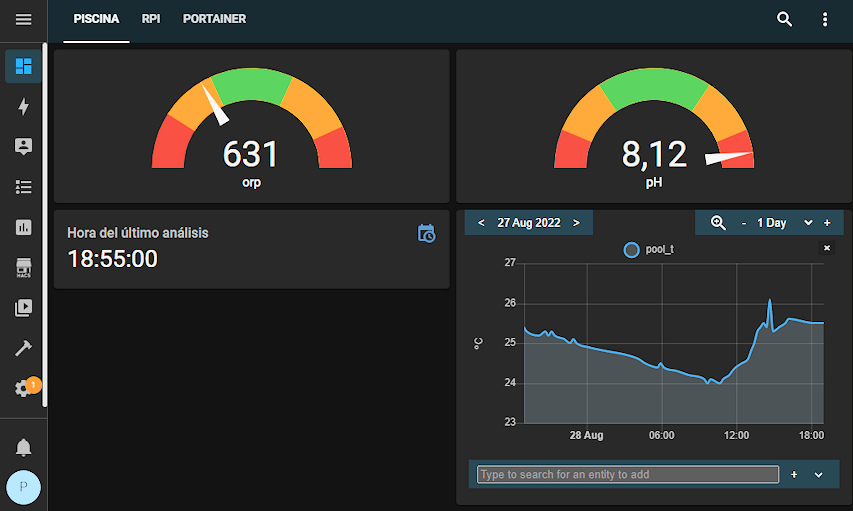
Don't worry! Now it's working `sensor:
|
Beta Was this translation helpful? Give feedback.

-
|
i want to use your configuration but i have this error can you help me please |
Beta Was this translation helpful? Give feedback.
-
|
hi, It work fine now, can you said me witch card you for lovelace |
Beta Was this translation helpful? Give feedback.
-
|
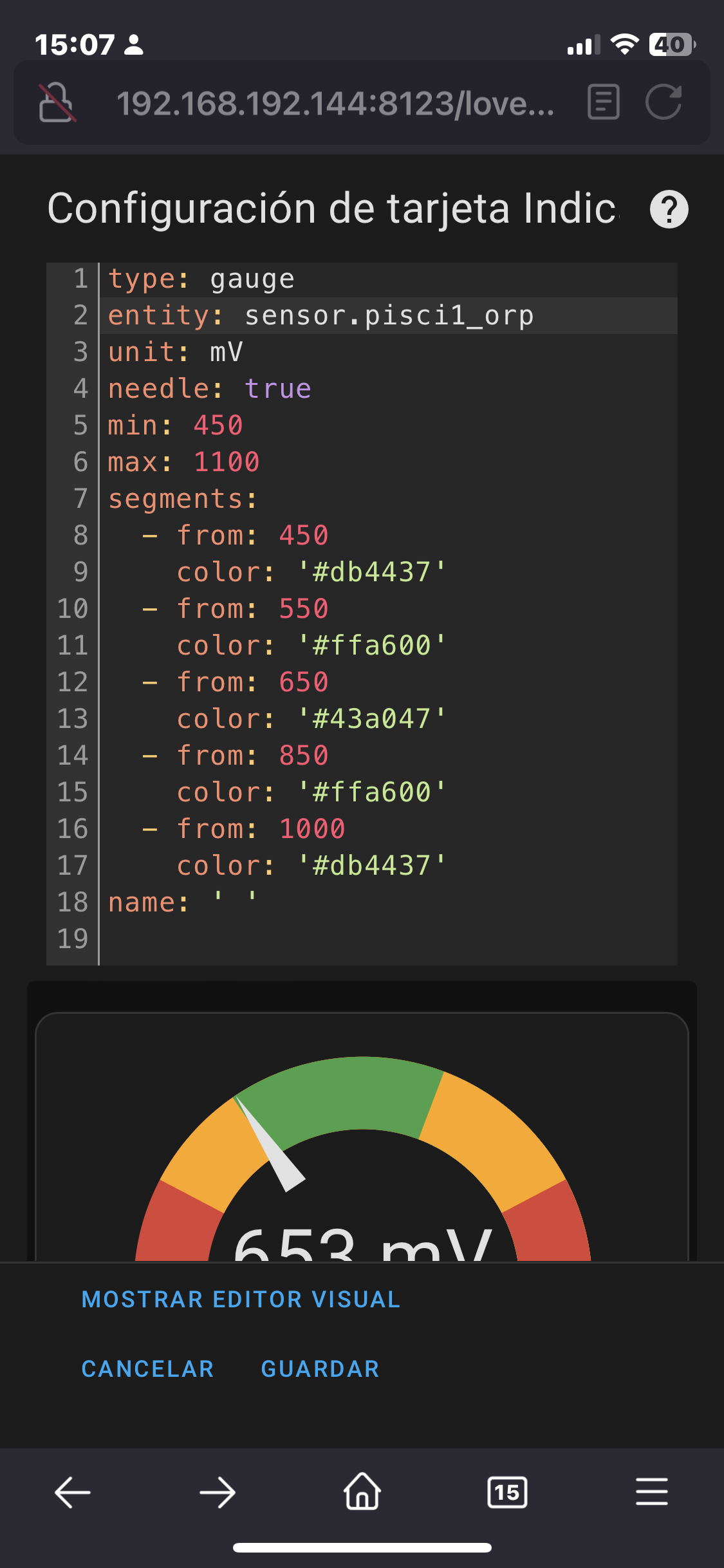
For example, a gauge one like this one
|
Beta Was this translation helpful? Give feedback.

-
|
bad indentation of a mapping entry (4:7) 1 | - sensor: |
Beta Was this translation helpful? Give feedback.
-
|
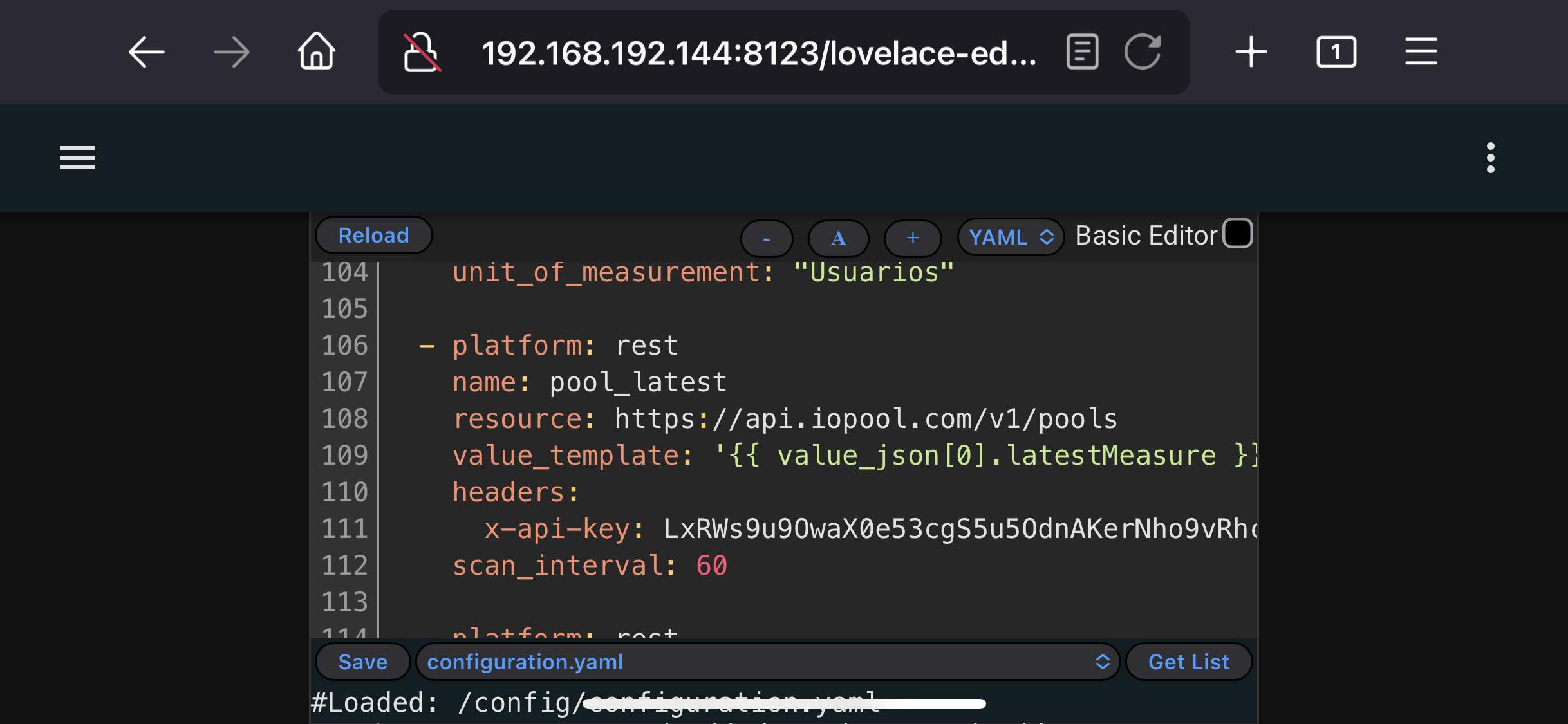
Hi For example, in my case is something similar to this one: headers: you have to ask for your APIkey to iopool people Also, you have to remember that It is a YAML file and you have to ‘indent’ the code lines |
Beta Was this translation helpful? Give feedback.
-
|
Thanks, i'm asking to the support an api key and after i'm testing |
Beta Was this translation helpful? Give feedback.
-
|
Den APIkey habe ich hier durch xxxxxxT |
Beta Was this translation helpful? Give feedback.

-
|
Please, hide your API KEY :(. |
Beta Was this translation helpful? Give feedback.
-
|
@Conterganer You are using a bad indentation :( The correct one is:
|

Beta Was this translation helpful? Give feedback.

-
|
Bonjour à tous, Après mon plugin sur Jeedom, je vous propose mon tuto pour HA : https://forum.hacf.fr/t/tuto-gestion-de-sa-piscine-avec-sonde-iopool/24292 Hello, After my Jeedom plugin, here is my tutorial for HA : https://forum.hacf.fr/t/tuto-gestion-de-sa-piscine-avec-sonde-iopool/24292 |
Beta Was this translation helpful? Give feedback.

-
|
I have Home Assistant. I would like to install this addon to Home Assistant, but I don't have any idea how to start. Can anyone help me. If it matters, I have HACS, file editor, and terminal installed. I will gladly pay somebody to help. My end goal is to use HA to send the values to an ISY |
Beta Was this translation helpful? Give feedback.

-
|
Hello, It's not an addon. You only need to follow my tutorial (link in my previous message) |
Beta Was this translation helpful? Give feedback.

-
|
Hi mguyard, i followed your Tutorial using the browser translation to german. So far it works, except for the part with the filtraion inteligence using app daemon. I didn't implemented it yet, because i don't know how exactly your filtration works. Could you please explain why do you have two timeslots for filtration. And how it works. Until now i have an fixed timeslot of 7 hours a day in the afternoon, and beforehand the pump can run whenever enough Power from my PV System is available |
Beta Was this translation helpful? Give feedback.

-
|
Marc,
Many thanks for your fast reply. Before my post, I had tried repeatedly to open both your links. I had click on both and copied and pasted in a new window. Each time , the link times out. Any idea how i can get your instructions some other way? Maybe post the instructions???? Once again, many thanks.
Best Regards,
Jimmy Scruggs
Office 713-649-2776 x 6
Mobile: 713-899-1862
On Jun 28, 2023, at 11:57 PM, Marc GUYARD ***@***.***> wrote:
Hello,
It's not an addon. You only need to follow my tutorial (link in my previous message)
—
Reply to this email directly, view it on GitHub<#14 (reply in thread)>, or unsubscribe<https://github.com/notifications/unsubscribe-auth/AIC6L6242M236QXFDJTZTA3XNUDMFANCNFSM57MGSJ7A>.
You are receiving this because you commented.Message ID: ***@***.***>
…________________________________
This email has been scanned for spam and viruses by Proofpoint Essentials. Click here<https://us1.proofpointessentials.com/index01.php?mod_id=11&mod_option=logitem&mail_id=1688014659-3U6uqGc46abK&r_address=jscruggs%40scruggsco.com&report=1> to report this email as spam.
|
Beta Was this translation helpful? Give feedback.
-
|
Marc, Many thanks for your fast reply. Before my post, I had tried repeatedly to open both your links. I had click on both and copied and pasted in a new window. Each time , the link times out. Any idea how i can get your instructions some other way? Maybe post the instructions???? Once again, many thanks. |
Beta Was this translation helpful? Give feedback.
-
|
Link can be open on my side So you need to look why you can't access to it on your side. |

Beta Was this translation helpful? Give feedback.
-
|
Anybody want to make $250? Back ground is I am 72 years old, have COPD, and on a breathing machine. I have a salt water pool and it needs acid added daily to keep it in the proper range. I can not safely handle acid. I have 4 Raspberry PI’s set up as web servers. I have programmed in many languages, but at this point in my life, I am tired of learning. I have a Universal Devices - ISY / Polisy. I designed, built, and programmed a CAI WebControl PLC, hooked up PH and ORP probes to read the values. My system works. Well it mostly works, but need constant tinkering. I programmed the PLC to send the values to the ISY. That works. I wrote an ISY program that reads the values and turns on the acid pump as needed. That works. But I want a simpler system. I installed Home Assistant in a PI. HA is an ISY plug in. |
Beta Was this translation helpful? Give feedback.

-
|
Made some improvements to the info here. Hope it's useful to someone. Using rest:
- resource: "https://api.iopool.com/v1/pools"
headers:
x-api-key: !secret iopool_api_key
sensor:
- name: iopool_title
icon: mdi:pool
value_template: "{{ value_json[0].title }}"
- name: iopool_mode
icon: mdi:pool
value_template: "{{ value_json[0].mode }}"
- name: iopool_action_required
icon: mdi:alert-box
value_template: "{{ value_json[0].hasAnActionRequired }}"
- name: iopool_temperature
icon: mdi:pool-thermometer
unit_of_measurement: '°F'
value_template: "{{ (value_json[0].latestMeasure.temperature * 9 / 5 + 32) | int }}" # degrees F
# value_template: "{{'%0.1f' | format(value_json[0].latestMeasure.temperature) }}" # degrees C
- name: iopool_ph
icon: mdi:ph
unit_of_measurement: 'pH'
value_template: "{{'%0.1f' | format(value_json[0].latestMeasure.ph) }}"
- name: iopool_orp
icon: mdi:scale-balance
unit_of_measurement: 'mV'
value_template: "{{ value_json[0].latestMeasure.orp }}"
- name: iopool_filtration_duration_advice
icon: mdi:pump
unit_of_measurement: 'h'
value_template: "{{ value_json[0].advice.filtrationDuration }}"I'm not the best at setting up cards, but here's what I have after my first day playing with this.
Conditional card: card:
content: >-
<font color="orange"><center><h2>Pool requires attention,<br>check iopool
app.</h2></center></font>
type: markdown
conditions:
- entity: sensor.iopool_action_required
state: 'True'
type: conditional
view_layout:
position: sidebarAuto entities card: type: custom:auto-entities
card:
type: entities
filter:
include:
- name: iopool*
exclude: []Vertical stack in card water temp: type: vertical-stack
cards:
- graph: line
type: sensor
entity: sensor.iopool_temperature
detail: 2
name: Water temperature
icon: ''
- type: gauge
entity: sensor.iopool_temperature
segments:
- from: 0
color: '#db4437'
- from: 59
color: '#ffa600'
- from: 69
color: '#43a047'
- from: 84
color: '#ffa600'
- from: 90
color: '#db4437'
min: 50
max: 100
needle: true
name: Water Temperature
- type: history-graph
entities:
- entity: sensor.iopool_temperatureVertical stack in card ph: type: vertical-stack
cards:
- graph: line
type: sensor
entity: sensor.iopool_ph
detail: 2
icon: ''
name: pH
- type: gauge
entity: sensor.iopool_ph
segments:
- from: 0
color: '#db4437'
- from: 6.8
color: '#ffa600'
- from: 7.1
color: '#43a047'
- from: 7.7
color: '#ffa600'
- from: 8.1
color: '#db4437'
min: 6.4
max: 8.4
needle: true
name: pH
- type: history-graph
entities:
- entity: sensor.iopool_phVertical stack in card orp: type: vertical-stack
cards:
- graph: line
type: sensor
entity: sensor.iopool_orp
detail: 2
name: Disinfection potential
icon: ''
- type: gauge
entity: sensor.iopool_orp
segments:
- from: 0
color: '#db4437'
- from: 550
color: '#ffa600'
- from: 650
color: '#43a047'
- from: 800
color: '#ffa600'
- from: 1000
color: '#db4437'
min: 350
max: 1100
needle: true
name: Disinfection potential
- type: history-graph
entities:
- entity: sensor.iopool_orp |

Beta Was this translation helpful? Give feedback.

-
|
great ;-) |
Beta Was this translation helpful? Give feedback.

-
|
Hello, I have 2 home assistant instances at home. one for the tests and the other as an operational system. The configuration poses no problem on the test instance but not on the production instance. All the sensors are well created but home assistant gives me an unknown feedback for each sensor. An idea of where it can come from? |
Beta Was this translation helpful? Give feedback.
-
|
|


Beta Was this translation helpful? Give feedback.
-
|
On my demo instance all IT' s OK |

Beta Was this translation helpful? Give feedback.
-
|
Check the logs of Home Assistant, maybe ? If it's working on your demo instance, I would suggest it's an issue with your production environment ;) |
Beta Was this translation helpful? Give feedback.

-
|
Indeed, I don't understand the 2 instances are running on the same machine and the config is a copy and paste... Logs: Enregistreur: homeassistant.helpers.template Template variable error: dict object has no element 0 when rendering '{{ value_json[0].hasAnActionRequired }}' |
Beta Was this translation helpful? Give feedback.
-
|
have you correctly set your apikey ? That's seems you don't received values from iopool.
|

Beta Was this translation helpful? Give feedback.
-
|
I actually use one! Secret even if I but the API directly it gives me the same thing iopool rest:
|
Beta Was this translation helpful? Give feedback.
-
|
Try to curl api from your prod HA to better understand which return you have and post here the return |
Beta Was this translation helpful? Give feedback.
-
|
I just reinstalled the instance and everything works like magic. thank you for your support |
Beta Was this translation helpful? Give feedback.

-
what do you mean by reinstalling the instance? |
Beta Was this translation helpful? Give feedback.

-
|
Hi, I am more or less new with HA and try to access IOPool like this
But as you can see I get an Error in the template testing. How can I fix the problem? Any Idea P.S. it is only the first snippet for testing it, for sure there are other sensors missing |


Beta Was this translation helpful? Give feedback.
-
|
Good things that yaml files works for you. Do you retrieve values in HA (not in template editor) ? 1 and 3, template editor isn't for YAML content. Is to try to parse content in HA and try to format it by another way. Only this. So you try to do something with something not done for.
|
Beta Was this translation helpful? Give feedback.

-
|
Update:
|


Beta Was this translation helpful? Give feedback.
-
|
I’m on Mac and don’t have issue with curl command. Have you tried with powershell command and if it’s also don’t works, please test curl command in powershell terminal. For errors, it’s normal as you don’t have set the right pool id in YAML you are not able to get infos |
Beta Was this translation helpful? Give feedback.
-
|
I find a solution to run the command in terminal in Home Assistant. Means i got an answer with this information
The ecoId is really the ID out of the app itself But problem is, there are no values inside the entities. Is there something wrong in the iopool.yaml or does it happen anywhere else? |

Beta Was this translation helpful? Give feedback.
-
|
Good if you have find a way. and also take attention, I see a space before your id in your screenshot. Except that the id is not the right, take attention to don’t have space and for information, no need to hide the unique_id as it’s a random unique id for Ha. No secret information in |
Beta Was this translation helpful? Give feedback.
-
|
Have you checked that it's correct the YAML syntax? Could you include a "screenshot" of the configuration.yaml? |
Beta Was this translation helpful? Give feedback.

-
|
Hi,
Do you see anything wrong here? It works ok using a curl command or postman app. Thanks!! Chris |

Beta Was this translation helpful? Give feedback.
-
|
Hi, I think you have an issue with resource. You use the pools endpoint who list all your pools in your account but to grab information from a pool you need to use another endpoint |
Beta Was this translation helpful? Give feedback.
-
|
Thanks!!! is working now! |
Beta Was this translation helpful? Give feedback.

-
|
Hi all, have my Iopool Eco Smart integrated with above code in my home assistant for close to a month now, all good. However, this morning all of a sudden, no data is coming over but sensor do get "updated" every 15mins. Just no "data" (NaN). My Android Iopool app shows the data, updated every 15mins, so all good there. The API key in the app is still the same as in home assistant. Rebooted home assistant but issue remains. Any pointers? |
Beta Was this translation helpful? Give feedback.
-
|
Same here works for months till today. |
Beta Was this translation helpful? Give feedback.
-
|
Hello, |
Beta Was this translation helpful? Give feedback.
-
|
The issue should be fixed now 🎉 Sorry for the inconvenience |
Beta Was this translation helpful? Give feedback.

-
And confirmed working again - thank you! |
Beta Was this translation helpful? Give feedback.

-
|
@mehdyouras it seems that it is down again? for me I did not notice it back in march but it's no longer working for me since last week |
Beta Was this translation helpful? Give feedback.

-
|
I'll try to get support here as well, I've been using my integration in home assistant for 6 months without issue, since last week my values are no longer updating in HA. When I do this call to test I get a "message forbidden" error:
This is my config in HA which never changed:
I contacted support since I start to believe that my API just stopped working on the server side. They don't help, they just send me here to github. So yeah, not sure where to go from here |


Beta Was this translation helpful? Give feedback.

-
|
Same here ! Please @mehdyouras fix it 🙏🏻 |
Beta Was this translation helpful? Give feedback.
-
|
Hello, Have you verified in mobile app that your api key is still the right ? |
Beta Was this translation helpful? Give feedback.
-
|
Yes, exactly the same. 

|
Beta Was this translation helpful? Give feedback.
-
|
Hello, For information, a iopool integration is now available : https://docs.page/mguyard/hass-iopool |
Beta Was this translation helpful? Give feedback.
-

Same with the HACS integration |
Beta Was this translation helpful? Give feedback.
-
|
I don't know if anything has been done, but I'm getting the information now, and everything is back to normal. |
Beta Was this translation helpful? Give feedback.


Hi
You have to write your APIkey instead “myAPI”.
For example, in my case is something similar to this one:
headers:
x-api-key: LxRWs9u9OwaX0e53cgS5u5OdnAKerNh…
scan_interval: 60
you have to ask for your APIkey to iopool people
Also, you have to remember that It is a YAML file and you have to ‘indent’ the code lines