- pandas 메모리 사용량을 줄이고 성능을 개선하기 위한 Categorical data 활용
- 다양한 데이터 시스템은 중복되는 데이터를 얼마나 효율적으로 저장하고 계산할 수 있는가를 중점으로 개발됨
- 데이터웨어하우스의 경우 구별되는 값을 담고 있는 차원 테이블과 그 테이블을 참조하는 정수키를 사용하는 것이 일반적
values = pd.Series([0, 1, 0, 0] * 2)
dim = pd.Series(['apple', 'orange'])
print(values)
# 0    0
# 1    1
# 2    0
# 3    0
# 4    0
# 5    1
# 6    0
# 7    0
# dtype: int64
print(dim)
# 0     apple
# 1    orange
# dtype: object

dim.take(values)
# 0     apple
# 1    orange
# 0     apple
# 0     apple
# 0     apple
# 1    orange
# 0     apple
# 0     apple
# dtype: object- take 메서드로 원래 저장된 문자열을 구함
- Categorical data (범주형 데이터)
- 정수로 표현된 값은 범주형 or 사전형 표기법
- 별개의 값을 담고 있는 배열은 범주, 사전 or 단계 데이터
범주형 데이터를 가리키는 정수값은 범주 코드 or 코드
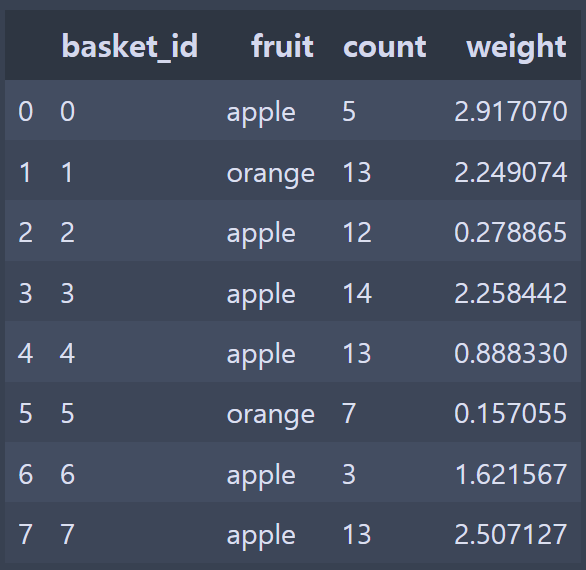
fruit_cat = df['fruit'].astype("category")
fruit_cat
# 0     apple
# 1    orange
# 2     apple
# 		...
Name: fruit, dtype: category
Categories (2, object): [apple, orange]

c = fruit_cat.values
type(c)
# pandas.core.arrays.categorical.Categorical

c.categories
# Index(['apple', 'orange'], dtype='object')

c.codes
# array([0, 1, 0, 0, 0, 1, 0, 0], dtype=int8)- 문자열 객체의 배열을 범주형 데이터로 변경
- Categorical 객체는 categories와 codes 속성을 가짐
my_categories = pd.Categorical(['foo', 'bar', 'baz', 'foo', 'bar'])
my_categories
# [foo, bar, baz, foo, bar]
# Categories (3, object): [bar, baz, foo]

categories = ['foo', 'bar', 'baz']
codes = [0, 1, 2, 0, 0, 1]
my_cats_2 = pd.Categorical.from_codes(codes, categories)
my_cats_2
# [foo, bar, baz, foo, foo, bar]
# Categories (3, object): [foo, bar, baz]- 위와 같이 categorical data를 직접 생성하거나 기존에 정의된 범주 코드가 있으면 from_codes 메서드를 이용해 생성하는 것도 가능
ordered_cat = pd.Categorical.from_codes(codes, categories, ordered=True)
ordered_cat
# [foo, bar, baz, foo, foo, bar]
# Categories (3, object): [foo < bar < baz]

my_cats_2.as_ordered()
# [foo, bar, baz, foo, foo, bar]
# Categories (3, object): [foo < bar < baz]- 범주형으로 변경하는 경우 명시적으로 지정하지 않으면 특정 순서 보장X
- ordered=True 옵션을 주고 생성, 순서가 없는 범주형 인스턴스는 as_ordered 메서드 이용
- foo, bar, baz 순서를 갖도록 생성
- 범주형 데이터는 꼭 문자열일 필요는 없으며, 변경이 불가능한 값이라면 어떤 자료형이어도 무관
import pandas as pd
import numpy as np

np.random.seed(12345)

draws = np.random.randn(1000)

# 데이터의 시작과 끝값에 대한 정보를 포함하지 않게 이름을 지정
bins = pd.qcut(draws, 4, labels=["Q1", "Q2", "Q3", "Q4"])
print(bins)
# [Q2, Q3, Q2, Q2, Q4, ..., Q3, Q2, Q1, Q3, Q4]
# Length: 1000
# Categories (4, object): [Q1 < Q2 < Q3 < Q4]

bins.codes[:10]
# array([1, 2, 1, 1, 3, 3, 2, 2, 3, 3], dtype=int8)

bins = pd.Series(bins, name="quartile")
results = (pd.Series(draws).groupby(bins).agg(["count", "min", "max"]).reset_index())
results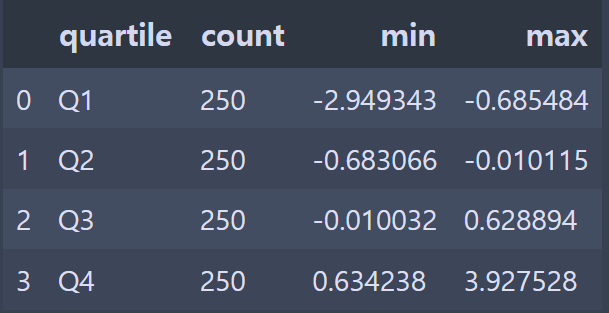
N = 10000000
draws = pd.Series(np.random.randn(N))
labels = pd.Series(["foo", "bar", "baz", "qux"] * (N // 4))
categories = labels.astype("category")

print(labels.memory_usage())
# 80000128
print(categories.memory_usage())
# 10000320

%time _ = labels.astype("category")
# Wall time: 357 ms- category 형태로 변환한 categories의 메모리 사용량이 변환하기 전 labels에 비해 8배 정도나 적은 것을 볼 수 있음
- 범주형으로 변환하는 과정은 한 번만 변환하면 되는 일회성 비용
- 범주형에 대한 그룹 연산은 문자열 배열을 사용하는 대신 정수 기반의 코드 배열을 사용하는 알고리즘으로 동작해서 훨씬 빠름
s = pd.Series(["a", "b", "c", "d"] * 2)
cat_s = s.astype("category")
cat_s
# 0    a
# 1    b
# 2    c
# 3    d
# 4    a
# 5    b
# 6    c
# 7    d
# dtype: category
# Categories (4, object): [a, b, c, d]

cat_s.cat.codes
# 0    0
# 1    1
# 2    2
# 3    3
# 4    0
# 5    1
# 6    2
# 7    3
# dtype: int8

cat_s.cat.categories
# Index(['a', 'b', 'c', 'd'], dtype='object')- cat 속성을 이용해서 categorical 메서드에 접근 가능
actual_categories = ["a", "b", "c", "d", "e"]
cat_s2 = cat_s.cat.set_categories(actual_categories)
cat_s2
# 0    a
# 1    b
# 2    c
# 3    d
# 4    a
# 5    b
# 6    c
# 7    d
# dtype: category
# Categories (5, object): [a, b, c, d, e]- set_categories 메서드를 이용해서 category 변경 가능
cat_s3 = cat_s[cat_s.isin(["a", "b"])]
cat_s3
# 0    a
# 1    b
# 4    a
# 5    b
# dtype: category
# Categories (4, object): [a, b, c, d]

cat_s3.cat.remove_unused_categories()
# 0    a
# 1    b
# 4    a
# 5    b
# dtype: category
# Categories (2, object): [a, b]- remove_unused_categories 메서드를 이용해서 실제로 존재하지 않는 category를 제거할 수 있음
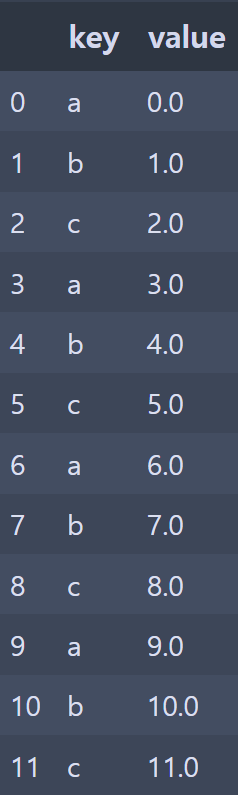
g = df.groupby("key").value
g.mean()
# key
# a    4.5
# b    5.5
# c    6.5

g.transform(lambda x: x.mean())
# 0     4.5
# 1     5.5
# 2     6.5
# 3     4.5
# ...

g.transform("mean")
# 0     4.5
# 1     5.5
# 2     6.5
# 3     4.5
# ...- apply와 마찬가지로 transform은 Series를 반환하는 함수만 사용가능하지만 결과는 입력과 동일한 크기여야 함
g.transform(lambda x: x * 2)
# 0      0.0
# 1      2.0
# 2      4.0
# 3      6.0
# 4      8.0
# ...

g.transform(lambda x: x.rank(ascending=False))
# 0     4.0
# 1     4.0
# 2     4.0
# 3     3.0
# 4     3.0
# ...

def normalize(x):
    return (x - x.mean()) / x.std()

# 셋 다 동일한 결과
g.transform(normalize)

g.apply(normalize)

normalized = (df["value"] - g.transform("mean")) / g.transform("std")
normalized
# 0    -1.161895
# 1    -1.161895
# 2    -1.161895
# 3    -0.387298
# 4    -0.387298
# 5    -0.387298
# 6     0.387298
# 7     0.387298
# 8     0.387298
# 9     1.161895
# 10    1.161895
# 11 1.161895- mean이나 sum 같은 내장 요약함수는 일반적인 apply 함수보다 더 빠르게 동작
- 이러한 함수들을 transform과 함께 사용하면 뒤로 되돌릴 수 있고 그룹 연산을 풀어낼 수 있음
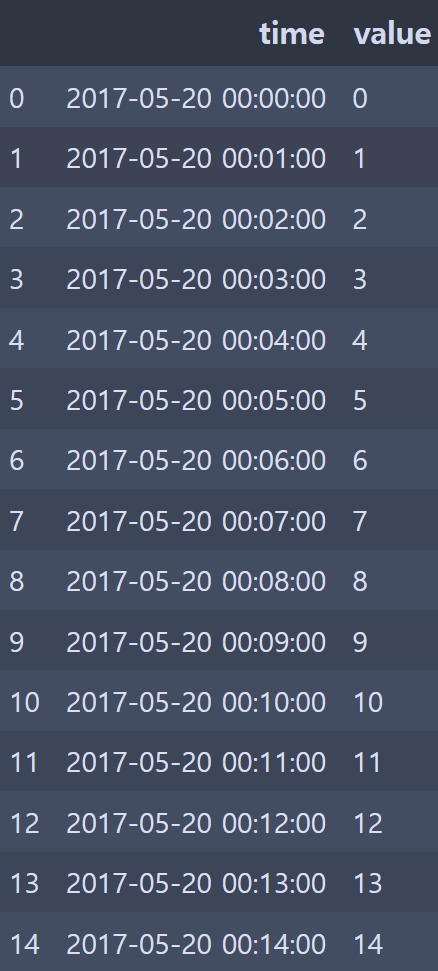
df.set_index("time").resample("5min").count()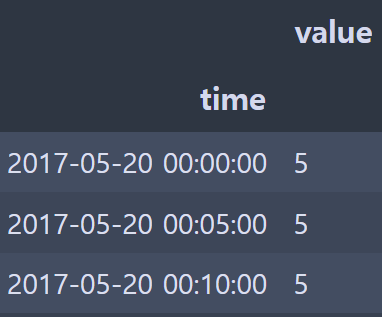
- 5분 단위로 grouping 하고 갯수 count
df2 = pd.DataFrame({"time": times.repeat(3),
                    # np.tile - value에 해당하는 array를 N번 반복
                   "key": np.tile(["a", "b", "c"], N),
                   "value": np.arange(N * 3.)})
df2[:7]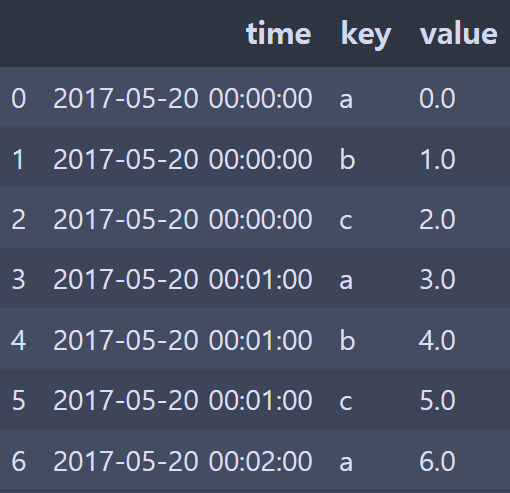
resampled = (df2.set_index("time").groupby(["key", pd.Grouper(freq="5min")]).sum())
resampled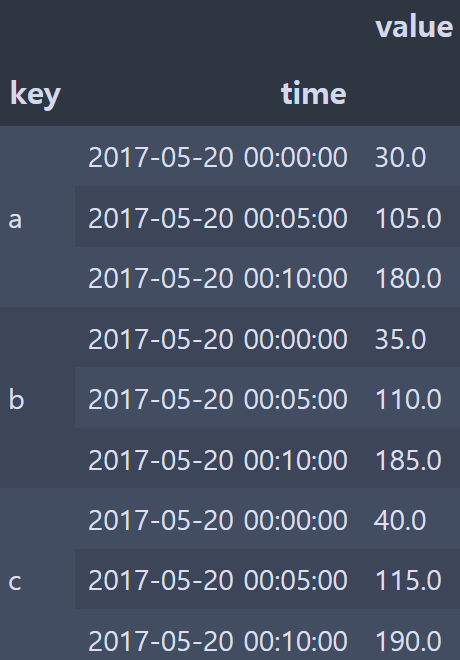
- key값을 기준으로 5분 단위로 grouping하고 합계를 구함
df2 = df.copy()
df2['k'] = v

df2 = df.assign(k=v)- 값을 직접 대입하는 것이 assign을 사용하는 것보다 빠르게 수행되지만 assign을 이용하면 메서드를 연결해서 사용 가능
df = load_data()
df2 = df[df['col2'] < 0]
# 위의 과정을 다음과 같이 사용 가능
# df = (load_data()[lambda x: x['col2'] < 0])

df2['col1_demeaned'] = df2['col1'] - df2['col1'].mean()
result = df2.groupby('key').col1_demeaned.std()

# 위의 과정을 다음과 같이 사용가능
# result = (df2.assign(col1_demeaned=df2.col - df2.col2.mean()).groupby('key').col1_demeaned.std())
result = (load_data()[lambda x: x['col2'] < 0].
assign(col1_demeaned=lambda x: x.col1 - x.col1.mean()).
groupby('key').col1_demeaned.std())- 위의 코드들을 하나의 연결표현으로 작성
a = f(df, arg1=v1)
b = g(a, v2, arg3=v3)
c = h(b, arg4=v4)

result = (df.pipe(f, arg1=v1).pipe(g, v2, arg3=v3).pipe(h, arg4=v4))- Series나 DataFrame 객체를 인자로 취하고 반환하는 함수를 사용하는 경우 pipe 메서드를 통해 연결가능
- f(df)와 df.pipe(f)는 동일
- pipe를 이용한 유용한 패턴 중 하나는 일련의 연산을 재사용 가능한 함수로 일반화하는 것
g = df.groupby(['key1', 'key2'])
df = df[df.col1 < 0]
df['col1'] = df['col1'] - g['col1'].transform('mean')


def group_demean(df, by, cols):
    result = df.copy()
    g = df.groupby(by)
    for c in cols:
        result[c] = df[c] - g[c].transform('mean')
    return result

result = (df[df.col1 < 0].pipe(group_demean, ['key1', 'key2'], ['col1']))- 각 컬럼에서 그룹의 평균을 빼는 작업
- 여러 컬럼에 대해 그룹 평균을 뺄 수 있고, 그룹의 키를 쉽게 변경 가능