
Compile-time source code generation from various sources including classes, JSON, XML, Excel files, and now also raw source files for documentation purposes.
NOTE: This package is in an early test stage and the API may change in the near future or it may not work as expected.
-
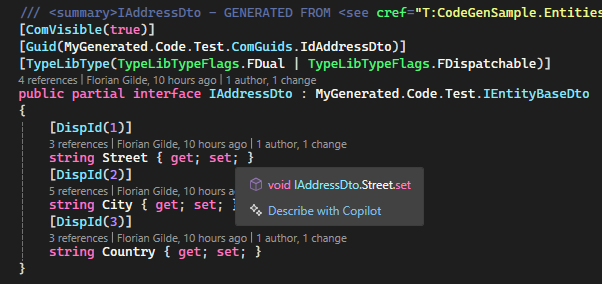
DTO Generation Automatically generate Data Transfer Objects (DTOs) from your classes and enums using attributes like this:
[AutoGenerateDto(ToDtoMethodName = "ToMegaDto", ToSourceMethodName = "AsSrc", IsComCompatible = true,
    Namespace = "MyGeneration"
)]
public class Address : EntityBase
{
    // ...
}
-
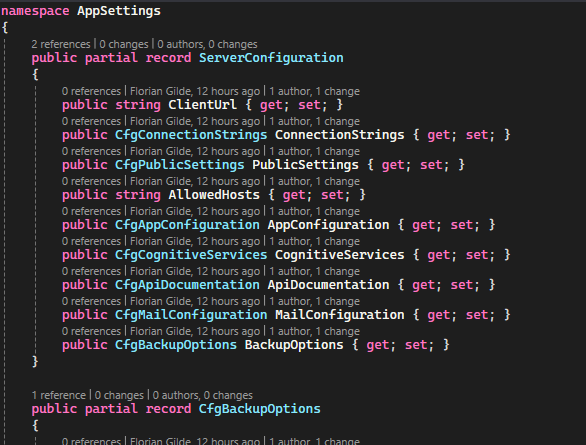
Class generation from XML or JSON files Generate strongly typed classes from JSON structures using the
StructureGenerationconfiguration. This is useful for configuration files or API responses.{ "SourceFile": "/Sources/appsettings.json", "RootClassName": "ServerConfiguration", "Namespace": "AppSettings" }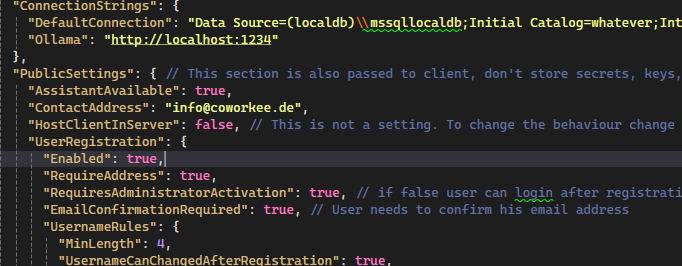
-
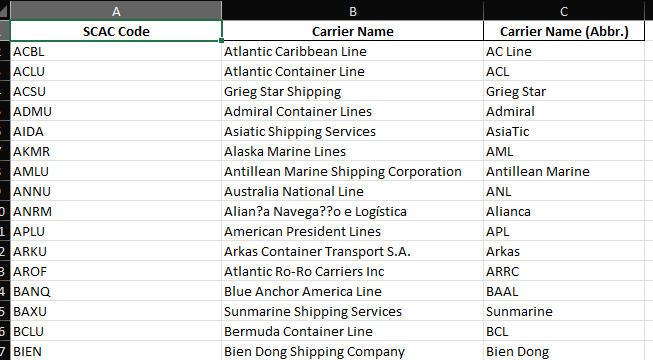
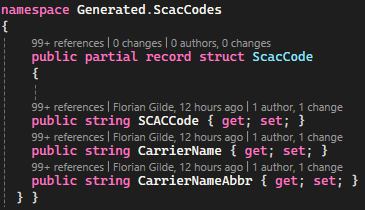
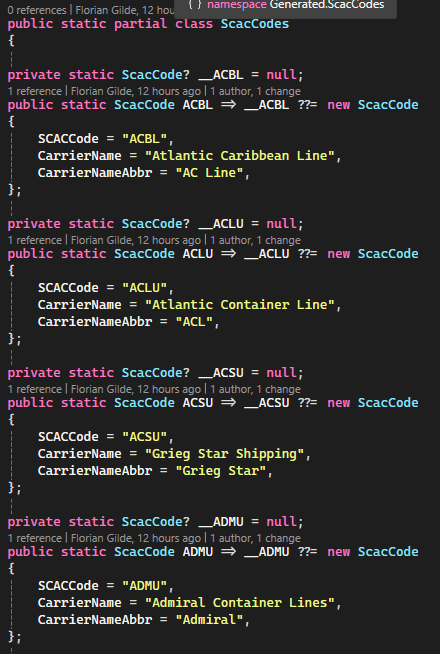
Class generation from Excel
"ExcelGenerations": [
  {
    "ModelType": "RecordStruct",
    "SourceFile": "/Sources/scac_codes.xlsx",
    "SheetName": null,
    "Namespace": "Generated.ScacCodes",
    "RootClassName": "ScacCode",
    "KeyColumn": "A",
    "HeaderRowIndex": 1,
    "DataStartRowIndex": 2,
    "GenerateModelClass": true,
    "GenerateStaticTable": true,
    "StaticClassName": "ScacCodes",
    "GenerateAllCollection": true,
    "OutputPath": "./Generated/Excel/"
  }
]
-
Source code documentation generation (
CodeToDocs)Generate documentation files directly from existing source files (e.g.
.cs,.razor,.html) using theCodeToDocsconfiguration. For every matching input file you can generate:- Plain text (
.txt) - Markdown (
.md) - HTML (
.html)
Example configuration:
{
  "DisableGeneration": false,
  "InputFolder": "./Entities",
  "OutputPath": "./Generated/HtmlDocs/",
  "FileIncludePattern": "*.cs",
  "SourceExportTypes": [ "PlainText", "Markdown", "Html" ]
}
Markdown output example:
- Plain text (
'''csharp
 public class Customer
 {
     public int Id { get; set; }
     public string Name { get; set; }
 }
'''With this package you can generate DTOs, Interfaces and other code from your classes and enums. It is a code generation library that uses attributes to define how the code should be generated.
After adding the package to your project, you can use the AutoGenerateDto attribute to mark classes that should have DTOs generated.
Additionally you need to to add a config file as AdditionalFile, this can be empty but maybe you want to control the generation process more precisely, or you want to use one of the other 2 Features
like generate code from other sources like JSON or Excel files.
For this, you can specify the Config in a additional json file.
The configuration file is a JSON file that defines how the code should be generated.
You can specify the namespace, the output directory, and other options.
Additionally, you can generate classes from JSON or XML files using the StructureGeneration configuration.
This allows you to create strongly typed classes from JSON structures,
which can be very useful for configuration files or API responses.
To add your configuration file please add a json as an AdditionalFile in your csproj file like this:
  <ItemGroup>
    <AdditionalFiles Include="CodeGen.config.json" />
  </ItemGroup>
Sample of a configuration file:
{
  "DtoGeneration": {
    // Notice:: The whole DtoGeneration section is optional and can also be overridden if set on the Attributes.
    "ComIdClassName": "ComGuids",
    "ComIdClassPropertyFormat": "Id{0}",
    "ComIdClassModifier": "Public",
    "BaseType": null,
    "AddReferencedNamespacesUsings": null,
    "AddContainingNamespaceUsings": null,
    "PreInterfaceString": null,
    "PreClassString": null,
    "KeepAttributesOnGeneratedClass": false,
    "KeepAttributesOnGeneratedInterface": false,
    "Interfaces": null,
    "DefaultMappingSettings": null,
    "OneFilePerClass": true,
    "Usings": null,
    "CreateRegions": true,
    "CreateComments": true,
    "GeneratePartial": true,
    "Namespace": "MyGenerated.Code.Test",
    "Suffix": "Wanda",
    "Prefix": null
    //"OutputPath": "./Generated/Dtos/" // Output path for the generated files, if its null or unset the files will added to generation source
  },
  "StructureGenerations": [
    {
      "SourceFile": "/Sources/appsettings.json", // Path to the source file to generate from
      "RootClassName": "ServerConfiguration", // Name of the root class to generate
      "Namespace": "AppSettings", // Namespace for the generated class
      "Prefix": "Cfg", // Prefix for the generated class name
      "Ignore": [ // Ignore for example to create a partial class with the same name or for whatever reason
        "PublicSettings.Endpoints"
      ],
      "OutputPath": "./Generated/AppSettings/" // Output path for the generated file, if its null or unset the files will added to generation source
    }
  ],
  "ExcelGenerations": [
    {
      "SourceFile": "/Sources/scac_codes.xlsx",
      "SheetName": null,
      "Namespace": "Generated.ScacCodes",
      "RootClassName": "ScacCode", // Name of the root class to generate
      "KeyColumn": "A", // Column to use as key for the generated class e.g. "A" for the first column B,C etc.
      "HeaderRowIndex": 1,
      "DataStartRowIndex": 2,
      "GenerateModelClass": true,
      "GenerateStaticTable": true,
      "StaticClassName": "ScacCodes", //Name of the static class to generate
      "GenerateAllCollection": true,
      "ColumnMappings": {
        "Coordinates (lat,lon)": "Coordinates",
        "Change indicator": "ChangeIndicator"
      },
      "PropertyTypeOverrides": {
        "Coordinates": "Coordinates", // eigener Struct
        "LocationStatus": "LocationStatus",
        "LocationFunction": "LocationFunction"
      },
      "OutputPath": "./Generated/Excel/" // Output path for the generated file, if its null or unset the files will added to generation source

    }
  ]
}
To use this package, you need to add the Nextended.CodeGen package to your project and additionally for using the attributes you need to add Nextended.Core as well.
  <ItemGroup>
    <PackageReference Include="Nextended.Core" Version="9.0.15" PrivateAssets="all" GeneratePathProperty="true" />
    <PackageReference Include="Nextended.CodeGen" Version="9.0.15"  />
  </ItemGroup>
Please have a look at this sample project to see how to use the code generation features: Nextended.CodeGen.Sample
For comprehensive documentation, examples, and API reference, see:
- .NET Standard 2.0 (Generator)
- .NET 8.0+ (Generated code)
This project is licensed under the GPL License.