spring cloud 学习笔记0x2 #19

Description

负载均衡客户端Ribbon
Spring cloud两种服务调用形式
- ribbon+restTemplate
- Feign
-
在笔记0x1的基础上,将端口设置为8662,启动,这时就有两个端口的应用,分别是之前的8664和现在的8662
-
新建一个eureka-client客户端,配置好端口,设置端口为8661,同样的,注册中心还是8767
server.port=8661

spring.application.name=eurekaribbon
eureka.client.serviceUrl.defaultZone=http://localhost:8767/eureka/
-
向ioc注入一个bean: restTemplate
-
加注解@LoadBalanced,开启负载均衡
@SpringBootApplication
@EnableEurekaClient
public class EurekaribbonApplication {

    public static void main(String[] args) {
       SpringApplication.run(EurekaribbonApplication.class, args);
    }

   @Bean
   @LoadBalanced
   RestTemplate restTemplate() {
       return new RestTemplate();
   }
}
-
写一个服务,通过注入在ioc的restTemplate来消费之前客户端eurekaclient的“/nice” api
@Service
public class RibbonService {
    @Autowired
    RestTemplate restTemplate;

    public String niceService(String name) {
        return restTemplate.getForObject("http://EUREKACLIENT/nice?name=" + name, String.class);
    }
}
这里可用程序名代替url地址,ribbon会根据程序名来选择服务实例,实现负载均衡
-
写一个controller,来调用上面的service
@RestController
public class RibbonControler {
    @Autowired
    RibbonService service;

    @GetMapping(value = "/b")
    public String hi(@RequestParam String name) {
        return service.niceService(name);
    }
}
-
不断请求http://localhost:8661/b?name=hugeterry ,会得到如下响应报文
hello hugeterry ,port:8664
hello hugeterry ,port:8662 -
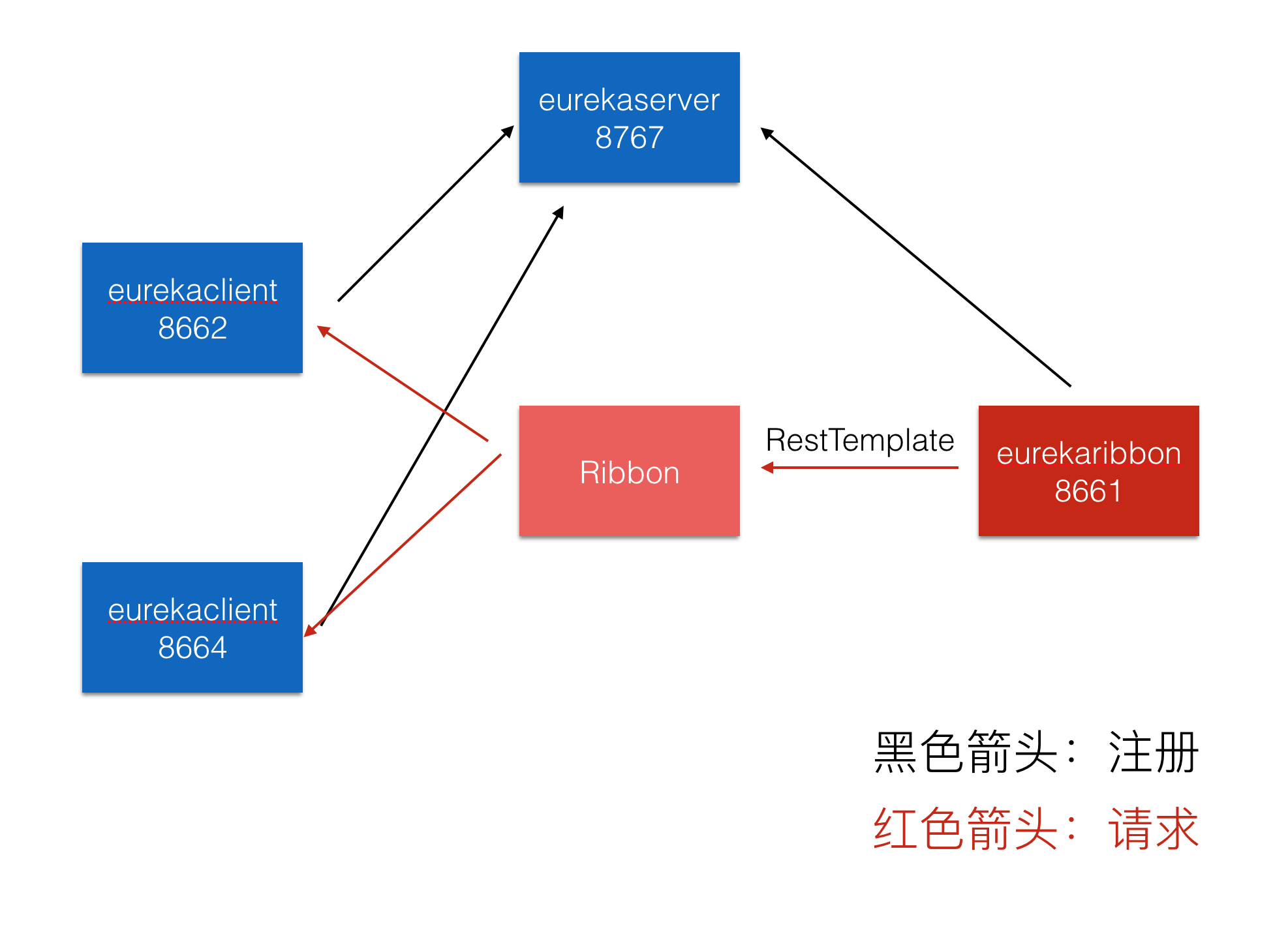
架构图如下: