Implemented with serverless architecture, REST APIs, and a cloud-hosted database, optimizing scalability and performance.
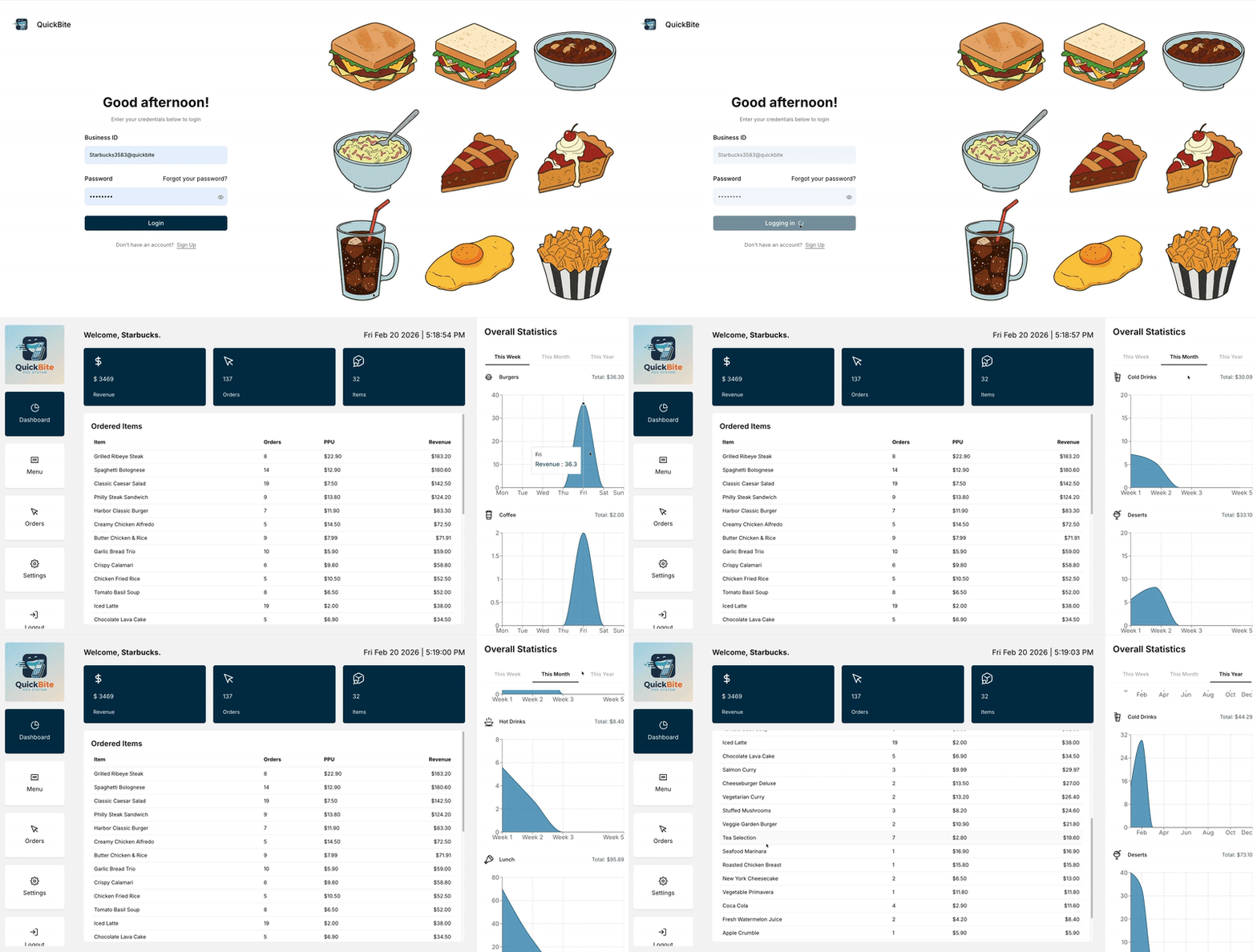











- Secure Login System: Business ID and password-based authentication
- User Registration: Sign up with unique business ID
- Password Reset: Forgot password functionality
- Session Management: JWT-based sessions with NextAuth.js
- Protected Routes: Server-side route protection
- Add Menu Items: Create items with name, description, price, category, and images
- Delete Menu Items: Remove items from your menu
- Category Organization: Organize items by categories (breakfast, lunch, dinner, burgers, pizzas, drinks, desserts, etc.)
- Image Upload: Cloudinary integration for optimized image storage
- Multi-tenant: Each business has its own isolated menu
- Add to Cart: Quick add items to cart
- Quantity Management: Increase/decrease item quantities
- Persistent Cart: Cart state persists across sessions using localStorage
- Cart Sidebar: Easy access to cart from any page
- Order Review: Review items before checkout
- Payment Interface: Payment section UI (ready for integration)
- Order Management: Orders page structure (ready for implementation)
- Welcome Screen: Personalized greeting
- Date Display: Current date information
- Navigation Hub: Quick access to all features
- Framework: Next.js 16 (App Router) with React 19
- Language: TypeScript
- Database: PostgreSQL with Prisma ORM
- Authentication: NextAuth.js v5 (beta)
- State Management: Zustand
- Styling: Tailwind CSS v4
- UI Components: Radix UI
- Image Storage: Cloudinary
- Animations: Motion (Framer Motion)
- Notifications: Sonner
quickbite-app/
├── app/                      # Next.js App Router pages
│   ├── (auth)/              # Authentication routes
│   │   ├── login/
│   │   ├── sign-up/
│   │   └── forgot-password/
│   ├── (pos)/               # POS system routes
│   │   ├── (dashboard)/     # Dashboard routes
│   │   │   ├── dashboard/
│   │   │   ├── inventory/
│   │   │   ├── orders/
│   │   │   └── settings/
│   │   ├── menu/            # Menu pages
│   │   │   └── [category]/  # Dynamic category pages
│   │   └── checkout/        # Checkout page
│   ├── api/                 # API routes
│   │   ├── auth/            # Authentication API
│   │   └── menu-items/      # Menu items API
│   └── layout.tsx           # Root layout
├── components/              # React components
│   ├── auth/               # Authentication components
│   ├── dashboard/          # Dashboard components
│   ├── menu/              # Menu components
│   ├── sidebar/           # Sidebar components
│   ├── shared/            # Shared components
│   └── ui/                # UI components
├── lib/                    # Utility libraries
│   ├── prisma.ts          # Prisma client
│   ├── cloudinary.ts      # Cloudinary config
│   └── utils.ts           # Utility functions
├── prisma/                 # Database schema
│   ├── schema.prisma      # Prisma schema
│   └── migrations/        # Database migrations
├── store/                  # State management
│   └── cart-store.ts      # Zustand cart store
├── types/                  # TypeScript types
└── public/                 # Static assets
- Business accounts with unique
businessId - Hashed passwords
- One-to-many relationship with MenuItems
- Name, description, price
- Category classification
- Image URLs (Cloudinary)
- Availability status
- User ownership
- NextAuth.js session management
- OAuth account linking support
Each business user has a unique businessId and can only access and manage their own menu items. Data is isolated at the database level using user ID filtering.
Menu item images are automatically optimized using Cloudinary's transformation API, ensuring fast loading times and optimal image quality.
The shopping cart uses Zustand with localStorage persistence, so cart items remain even after page refreshes or browser restarts.
Leverages Next.js App Router for optimal performance with server components for data fetching and client components for interactivity.
This project is private and proprietary.
Brandon Jenkins [devjenko]