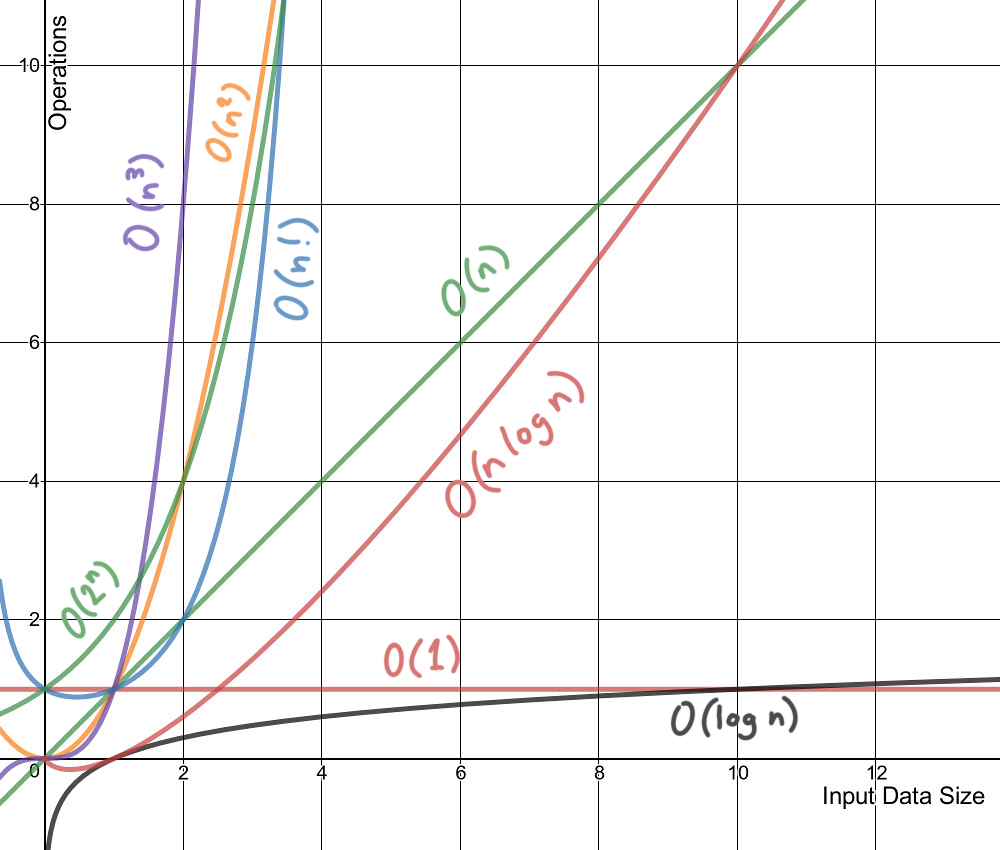
- Endian or endianness is the byte order chosen for all digital computing made in a specific computer system and dictates the architecture and low-level programming approach to be used for that system. Though today, endianness is not such a large concern for system compatibility since it can always be circumvented in the lower levels so that high-level language programmers and users are already abstracted from the endianness of the system.
- Two endian:
- Little Endian : the least significant bit (or "littlest" end) is first stored at address 0, and subsequent bits are stored incrementally.
- Big Endian : opposite of Little Endian
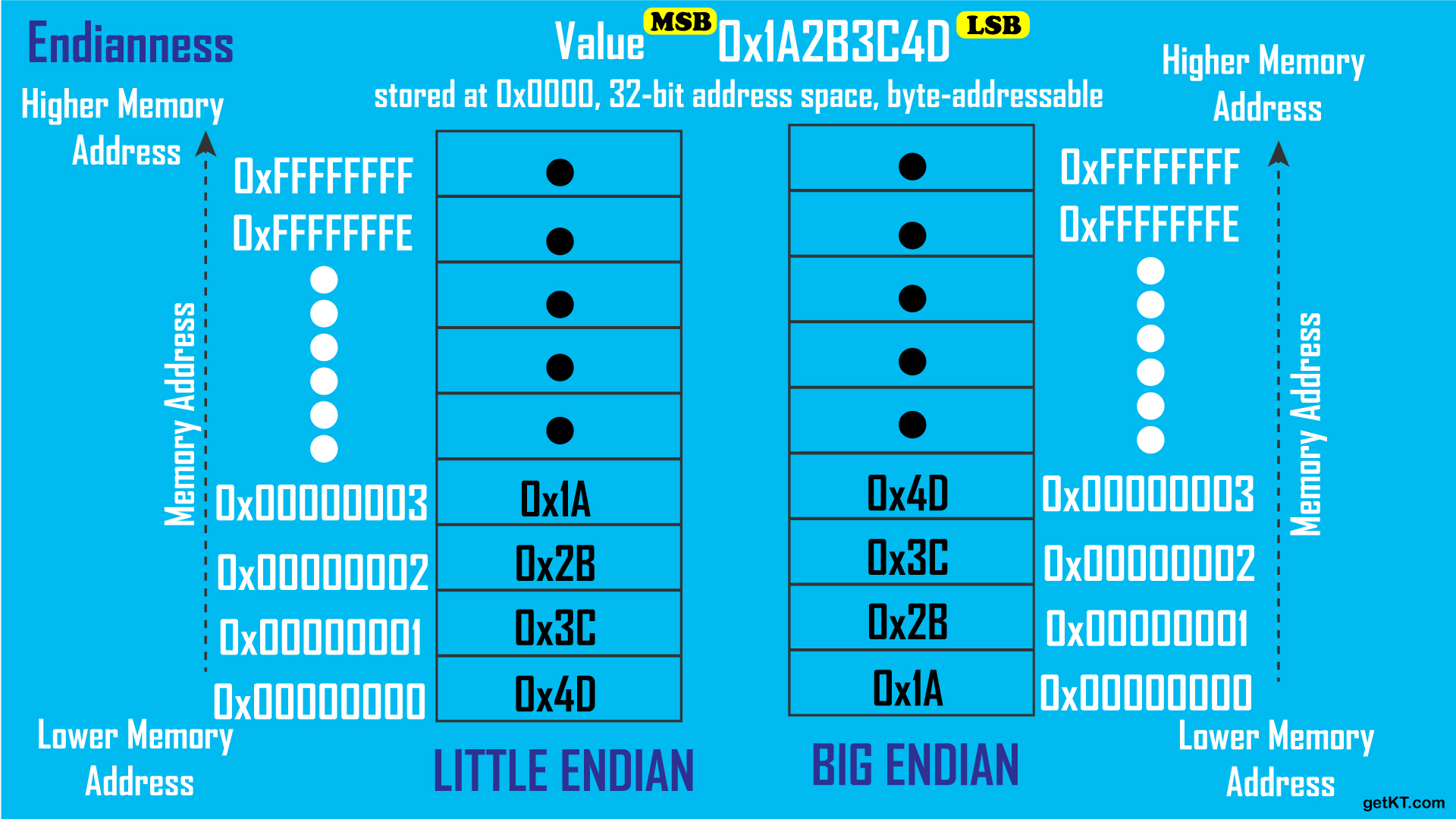
Bit shifting is an operation done on all the bits of a binary value in which they are moved by a determined number of places to either the left or right. Bit shifting is used when the operand is being used as a series of bits rather than as a whole. In other words, the operand is treated as individual bits that stand for something and not as a value.
Bit shifting is often used in programming and has at least one variation in each programming language. Bit shifting may also be known as a bitwise operation.
1 byte = 8 bits = 256 values (0...255)
1 int = 4 bytes = 32 bits
| 256 | 256 | 256 | 256 |
|---|---|---|---|
| 0000 0000 | 0000 0000 | 0000 0000 | 0000 0000 |
int red = 42;| 0 | 0 | 0 | 42 |
|---|---|---|---|
| 0000 0000 | 0000 0000 | 0000 0000 | 0010 1010 |
red = red << 24;
// r = 704643072;| red | none | none | none |
|---|---|---|---|
| 42 | 0 | 0 | 0 |
| 0010 1010 | 0000 0000 | 0000 0000 | 0000 0000 |
0 0 0 1
0 0 1 1
    | |
0 0 1 1
Here's how it works:
- It takes two numbers as operands.
- It compares each bit of the first operand to the corresponding bit of the second operand.
- If either bit is
1, the corresponding result bit is set to1. Otherwise, the corresponding result bit is0.
In the context of the code, r << 24 | g << 16 | b << 8 | a is used to combine the bits of the shifted values of r, g, b, and a into a single integer. Each color component occupies 8 bits in the rgba integer. The bitwise OR operation ensures that the bits from each color component are preserved in the correct location within the rgba integer.
int rgba;     // 00000000 00000000 00000000 00000000
int r = 42;   // 00000000 00000000 00000000 00101010
int g = 100;  // 00000000 00000000 00000000 01100100
int b = 255;  // 00000000 00000000 00000000 11111111
int a = 255;  // 00000000 00000000 00000000 11111111
rgba = r << 24 | g << 16 | b << 8 | a;
              // 00101010 01100100 11111111 11111111
printf("%i", rgba);
// output: 711262207| red | green | blue | alpha |
|---|---|---|---|
| 42 | 100 | 255 | 255 |
| 0010 1010 | 0110 0100 | 1111 1111 | 1111 1111 |
0 0 0 1
0 0 1 1
    | |
0 0 0 1
- & : takes two numbers as operands and does AND on every bit of two numbers. The result of AND is 1 only if both bits are 1
  printf("\n red = %i", rgba >> 24 & 0xFF);
  printf("\n green = %i", rgba >> 16 & 0xFF);
  printf("\n blue = %i", rgba >> 8 & 0xFF);
  printf("\n alpha = %i", rgba & 0xFF);


  // g =                  00000000 00000000 00000000 01100100 | = 100
  // g << 16 =            00000000 01100100                   | != 100 (100 before right shift)

  // rgba =               00101010 01100100 11111111 11111111 |
  // rgba >> 16 =                           00101010 01100100 | 11111111 11111111
  // 0xFF =               00000000 00000000 00000000 11111111 | = 255
  //   & : AND                                        ||  |  = only when 1 and 1 -> 1 else 0
  // rgba >> 16 & 0xFF =  00000000 00000000 00000000 01100100 = 100

  // output:
  // red = 42
  // green = 100
  // blue = 255
// alpha = 250 0 0 1
0 0 1 1
| |
0 0 1 0
The result of XOR is 1 if the two bits are different.
0 0 1 1
| | | |
1 1 0 0
Takes one number and inverts all bits of it.
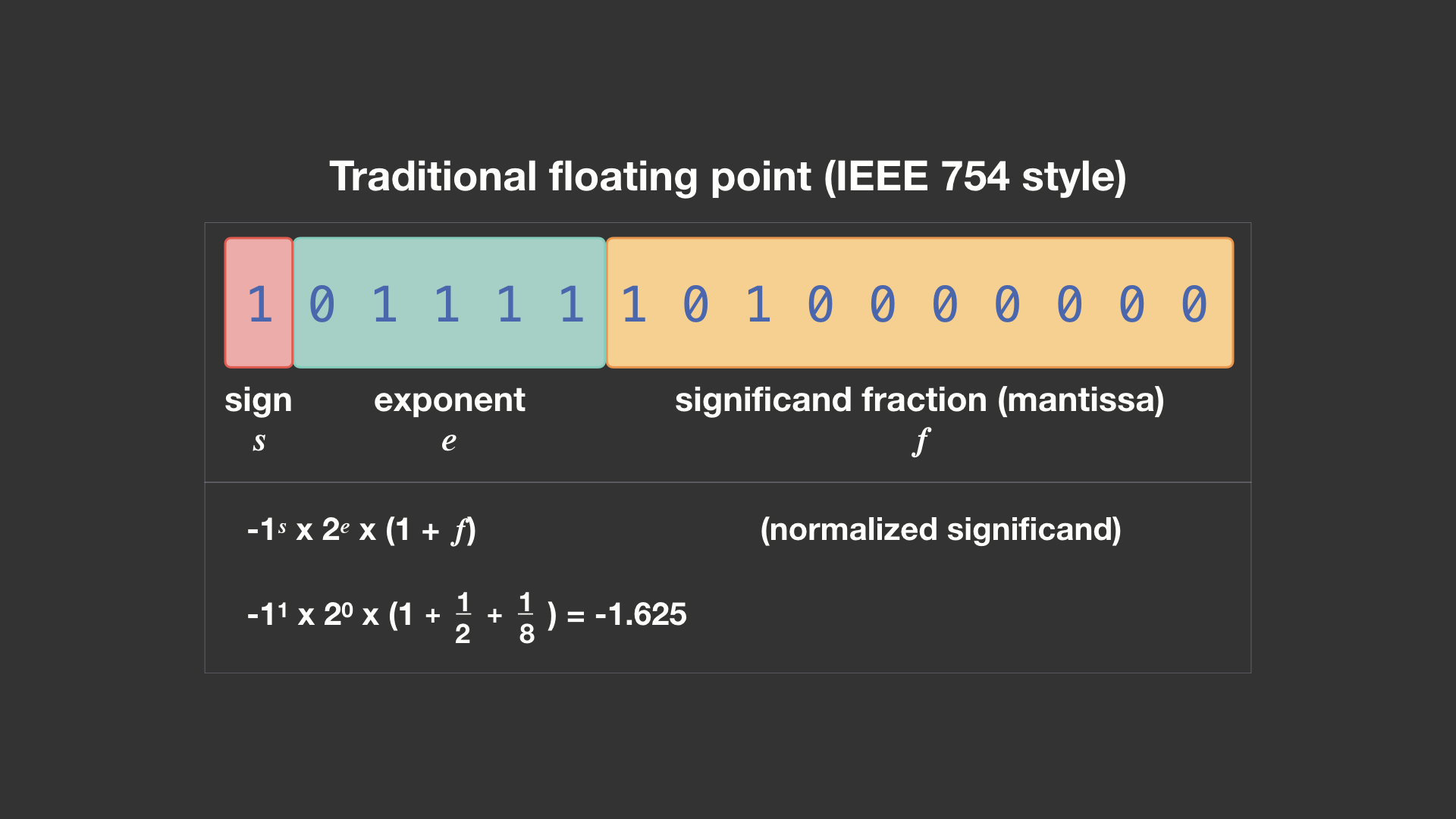
Floating point numbers are numbers that have fractional parts (usually expressed with a decimal point). They are used when the range of values is too large for an integer. Floating point numbers are used to represent real numbers (numbers that may have a fractional part).
Floating point numbers are stored in memory in a format that is different from the way integers are stored. Integers are stored in memory as a series of bits (binary digits), but floating point numbers are stored in a format that allows for a fractional part.
Floating point numbers are stored in memory using a format called IEEE 754. This format allows for a fractional part and an exponent part. The fractional part is stored as a series of bits, and the exponent part is stored as a series of bits. The exponent part is used to represent the power of 2 that the fractional part should be multiplied by.
Precision problem: to simplify things, the way we often think about loss of precision problems is that a float gradually gets "corrupted" as you do more and more operations on it.

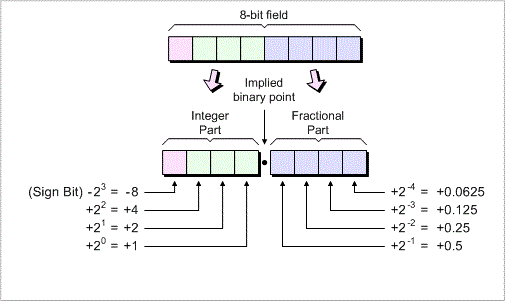
| Decimal | Binary Fixed-Point|
|---------|-------------------|
| 0.0     | 0000 0000         |
| 0.5     | 0000 1000         |
| 1.0     | 0001 0000         |
| 1.5     | 0001 1000         |
| 2.0     | 0010 0000         |
| 2.5     | 0010 1000         |
| 3.0     | 0011 0000         |
| 3.5     | 0011 1000         |

Note: This table assumes 8-bit fixed-point binary representation
in <8,4> format. The binary values are approximations.
Fixed-point arithmetic is an arithmetic that represents numbers in a fixed number of digits. It is a way to represent numbers that have a fractional part without using floating-point numbers. Fixed-point arithmetic is used in situations where the range of values is too large for integers but the precision of floating-point numbers is not needed.
Fixed Point in code - Geeks for Geeks
When an integer is shifted right by one bit in a binary system, it is comparable to being divided by two. Since we cannot represent a digit to the right of a binary point in the case of integers since there is no fractional portion, this shifting operation is an integer division.
- A number is always divided by two when the bit pattern of the number is shifted to the right by one bit.
- A number is multiplied by two when it is moved left one bit.
Advantages of Fixed Point Representation:
- Integer representation and fixed point numbers are indeed close relatives.
- Because of this, fixed point numbers can also be calculated using all the arithmetic operations a computer can perform on integers.
- They are just as simple and effective as computer integer arithmetic.
- To conduct real number arithmetic using fixed point format, we can reuse all the hardware designed for integer arithmetic.
Disadvantages of Fixed Point Representation:
- Loss in range and precision when compared to representations of floating point numbers.
Complexity is a way to describe how an algorithm performs as the input size increases. It's a way to compare the efficiency of different approaches to a problem. It's also a way to describe how much time and memory an algorithm will require to run. There are two types of complexity:
- Time Complexity: Time taken by the algorithm to run as a function of the length of the input.
- Space Complexity: Space taken by the algorithm to run as a function of the length of the input.
The most common way to describe complexity is using Big
Let's look at some common sorting algorithms and their complexities:
-
Bubble Sort:
- Time Complexity: Best -
$O(n)$ , Average -$O(n^2)$ , Worst -$O(n^2)$ - Space Complexity:
$O(1)$
- Time Complexity: Best -
-
Selection Sort:
- Time Complexity: Best -
$O(n^2)$ , Average -$O(n^2)$ , Worst -$O(n^2)$ - Space Complexity:
$O(1)$
- Time Complexity: Best -
-
Insertion Sort:
- Time Complexity: Best -
$O(n)$ , Average -$O(n^2)$ , Worst -$O(n^2)$ - Space Complexity:
$O(1)$
- Time Complexity: Best -
-
Merge Sort:
- Time Complexity: Best -
$O(n log(n))$ , Average -$O(n log(n))$ , Worst -$O(n log(n))$ - Space Complexity:
$O(n)$
- Time Complexity: Best -
-
Quick Sort:
- Time Complexity: Best -
$O(n log(n))$ , Average -$O(n log(n))$ , Worst -$O(n^2)$ - Space Complexity:
$O(log n)$
- Time Complexity: Best -
-
Heap Sort:
- Time Complexity: Best -
$O(n log(n))$ , Average -$O(n log(n))$ , Worst -$O(n log(n))$ - Space Complexity:
$O(1)$
- Time Complexity: Best -