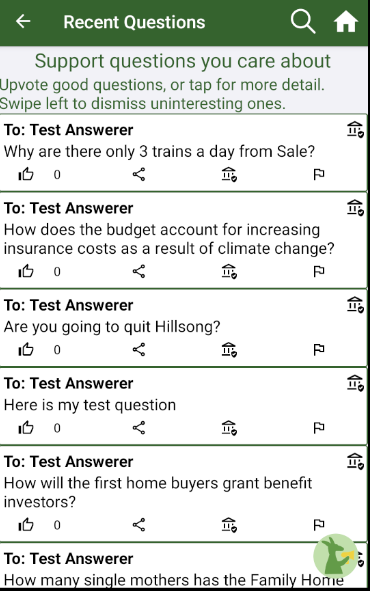
- List of questions downloaded from the server
- Each question has the ability to be Upvoted, Shared, Answered, or Flagged/Reported as buttons shown below the question text
- An answer status shown in the top right
- The number of upvotes (next to the upvote icon)
- Search frame (Appears after clicking the Search Icon in the toolbar) - toggleable
- Search bar
- Button for filters that takes you to the Advanced Search Filter Page
- Draft button (Image of the kangaroo icon)
- Sends the user to the QuestionDrafting Page after popping back to the main page. This operation needs to be done on the main thread, since the main thread is also the UI thread. Due to using async/await in the navigation process it could be trying to move these operations to other threads, but it needs to be done on main. I wrote a Shell extension method to help with this called PopGoToAsync() that manually removes the pages on the navigation stack to get us back to main, before pushing a DraftingPage.
- https://docs.microsoft.com/en-us/xamarin/essentials/main-thread#:~:text=This%20thread%20is%20often%20called,on%20the%20application's%20main%20thread.
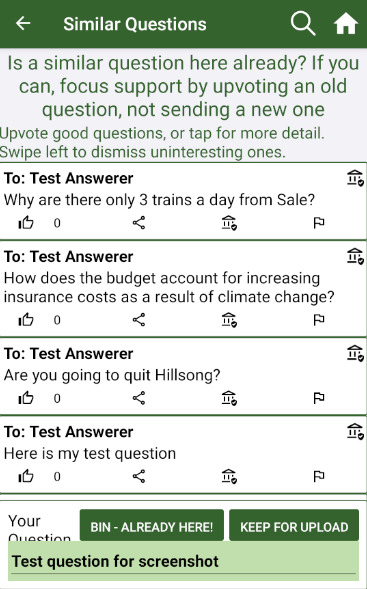
- Draft Question Entry that holds your existing question draft text (if applicable)
- Button to discard draft
- Button to Keep the question and proceed to the question details page to review before uploading.
- Has its own ReadingPageViewModel but grabs the question string if you are currently drafting a question from the global DraftQuestion variable stored on the App.ReadingContext