- Meter Broadcast Message
- Meter Broadcast Message Format
- Broadcast Mode
- BLE Communication Data Message Basic Format
- 0x02 Get Device Basic Info
- 0x0F Extend Command
- Other Devices
- This broadcast message defines the Service data of Scan Rsp of the specific Device.
- The length of the Service data is different based on Device Type. The Service data can be 8 bytes max. The Byte: 0, Byte: 1 and Byte: 2 are for every Device Type. The bytes start from Byte: 3 depends on different Device Type. Please refer to Device Type definition in the table below.
- Broadcast modes are defined as:
- SwitchBot Mode (Default)
- Simple Mode
- iBeacon Mode
| Device Type | |||
|---|---|---|---|
| Product Name | HEX | ASCII | Note |
| SwitchBot Bot (WoHand) | 0x48 | 'H' | |
| WoButton | 0x42 | 'B' | |
| SwitchBot Hub (WoLink) | 0x4C | 'L' | Add Mode |
| 0x6C | 'l' | Normal | |
| SwitchBot Hub Plus (WoLink Plus) | 0x50 | 'P' | Add Mode |
| 0x70 | 'p' | Normal Mode | |
| SwitchBot Fan (WoFan) | 0x46 | 'F' | Add Mode |
| 0x66 | 'f' | Normal Mode | |
| SwitchBot MeterTH (WoSensorTH) | 0x74 | 't' | Add Mode |
| 0x54 | 'T' | Normal Mode | |
| SwitchBot Mini (HubMini) | 0x4D | 'M' | Add Mode |
| 0x6D | 'm' | Normal Mode | |
Use this for firmware version before Bot v30, Remote v20 and Hub v6.
Advertise:
- Manufacturer data: includes device's company ID and MAC address (support WeChat protocol)
Scanrsp:
- Device Name: "Bot", "Remote", "Hub", "WoSensorTH"
- UUID: ''cba20d00-224d-11e6-9fb8-0002a5d5c51b'' and ''fee7''
The length of the Service data is different based on Device Type. The Service data can be 8 bytes max.
The bit[6:0] in Byte: 0 of the broadcast message is Device Type. The Byte: 0, Byte: 1 and Byte: 2 are for every Device Type. The bytes start from Byte: 3 depends on different Device Type, serving as general registers.
The backend also needs a mapping table of the Service data, so both the backend and app can parse the Service data.
| Service data | ||
|---|---|---|
| Byte: 0 | Enc Type Dev Type | Bit[7] - Reserved |
| Bit[6:0] - Device Type Please refer to the Device Type table above. | ||
| Byte: 1 | Status | Bit[7:4] - Reserved |
| Bit[3] – Group D Bit[2] – Group C Bit[1] – Group B
Bit[0] – Group A 0: the device is not in this group 1: the device is in this group |
||
| Byte: 2 | Update UTC Flag Battery | Bit[7] – Reserved |
| Bit[6:0] - Remaining Battery 0~100% | ||
| Byte: 3 | alarm flag the fraction part of temperatrue value (WoSensorTH) | Bit[7:6] – Temperature Alert Status
|
Bit[5:4] – Humidity Alert Status
|
||
|
Bit[3:0] – Decimals of the Temperature
|
||
| Byte: 4 | temperature mode Positive/Negative temperature flag the integer part of temperature value (WoSensorTH) | Bit[7] – Positive/Negative temperature flag
|
| Bit[6:0] – Integers of the Temperature 000 0000 – 111 1111: 0~127 °C Celsius to Fahrenheit: F=(C*1.8)+32 | ||
| Byte: 5 | humidity value (WoSensorTH) | Bit[7] – Temperature Scale
|
| Bit[6:0] – Humidity Value 000 0000 – 110 0011: 0~99% | ||
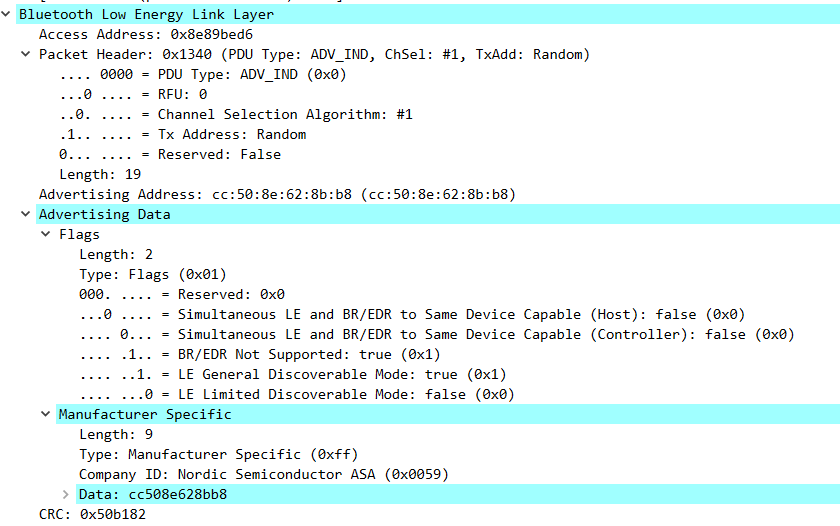
Advertise:
- Manufacturer data: include device's company ID (0x0059 Nordic) and MAC address (support WeChat protocol)
- BLE_ADVDATA_NO_NAME
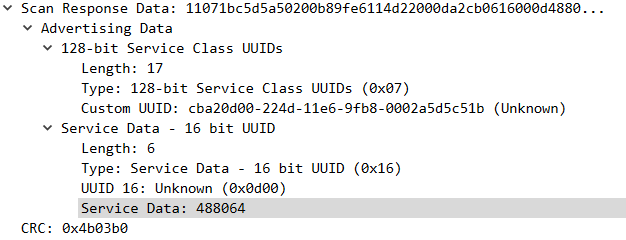
Scanrsp:
- UUID: ''cba20d00-224d-11e6-9fb8-0002a5d5c51b'' and ''fee7''
- BLE_ADVDATA_NO_NAME
Example:
Advsertise:
- BLE_ADVDATA_NO_NAME
Scanrsp:
- UUID (cba20d00-224d-11e6-9fb8-0002a5d5c51b)
- BLE_ADVDATA_NO_NAME
Advertise:
Standard iBeacon package
- UUID:cba20d00-224d-11e6-9fb8-0002a5d5c51b
- Major ID:
- High Byte: bit 7:4 - beacon type
- Bit[3:0] - beacon data
- Low Byte: beacon data
- Minor ID:beacon data
- TX power: 0xc3
- BLE_ADVDATA_NO_NAME
| beacon data instruction | ||||
|---|---|---|---|---|
| Beacon Type | Major ID High byte bit[3:0] | Major ID Low byte | Minor ID High byte | Minor ID Low byte |
| 0 | Alert | MAC [3] | MAC [4] | MAC [5] |
Scanrsp:
- UUID(cba20d00-224d-11e6-9fb8-0002a5d5c51b)
- BLE_ADVDATA_NO_NAME
-
The controlling terminal (short as the Terminal below) and the configured device (short as the Device below) use BLE to communicate with each other wirelessly. During the communication, the Terminal acts as a central device, while the Device acts as peripheral device. The Terminal gets basic device info by reading the broadcast message of the Device. They exchange data by using read and write characteristic of communication service.
-
All bilateral communication is after the BLE connection established. The Terminal send a REQ message to the Device, and then the Device returns a RESP message.
-
All communication message data length is 1-20 bytes, i.e. MTU=20. There are 2 types of REQ messages sending from the Terminal to the Device, encrypted and unencrypted.
-
Communication service UUID:
- 88cba20d00-224d-11e6-9fb8-0002a5d5c51b
- UUID TYPE:Vendor UUID types start at this index (128-bit)
-
RX characteristic UUID of the message from the Terminal to the Device:
- UUID: ''cba20002-224d-11e6-9fb8-0002a5d5c51b''
- UUID TYPE :Vendor UUID types start at this index (128-bit)
- Char Attribute :RW
- Char Properties: notify
-
TX characteristic UUID of the message from the Device to the Terminal:
- cba20003-224d-11e6-9fb8-0002a5d5c51b
- UUID TYPE :Vendor UUID types start at this index (128-bit)
- Char Attribute :RW
All communication message data length is 1-20 bytes, i.e. MTU=20. The REQ data from the Terminal to the Device has encrypted and unencrypted format, as below:
| REQ Packet (Unencrpted) | ||
|---|---|---|
| Byte: 0 | Magic Number | 0x57 – (fixed value) |
| Product | Header | Bit[7:6] – Version 0 – (fixed value) |
| Bit[5:4] – Reserved | ||
| Bit[3:0] – command 0x02 – Get Device Basic Info 0x0F – Expand Command | ||
| Byte: 2-19 | Payload | Depends on Command |
Payload complement the data info to the Commands. The Payload format varies for different Commands.
The basic format of RESP message from the Terminal to the Device:
| RESP Packet | ||
|---|---|---|
| Byte: 0 | Response status | 0x01 - OK Action executed 0x02 - ERROR Error while executing an Action 0x03 - BUSY Device is busy now, please try later 0x04 - Communication protocol version incompatible 0x05 - Device does not support this Command 0x06 - Device low battery 0x07 - Device is encrypted 0x08 - Device is unencrypted 0x09 - Password error 0x0A - Device does not support this encription method 0x0B - Failed to locate a nearby mesh device 0x0C - Failed to connect to the network |
| Byte: 1-19 | Payload | Depends on the Command to reply |
Status returns the handling result of the Device to the earlier command, which is the 1st Byte of every RESP message, and also mandatory.
Payload complement the data info to the Commands. The data length is 0-19 bytes depends on different cases, and can also be omitted.
The format of the Payload is up to the Command type it is responding and the handling result.
- This command is used to get the basic info of a Device:
- REQ message payload is 0.
- If executed successfully, the Status Byte of the RESP message will be 1. The payload is the device basic info:
- This command is used to get the basic info of a Meter - remaining battery, firmware version, Service data[0], Service data[1].
REQ message payload is 0.
| REQ message payload: 0 |
|---|
If executed successfully, the Status Byte of the RESP message will be 0, the payload format is as below:
| RESP Message payload | ||
|---|---|---|
| Byte: 0 | Bat Per | ASCII |
| Byte: 1 | FW Ver | Firmware Version Initial FW Ver: 10 (0x0A) |
| Byte: 2 | Service_data | Service_data[0] |
| Byte: 3 | Service_data | Service_data[1] |
- Read the information of Device hardware version.
- REQ Packet payload is 0。
- The Status byte of the RESP data packet after execution successfully is 1 and the payload is 0.
Read the hardware version of WoSensorTH
REQ Packet payload is 0.
| REQ Packet payload: 0 |
|---|
The Status byte of the RESP data packet after execution successfully is 1 and the payload is 0. The payload is as below:
| RESP Packet status: 1 | ||
|---|---|---|
| Byte: 0 | Status | Command |
| RESP Packet payload:1 | ||
|---|---|---|
| Byte: 0 | Hardware version | 0x01 – WoSensorTH V1.0 |
- This command is for setting the display mode of temperature. You could set it to display Celsius or Fahrenheit.
- The REQ Packet payload is 1。
- The Status byte of the RESP data packet after execution successfully is 1 and the payload is 0.
REQ Packet payload is 1.
REQ Packet payload is as below:
| REQ Packet payload: 1 | ||
|---|---|---|
| Byte: 0 | Temperature Mode | Bit[7-2]: Reserved Bit[1-0]: Temperature display settings 11:Reserved 10:F mode Fahrenheit mode 01:C mode Celsius mode 00:Reserved |
The Status byte of the RESP data packet after execution successfully is 1 and the payload is 0, the payload is as below:
| RESP Packet status: 1 | ||
|---|---|---|
| Byte: 0 | Status | Command |
| RESP Packet payload: 0 |
|---|
- This command is for reading the temperature and humidity from the WoSensorTH, the temperature value is one decimal, the range is (-20.0 °C ~ 60.0 °C) ;The humidity is an integer, the range is (0 ~ 99%).
- The REQ Packet payload is 0.
- The Status byte of the RESP data packet after execution successfully is 1 and the payload is 3.
The REQ Packet payload is 0.
| REQ Packet payload: 0 |
|---|
The Status byte of the RESP data packet after execution successfully is 1 and the payload is 3. The payload is as below:
| RESP Packet status: 1 | ||
|---|---|---|
| Byte: 0 | Status | 1 – OK |
The temperature value is one decimal, the range is (-20.0 °C ~ 60.0 °C) ;The humidity is an integer, the range is (0 ~ 99%).
| RESP Packet payload: 3 | ||
|---|---|---|
| Byte: 0 | The fractional part of temperature value | bit[7-6]: Reserved bit[3-0]: The fractional part of temperature value 0000 – 1001: 0~9 |
| Byte: 1 | Temperature Mode Positive/Negative temperature flag The integral part of temperature value | bit[7]: Positive/Negative temperature flag 0: subzero temperature 1: positive value bit[6-0]: The integral part of temperature value 000 0000 – 111 1111: 0~127 °C Formula for Celsius to Fahrenheit F=(C*1.8)+32 |
| Byte: 2 | Humidity value | bit[7]: Temperature Mode 0: °C 1: °F If the temperature mode did not be changed by the physical button behind the device, the default value is 0 °C. bit[6-0]: Humidity value 000 0000 – 110 0011: 0~99 % |
This section is for devices that don't quite fit the general specification above. Data here is unofficial and community provided.
WoSensorTHO (Model W3400010)
This device advertises 3 sections:
# Sample Advertisement
Length: 0x02, Type: 0x01, Data: bytes('06')
Length: 0x0F, Type: 0xFF, Data: bytes('6909XXXXXXXXXXXX360302963700')
Length: 0x06, Type: 0x16, Data: bytes('3DFD770064')
XXXXXXXXXXXX represents BT device MAC address.
The device type in the Service Data matches that of the WoSensorTH, but the data has moved to different locations, so the same code cannot be used.
# Data from Type: 0xFF (Manufacturer Specific Data)
temp = ((data[10] & 0x0F) * 0.1 + (data[11] & 0x7F)) * (((data[11] & 0x80) > 0 : 1 : -1);
humidity = data[12] & 0x7F;
# Data from Type: 0x16 (Service Data)
battery_pct = data[5] & 0x7F
CopyRight@2022 Wonderlabs, Inc.