



The world's largest hash database for memory integrity validation 🌍
Quick Start · Architecture · Workflows · Examples · Contributing
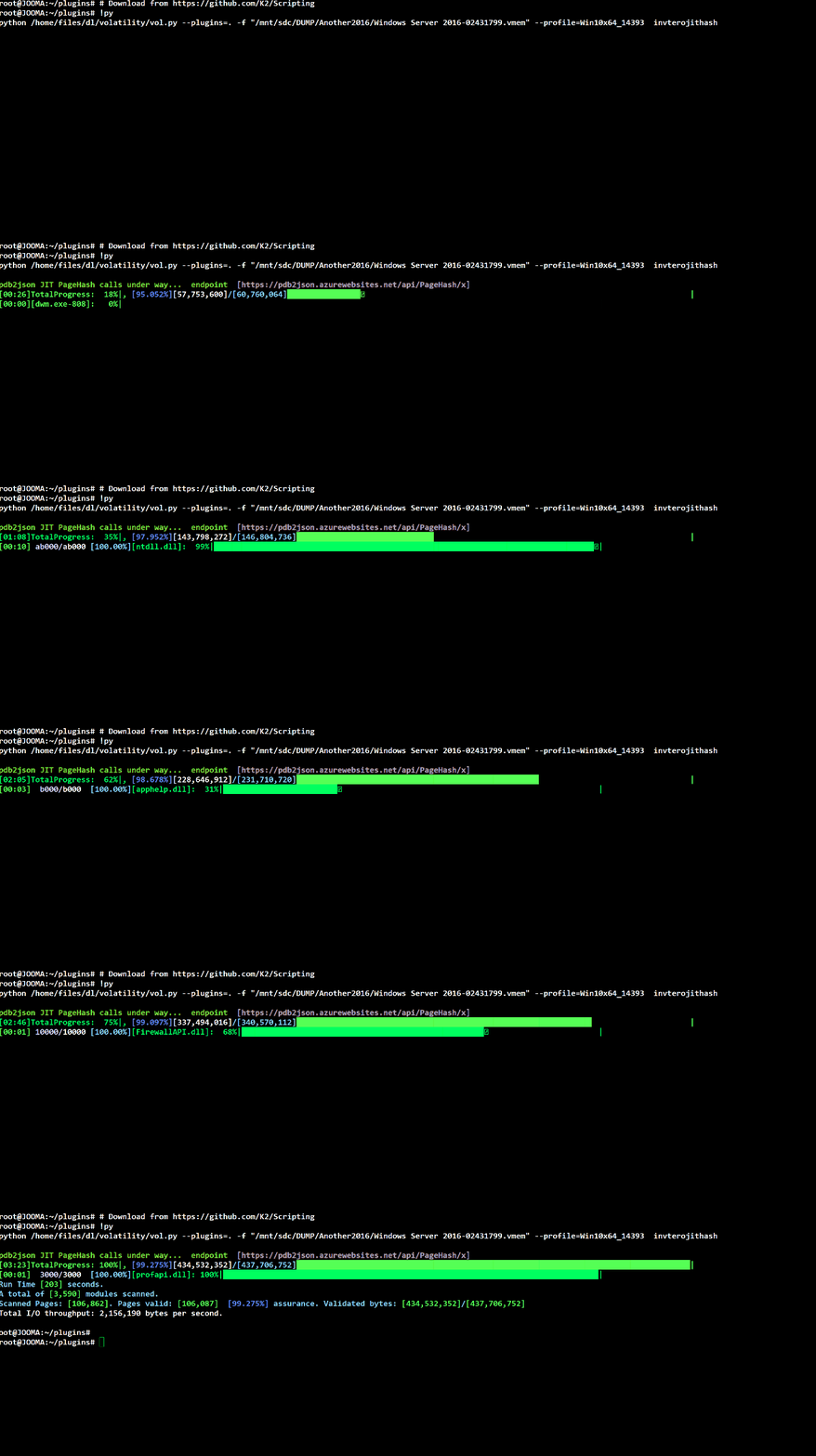
PDB2JSON is an Azure Functions-based application that provides memory integrity validation through Just-In-Time (JIT) hashing. This repository contains scripts and tools that interface with the cloud-hosted Code+PDB analysis server.
%%{init: {'theme':'dark', 'themeVariables': { 'primaryColor':'#667eea','primaryTextColor':'#fff','primaryBorderColor':'#764ba2','lineColor':'#4ecdc4','secondaryColor':'#45b7d1'}}}%%
graph LR
    A[💻 Your System<br/>Memory Scanner] -->|SHA256 Hashes| B[🌐 HTTPS/JSON<br/>Encrypted]
    B -->|Query| C[☁️ Azure Functions<br/>pdb2json.azurewebsites.net]
    C -->|JIT Calculation| D[(🗄️ 5TB Database<br/>Microsoft Software)]
    D -->|Results| C
    C -->|Validation| B
    B -->|✅ Valid/❌ Invalid| A

    style A fill:#667eea,stroke:#764ba2,color:#fff
    style B fill:#4ecdc4,stroke:#2c7873,color:#fff
    style C fill:#fa709a,stroke:#fee140,color:#fff
    style D fill:#30cfd0,stroke:#330867,color:#fff
| Feature | Description |
|---|---|
| 🔒 Privacy-First | Only SHA256 hash values transmitted - no binary data uploaded |
| ⚡ JIT Hashing | Dynamic hash calculation for any virtual address |
| 🌍 Massive Scale | 5TB+ of Microsoft software pre-indexed |
| 🆓 Free & Unlimited | No cost, no rate limits, fully accessible |
| 🔐 Secure | TLS encryption, certificate validation |
| 🚀 High Performance | Parallel processing up to 512 threads |
# Clone the repository
git clone https://github.com/K2/Scripting.git
cd Scripting

# For PowerShell users
Install-Module ShowUI -Scope CurrentUser

# For Python users (Volatility plugin)
pip install -r requirements.txt

# For Bash users
# Ensure llvm-readobj and curl are installed# Basic remote memory scan
.\Test-AllVirtualMemory.ps1 `
-TargetHost "192.168.1.100" `
-aUserName "Administrator" `
-aPassWord "YourPassword" `
-GUIOutput# Analyze a memory dump
python vol.py --plugins=. -f memory.vmem \
--profile=Win10x64_14393 invterojithash# Extract structure definition
./dt.sh -i ntoskrnl.exe -t _EPROCESS👉 For detailed setup instructions, see QUICKSTART.md
We've created comprehensive documentation to help you get started:
%%{init: {'theme':'dark', 'themeVariables': { 'primaryColor':'#f093fb','primaryTextColor':'#fff','primaryBorderColor':'#f5576c','lineColor':'#4facfe','secondaryColor':'#30cfd0'}}}%%
mindmap
  root((📚 Documentation))
    🚀 Quick Start Guide
      Installation
      First Scan
      Common Tasks
      Troubleshooting
    🏗️ Architecture
      System Design
      Component Details
      Data Flow
      Security Model
    🔄 Workflows
      Live Analysis
      Forensic Investigation
      Incident Response
      Threat Hunting
    💡 Examples
      PowerShell Scripts
      Python Plugins
      Bash Tools
      Integration Patterns
    🤝 Contributing
      Code Style
      Pull Requests
      Reporting Issues
      Security
| Document | Description |
|---|---|
| 📖 QUICKSTART.md | Get started in 5 minutes with step-by-step examples |
| 🏗️ ARCHITECTURE.md | Deep dive into system architecture and design |
| 🔄 WORKFLOWS.md | Common workflows and process guides |
| 💡 examples/ | Ready-to-use example scripts and templates |
| 🤝 CONTRIBUTING.md | Guidelines for contributing to the project |
Remote memory integrity scanning and validation
Remotely scans all virtual memory in a target system and validates it against the hash database.
%%{init: {'theme':'dark', 'themeVariables': { 'primaryColor':'#4facfe','primaryTextColor':'#fff','primaryBorderColor':'#00f2fe','lineColor':'#f093fb','secondaryColor':'#30cfd0'}}}%%
graph TD
    A[Connect to Target] --> B[Enumerate Processes]
    B --> C[Read Memory Pages]
    C --> D[Calculate SHA256]
    D --> E[Send to Server]
    E --> F{Validation<br/>Result}
    F -->|Valid| G[✅ Mark Green]
    F -->|Invalid| H[❌ Mark Red]
    G --> I[TreeMap Visualization]
    H --> I

    style A fill:#4facfe,stroke:#00f2fe,color:#fff
    style D fill:#f093fb,stroke:#f5576c,color:#fff
    style E fill:#fa709a,stroke:#fee140,color:#fff
    style G fill:#96ceb4,stroke:#618833,color:#fff
    style H fill:#ff6b6b,stroke:#c92a2a,color:#fff
    style I fill:#667eea,stroke:#764ba2,color:#fff
Key Features:
- 🌐 Remote scanning via PSRemoting
- 🔄 Parallel processing (up to 512 threads)
- 🎨 Interactive TreeMap visualization with heat mapping
- 🔐 Optional SYSTEM-level privilege escalation
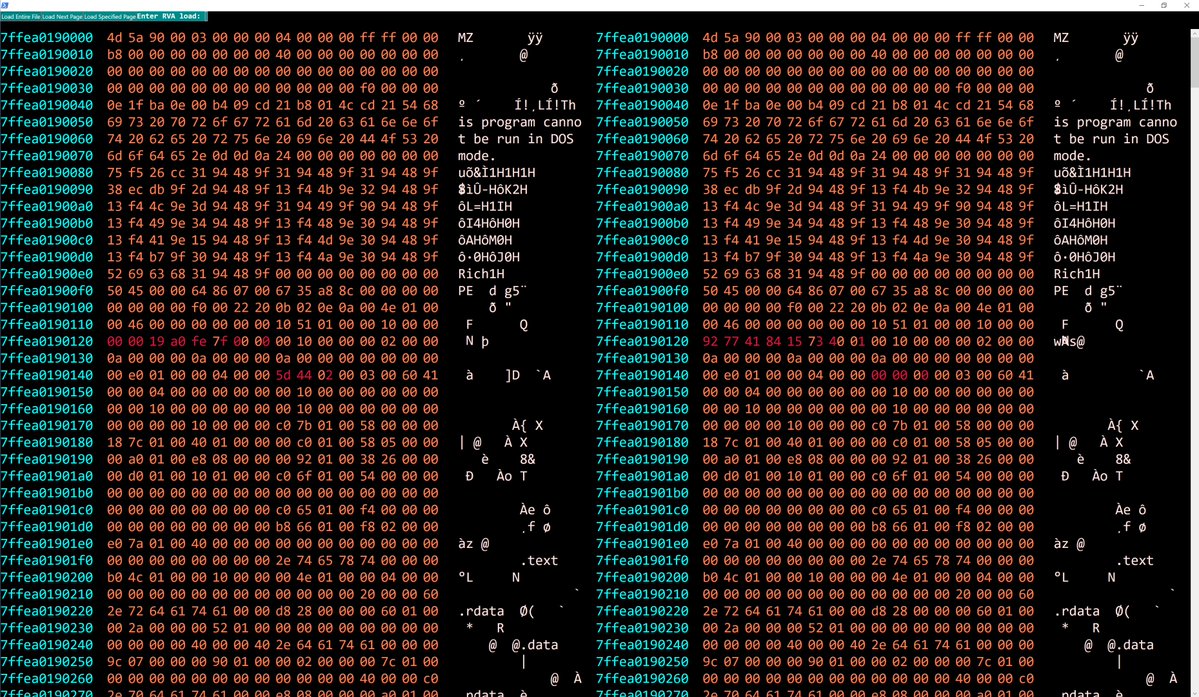
- 💾 Binary diff viewer for modified pages
Example Usage:
# Comprehensive scan with GUI
.\Test-AllVirtualMemory.ps1 `
    -TargetHost "Server2016" `
    -aUserName "admin" `
    -aPassWord "password" `
    -MaxThreads 256 `
    -ElevatePastAdmin `
    -GUIOutput

# Filter specific processes
.\Test-AllVirtualMemory.ps1 `
    -TargetHost "192.168.1.100" `
    -aUserName "admin" `
    -aPassWord "pass" `
    -ProcNameGlob @("chrome.exe", "iexplore.exe") `
-GUIOutputHigh-performance parallel processing framework
Enables concurrent execution of script blocks across multiple runspaces for maximum performance.
Features:
- ⚡ Up to 512 concurrent threads
- 🔄 Automatic runspace management
- 📊 Progress tracking and logging
- ⏱️ Timeout and retry handling
- 💾 Memory-efficient batching
Advanced data visualization with TreeMap algorithm
Creates interactive squarified TreeMap visualizations with heat mapping for memory validation results.
Features:
- 🎨 Squarified layout algorithm
- 🌈 Heat map color coding
- 🖱️ Interactive tooltips and drill-down
- 📊 Size by memory, color by validation percentage
- 🔍 Binary diff viewer on right-click
Volatility Framework plugin for memory dump analysis
Validates memory dumps against the PDB2JSON hash database using the Volatility Framework.
%%{init: {'theme':'dark', 'themeVariables': { 'primaryColor':'#fa709a','primaryTextColor':'#fff','primaryBorderColor':'#fee140','lineColor':'#4facfe','secondaryColor':'#30cfd0'}}}%%
sequenceDiagram
    participant V as 🔬 Volatility
    participant P as 🐍 Plugin
    participant M as 💾 Memory Dump
    participant S as ☁️ Server

    V->>P: Load inVteroJitHash
    P->>M: Parse Memory Image
    M-->>P: Process List + Modules
    P->>P: Check NX Bits (Skip non-executable)
    loop For Each Executable Page
        P->>P: Calculate SHA256
        P->>S: Send Hash Batch
        S-->>P: Validation Results
        P->>P: Update Statistics
    end
    P->>V: Generate Report
    V->>V: Display Color-Coded Results
Key Features:
- 🔍 NX-bit aware validation (only executable pages)
- 🎨 ANSI color-coded terminal output
- 📊 Real-time progress bars (tqdm)
- 🔄 Retry logic with exponential backoff
- 💾 Optional failed block dumping
- 📝 Comprehensive logging
Example Usage:
# Basic scan
python vol.py --plugins=. -f memory.vmem \
    --profile=Win10x64_14393 invterojithash

# Advanced scan with extra details
python vol.py --plugins=. -f suspicious.raw \
    --profile=Win7SP1x64 invterojithash \
    -x -s -D /output/failed -F failures.txt
Command-Line Options:
-x, --ExtraTotals: Display per-module statistics-s, --SuperVerbose: Show per-page validation details-D, --DumpFolder: Directory to dump failed blocks-F, --FailFile: Output file for failure details
Symbol extraction and PDB query tool
Extract JSON symbol information from Windows binaries without downloading PDB files.
%%{init: {'theme':'dark', 'themeVariables': { 'primaryColor':'#30cfd0','primaryTextColor':'#fff','primaryBorderColor':'#330867','lineColor':'#4facfe','secondaryColor':'#f093fb'}}}%%
flowchart LR
    A[📁 PE Binary] --> B[llvm-readobj]
    B --> C[Extract Debug Info]
    C --> D{Query Type}
    D -->|typedef| E[Structure Definition]
    D -->|SymFromName| F[Symbol Lookup]
    D -->|SymFromAddr| G[Address Resolution]
    D -->|Relocs| H[Relocation Data]
    E --> I[📡 cURL HTTPS]
    F --> I
    G --> I
    H --> I
    I --> J[☁️ Azure API]
    J --> K[📋 JSON Response]

    style A fill:#4facfe,stroke:#00f2fe,color:#fff
    style D fill:#f093fb,stroke:#f5576c,color:#fff
    style I fill:#fa709a,stroke:#fee140,color:#fff
    style J fill:#667eea,stroke:#764ba2,color:#fff
    style K fill:#96ceb4,stroke:#618833,color:#fff
Example Usage:
# Get structure definition
./dt.sh -i ntoskrnl.exe -t _EPROCESS

# Find symbols by name pattern
./dt.sh -i kernel32.dll -X "CreateFile*"

# Resolve symbol at address
./dt.sh -i ntdll.dll -A 0x1400

# Extract relocations
./dt.sh -i app.exe -r -o relocations.bin
Command-Line Options:
-i FILE: Input PE file (required)-t TYPE: Type definition query (_EPROCESS, etc.)-X PATTERN: Symbol name with wildcards-A ADDR: Address to resolve-r: Get relocation data-b BASE: Optional base virtual address-o FILE: Output file
The PDB2JSON server provides several REST API endpoints:
%%{init: {'theme':'dark', 'themeVariables': { 'primaryColor':'#667eea','primaryTextColor':'#fff','primaryBorderColor':'#764ba2','lineColor':'#4ecdc4','secondaryColor':'#45b7d1'}}}%%
graph TB
    subgraph "🔌 API Endpoints"
        A[📋 /api/typedef/x<br/>Type Definitions]
        B[🔍 /api/SymFromName/x<br/>Symbol by Name]
        C[📍 /api/SymFromAddr/x<br/>Symbol by Address]
        D[🔄 /api/Relocs/x<br/>Relocation Data]
        E[#️⃣ /api/PageHash/x<br/>Hash Validation]
    end

    F[☁️ pdb2json.azurewebsites.net]

    A --> F
    B --> F
    C --> F
    D --> F
    E --> F

    style A fill:#4facfe,stroke:#00f2fe,color:#fff
    style B fill:#f093fb,stroke:#f5576c,color:#fff
    style C fill:#fa709a,stroke:#fee140,color:#fff
    style D fill:#30cfd0,stroke:#330867,color:#fff
    style E fill:#96ceb4,stroke:#618833,color:#fff
    style F fill:#667eea,stroke:#764ba2,color:#fff
Get JSON-formatted structure definitions for automatic profile generation.
Endpoint: https://pdb2json.azurewebsites.net/api/typedef/x
Use Cases:
- Volatility/Rekall profile generation
- inVtero.net automation
- Structure reverse engineering
Returns symbol information based on name (e.g., _EPROCESS).
Endpoint: https://pdb2json.azurewebsites.net/api/SymFromName/x
Returns the symbol located at the specified virtual address.
Endpoint: https://pdb2json.azurewebsites.net/api/SymFromAddr/x
Returns relocation data needed to reconstruct binaries from memory.
Endpoint: https://pdb2json.azurewebsites.net/api/Relocs/x
Use Case: Recover the exact binary that the OS loaded into memory by combining dumped code with relocation data.
JIT hash validation for memory pages.
Endpoint: https://pdb2json.azurewebsites.net/api/PageHash/x
Request Format:
{
    "HdrHash": "QUTB1TPisyVGMq0do/CGeQb5EKwYHt/vvrMHcKNIUR8=",
    "TimeDateStamp": 3474455660,
    "AllocationBase": 140731484733440,
    "BaseAddress": 140731484737536,
    "ImageSize": 1331200,
    "ModuleName": "ole32.dll",
    "HashSet": [
        {"Address": 140731484798976, "Hash": "+REyeLCxvwPgNJphE6ubeQVhdg4REDAkebQccTRLYL8="},
        {"Address": 140731484803072, "Hash": "xQJiKrNHRW739lDgjA+/1VN1P3VSRM5Ag6OHPFG6594="}
    ]
}
Response Format:
[
    {"Address": 140731484733440, "HashCheckEquivalant": true},
    {"Address": 140731484798976, "HashCheckEquivalant": true},
    {"Address": 140731484803072, "HashCheckEquivalant": false}
]Traditional Pre-Computed Hashing ❌
- Must calculate hashes for every possible load address
- Requires ~100TB of storage for Windows alone
- Inflexible when new addresses are encountered
JIT (Just-In-Time) Hashing ✅
- Calculates hashes on-demand based on client's virtual address
- Requires only ~5TB for base images + relocation data
- Works instantly for any load address
%%{init: {'theme':'dark', 'themeVariables': { 'primaryColor':'#4ecdc4','primaryTextColor':'#fff','primaryBorderColor':'#2c7873','lineColor':'#ffd93d','secondaryColor':'#ff6b6b'}}}%%
graph TB
    subgraph "Traditional Approach"
        A1[All Possible<br/>Load Addresses] --> A2[Pre-compute<br/>All Hashes]
        A2 --> A3[Store 100TB+<br/>of Hashes]
        A3 --> A4[❌ Inflexible<br/>❌ Massive Storage]
    end

    subgraph "JIT Approach"
        B1[Base Image<br/>+ Relocations] --> B2[Client Sends<br/>Virtual Address]
        B2 --> B3[Calculate Hash<br/>On-Demand]
        B3 --> B4[✅ Flexible<br/>✅ 5TB Storage]
    end

    style A1 fill:#ff6b6b,stroke:#c92a2a,color:#fff
    style A2 fill:#ff6b6b,stroke:#c92a2a,color:#fff
    style A3 fill:#ff6b6b,stroke:#c92a2a,color:#fff
    style A4 fill:#c92a2a,stroke:#5c0002,color:#fff
    style B1 fill:#4ecdc4,stroke:#2c7873,color:#fff
    style B2 fill:#4ecdc4,stroke:#2c7873,color:#fff
    style B3 fill:#4ecdc4,stroke:#2c7873,color:#fff
    style B4 fill:#96ceb4,stroke:#618833,color:#fff
%%{init: {'theme':'dark', 'themeVariables': { 'primaryColor':'#ff6b6b','primaryTextColor':'#fff','primaryBorderColor':'#c92a2a','lineColor':'#4ecdc4','secondaryColor':'#45b7d1'}}}%%
graph LR
    A[💻 Local System] -->|1. Read Memory| B[💾 Memory Pages]
    B -->|2. Calculate| C[#️⃣ SHA256 Hash]
    C -->|3. Send ONLY Hashes| D[🔒 TLS Encrypted]
    D -->|4. HTTPS POST| E[☁️ Cloud Server]
    E -->|5. Validation| D
    D -->|6. Results| A

    F[🚫 NO Binary Data<br/>🚫 NO Source Code<br/>🚫 NO Credentials<br/>🚫 NO PII] -.->|Never Transmitted| D

    style A fill:#667eea,stroke:#764ba2,color:#fff
    style C fill:#f093fb,stroke:#f5576c,color:#fff
    style D fill:#4ecdc4,stroke:#2c7873,color:#fff
    style E fill:#fa709a,stroke:#fee140,color:#fff
    style F fill:#ff6b6b,stroke:#c92a2a,color:#fff
Security Guarantees:
- 🔒 TLS 1.2+ Required - All communications encrypted
- ✅ Certificate Validation - Server authenticity verified
- #️⃣ Hash-Only Transmission - No binary data ever uploaded
- 🔐 No PII Storage - Zero personal information collected
- 📊 Audit Trail - Comprehensive logging for accountability
The PowerShell GUI provides an interactive TreeMap visualization:
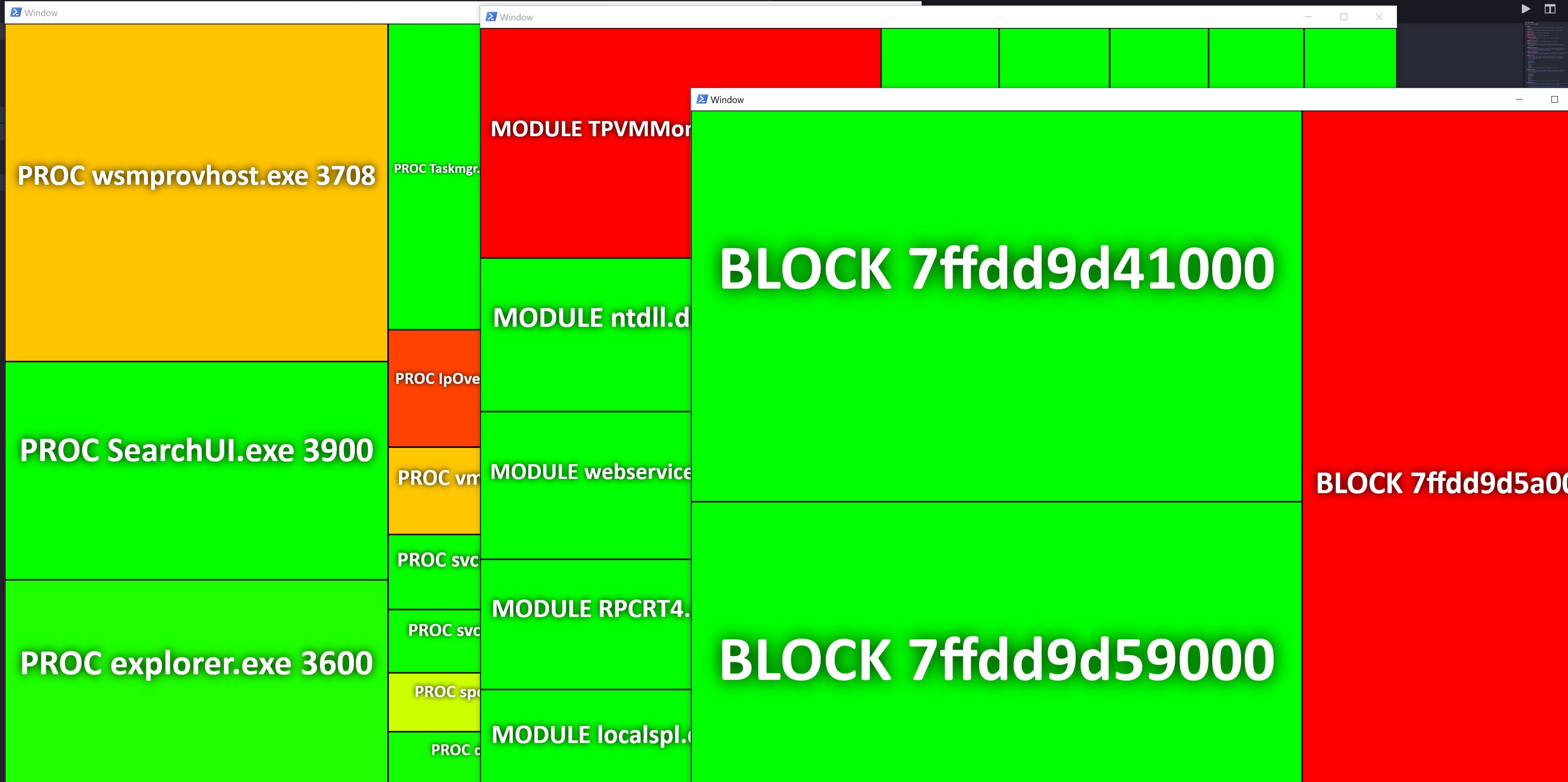
| Validation % | Color | Interpretation |
|---|---|---|
| 100% | 🟦 Blue | ✅ Fully Validated - No Issues |
| 90-99% | 🟩 Green | |
| 70-89% | 🟨 Yellow | |
| 50-69% | 🟧 Orange | 🚨 Multiple Issues Detected |
| 20-49% | 🟥 Red | 🚨 Serious Problems |
| < 20% | 🟪 Purple | 💀 Critical - Likely Malware |
Rapidly assess system compromise by validating all running code against known-good hashes.
Proactively hunt for code injection, process hollowing, and memory-resident malware.
Analyze memory dumps to identify modified or injected code regions.
Validate memory integrity as part of comprehensive forensic examination.
Look up symbol information and structure definitions without downloading PDBs.
We welcome contributions! Please see CONTRIBUTING.md for guidelines.
- 📖 Documentation improvements
- 🐛 Bug fixes and enhancements
- 💡 New example scripts
- 🧪 Test cases and validation
- 🌍 Platform support (Linux binaries, macOS, etc.)
This project is licensed under the GNU Affero General Public License v3.0 (AGPL-3.0).
See LICENSE for full details.
- Shane Macaulay (K2) - Original concept and implementation
- Boe Prox - Invoke-Parallel and TreeMap algorithms
- Volatility Foundation - Memory forensics framework
- Microsoft - Symbol and PDB infrastructure
- Azure Functions Team - Serverless platform
- 🐛 Issues: GitHub Issues
- 💬 Discussions: GitHub Discussions
- 📧 Email: See LICENSE for contact information
- HashServer - Local JIT hash server for custom software
- inVtero.net - Advanced memory analysis framework
- Volatility - Memory forensics framework
Made with 💙 for the Security Community
⭐ Star this repository if you find it useful! ⭐

