If you have many lines that you're numbering, the Insert Numbers command will mess up the cursor positions after inserting the numbers. (The numbers are inserted in the correct locations, but you cannot change the format from the default, because the new format will cause numbers to be inserted at the messed-up cursor locations).
In my example:
- I duplicated a line >1000 times.
-- I don't think content matters; I used: 3 spaces, "foo", 6 spaces
-- It looks like the threshold is 1000 lines. 999 lines works, but 1000 lines does not work.
- Position the cursor in the middle of each line
-- click on first line, then alt+shit+click at same column on last line
- Invoke
Insert Numbers & press Enter
- Scroll to top of document and observe cursor positions.
See screenshot:
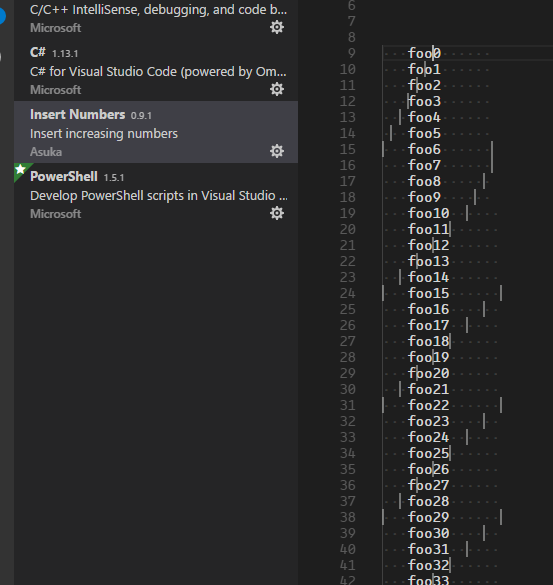

If you have many lines that you're numbering, the
Insert Numberscommand will mess up the cursor positions after inserting the numbers. (The numbers are inserted in the correct locations, but you cannot change the format from the default, because the new format will cause numbers to be inserted at the messed-up cursor locations).In my example:
-- I don't think content matters; I used: 3 spaces, "foo", 6 spaces
-- It looks like the threshold is 1000 lines. 999 lines works, but 1000 lines does not work.
-- click on first line, then alt+shit+click at same column on last line
Insert Numbers& press EnterSee screenshot:
