The BITalino (r)evolution Python API provides the needed tools to interact with BITalino (r)evolution using Python.
- Python >2.7 or Anaconda or Python 3.4
- NumPy
- pySerial
- pyBluez (Not needed for Mac OS)
- Install Dependencies
- NumPy
pip install numpy
- pySerial
pip install pyserial
- PyBluez
pip install PyBluez
- Install bitalino API package
pip install bitalino
For Windows 10 the installation procedure is slightly different, including some additional steps that will be presented on the following topics (required by PyBluez package):
- Install Dependencies
- NumPy
pip install numpy
- pySerial
pip install pyserial
-
Download and start the installation of Visual Studio 2015 (https://go.microsoft.com/fwlink/?LinkId=532606&clcid=0x409)
-
During the installation select the "Custom" option
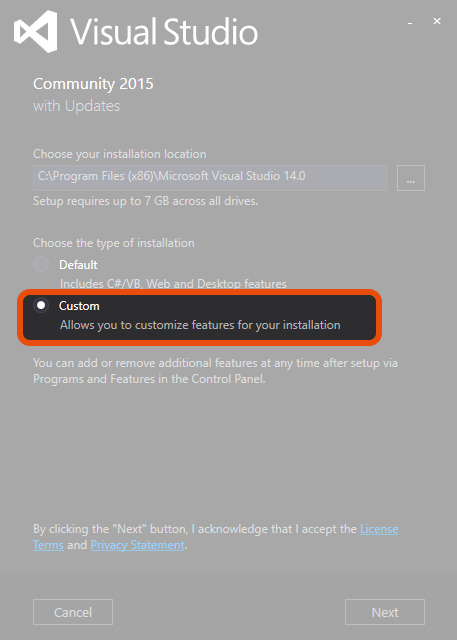
- On the new screen, select some additional functionalities required for pyBluez installation, namely:
- Visual C++
- Python Tools for Visual Studio
- Windows 10 SDK

- After ending step 4 you will be able to install PyBluez
- PyBluez-win10
pip install PyBluez-win10
- Install bitalino API package
pip install bitalino
import time
from bitalino import BITalino

# The macAddress variable on Windows can be "XX:XX:XX:XX:XX:XX" or "COMX"
# while on Mac OS can be "/dev/tty.BITalino-XX-XX-DevB" for devices ending with the last 4 digits of the MAC address or "/dev/tty.BITalino-DevB" for the remaining
macAddress = "00:00:00:00:00:00"

# This example will collect data for 5 sec.
running_time = 5

batteryThreshold = 30
acqChannels = [0, 1, 2, 3, 4, 5]
samplingRate = 1000
nSamples = 10
digitalOutput = [1,1]

# Connect to BITalino
device = BITalino(macAddress)

# Set battery threshold
device.battery(batteryThreshold)

# Read BITalino version
print(device.version())

# Start Acquisition
device.start(samplingRate, acqChannels)

start = time.time()
end = time.time()
while (end - start) < running_time:
    # Read samples
    print(device.read(nSamples))
    end = time.time()

# Turn BITalino led on
device.trigger(digitalOutput)

# Stop acquisition
device.stop()

# Close connection
device.close()This project is licensed under the GNU GPL v3