
A DIY ESP32 Handheld Gaming Console
13 games. Infinite demos. Built from scratch.


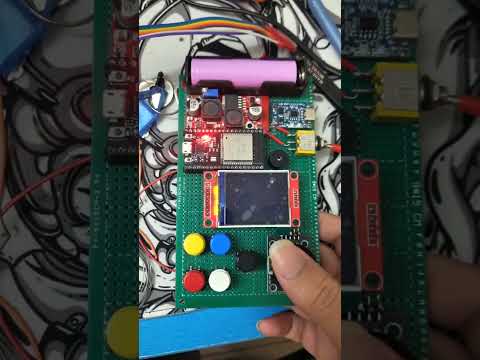
- 13 playable games including Snake, Pong, Tetris, Flappy Bird, Asteroids, Breakout, and Conway's Game of Life
- Visual demos — Matrix Rain, Kaleidoscope, Maze Solver, Particles, Fractals, Slime Simulator
- Hardware controls — Analog joystick + 6-button layout (A, B, X, Y, Select, Back)
- Buzzer audio feedback — click, confirm, and error sounds
- Animated menu — auto-scrolling, category headers, animated cursor, scanline transitions
- Flicker-free splash screen — fade-in/out Debyte logo on boot
- 20MHz SPI — buttery smooth gameplay on the ST7735 display
| Component | Model |
|---|---|
| Microcontroller | ESP32 Dev Board (38-pin) |
| Display | 1.8" ST7735 TFT (160×128) |
| Input | Analog joystick + 5 tactile buttons |
| Audio | Passive buzzer |
| Bus | SPI @ 20MHz |
Total build cost: ~₹800–1200
See the Bill of Materials for full parts list and links.
- PlatformIO Core or PlatformIO IDE (VS Code extension)
- ESP32 toolchain (installed automatically by PlatformIO)
- A USB cable capable of data sync
# Clone the repository
git clone https://github.com/Debyte404/Meantendo.git
cd Meantendo

# Install dependencies and build
pio run

# Upload to your ESP32 (ensure COM port is correct in platformio.ini)
pio run --target upload

# Monitor serial output
pio device monitor
Or open the project in VS Code with the PlatformIO extension installed and click Upload.
Note: Unplug the TFT display's CS wire (GPIO 5) before uploading, then reconnect it after flashing. The display can interfere with SPI during programming.
Meantendo/
├── src/
│   ├── main.cpp          # Entry: init → splash → menu loop
│   ├── core/             # Shared engine
│   │   ├── Game.hpp      # GameDef registry + registration
│   │   ├── Display.hpp   # TFT SPI init, pin mapping
│   │   ├── Input.hpp     # Joystick + button reads
│   │   ├── Buzzer.hpp    # Audio feedback
│   │   ├── Menu.hpp      # UI: categories, cursor, scrollbar
│   │   └── Splash.hpp    # Fade-in/out logo
│   └── games/            # Game implementations
│       ├── Snake.cpp
│       ├── Pong.cpp
│       ├── Tetris.cpp
│       ├── Breakout.cpp
│       ├── Asteroids.cpp
│       ├── FlappyBird.cpp
│       ├── GameOfLife.cpp
│       ├── Kaleidoscope.cpp
│       ├── MatrixRain.cpp
│       ├── MazeSolver.cpp
│       ├── Particles.cpp
│       ├── Fractals.cpp
│       └── SlimeSim.cpp
├── assets/           # Product photos
│   ├── product.jpeg
│   └── wiring.jpeg
├── docs/
│   ├── BOM.md            # Bill of materials
│   └── wiring_guide.md   # Pinout and wiring diagram
├── include/              # Header files
├── test/                 # Unit tests
├── platformio.ini        # Build configuration
└── README.md
| Button | Action |
|---|---|
| Joystick | Navigate menu / move player |
| A | Select / confirm |
| B | Back / cancel |
| X / Y | Reserved |
| Select | Alternate confirm |
| Back | Exit game to menu |
| Component | ESP32 GPIO |
|---|---|
| TFT CS | GPIO 5 |
| TFT DC | GPIO 16 |
| TFT RST | GPIO 17 |
| TFT SCLK | GPIO 18 |
| TFT MOSI | GPIO 23 |
| Joystick X | GPIO 34 (ADC) |
| Joystick Y | GPIO 35 (ADC) |
| Joystick SW | GPIO 19 |
| Button A | GPIO 32 |
| Button B | GPIO 33 |
| Button X | GPIO 26 |
| Button Y | GPIO 27 |
| Button Back | GPIO 25 |
| Buzzer | GPIO 15 |
See wiring_guide.md for the full pinout table and wiring photos.
Built with caffeine by Debyte
Libraries used:
MIT License — see LICENSE