Overview
This memory mapped file is also used for exceptionally fast interprocess communication (IPC) without affecting your system performance. This is especially useful when there is a need to transfer large amounts of data, its ideal for transferring data between processes very quickly on the same server or across the network. There is no Garbage Collection (GC) as everything is done off heap.
More info: https://chronicle.software/libraries/queue/
Kdb+, from Kx, is / has:
- a high-performance cross-platform historical time-series columnar database
- an in-memory compute engine
- a real-time streaming processor
- an expressive query and programming language called q
More info: https://code.kx.com/q/
Create an "adapter" to allow messages arriving on a Chronicle Queue to be inserted into a table in kdb+.
- "Quotes added as messages to a Chronicle Queue should be replicated as entries in the quote table in our kdb+ database."
- Create an Adapter to anable this
- Quote >> Chronicle Queue >> Adapter >> kdb+
We will have the following components:
- Producer - create Quotes and place as new messages on a Chronicle Queue named "quote".
- Chronicle Queue - a file based queue called "quote", adressed via filesystem location e.g. "C:\ChronicleQueue\Producer\quote".
- Adapter - Application to read from the queue and write to the database.
- kdb+ - Destination database containing quote database table and supporting functions to allow data to be added.
Messages representing a Quote will be randomly generated by the Producer and added to the Quote queue in the following format:
Quote message data fields
time : 2020.01.24+14:00:16.083Z
sym : VOD.L
bid : 152
bsize : 42035
ask : 152
assize : 48514
bex : XLON
aex : XLON
Messages are created as a "document" and each field and value is added as a name | value pair to the document. The document is added to the queue by a Chronicle Queue Appender.
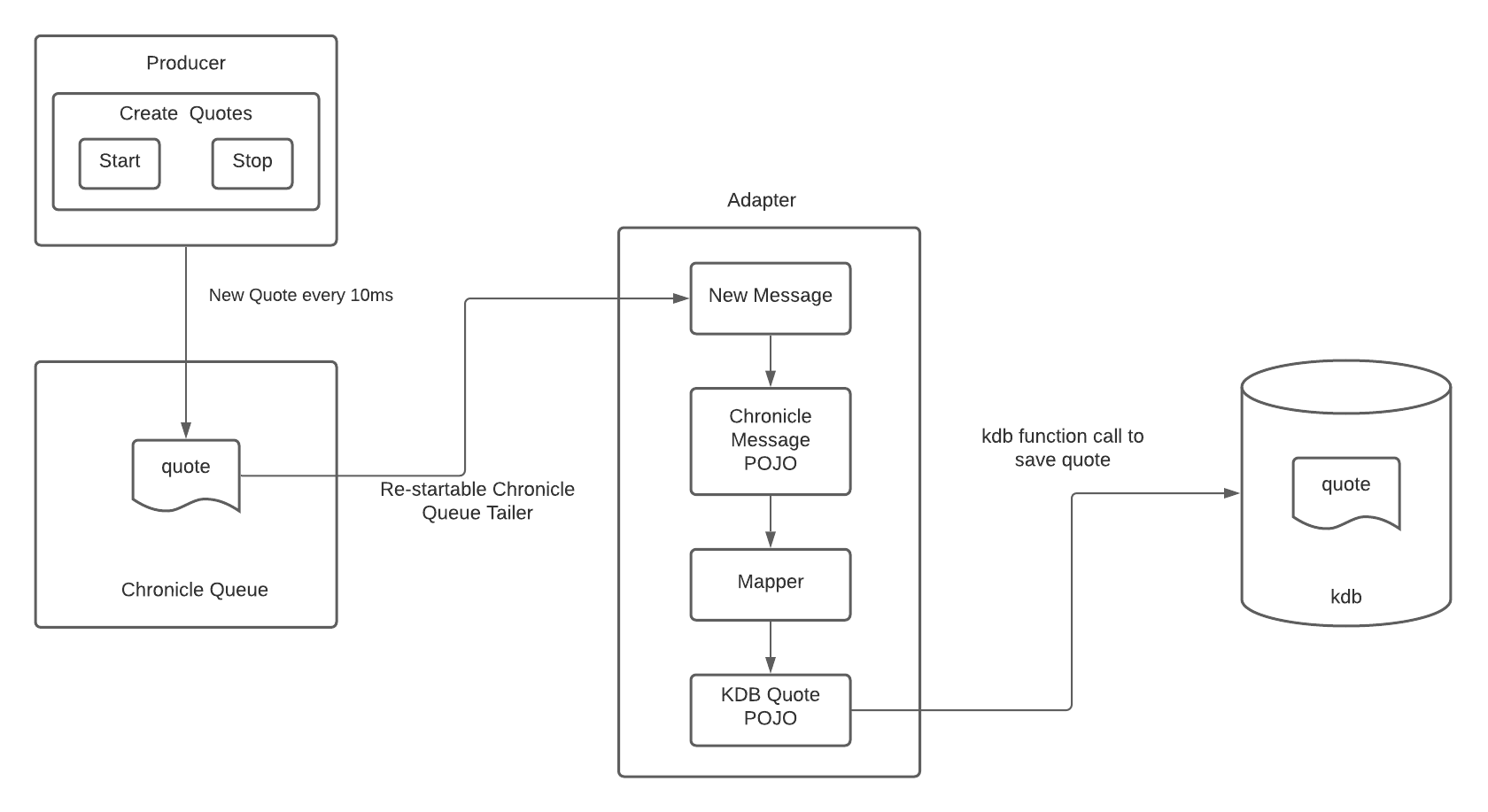
The Adapter for our scenario has been built as a Java with Spring Boot (CommandLineRunner) application that builds out to a jar file. The application will implement the process above using vendor specific libraries (Chronicle and kdb+) as well as other 3rd party Open Source libraries.
When the application is started, use Chronicle Queue java library to connect to a queue.
This library can be added to a maven project pom.xml file as a dependency:
	<dependency>
		<groupId>net.openhft</groupId>
		<artifactId>chronicle-queue</artifactId>
		<version>5.20.111</version>
	</dependency>
The datasource / queue should be identified via an external properties file. Chronicle Queues are typically adressed via filesystem location e.g. "C:\ChronicleQueue\Producer\quote"
Once connected to the datasource, use a Chronicle Queue Tailer to read the queue and check for new messages. The tailer should be named based on configuration in an external properties file. The tailer should read forward from the last message read when re-started.
Marshall each message that is read by the tailer into a specific POJO representing the chronicle queue quote message. This will be achieved using a simple Builder component to create an instance of the "Chronicle Quote Message" POJO for each message that is read.
Map the source Chronicle Quote Message POJO to the destination kdb+ Quote POJO.
Mapstruct allows simple or very complex mapping between source and destination POJO's to be coded quickly as an interface. Mapping is defined in the interface and when the application is built, code is automatically generated to implement the interface.
Maven dependency to include Mapstruct:
	<dependency>
		<groupId>org.mapstruct</groupId>
		<artifactId>mapstruct</artifactId>
		<version>1.4.1.Final</version>
	</dependency>
Reference guide: https://mapstruct.org/documentation/stable/reference/html/