Currently, when you import a model, you can select a Material Type to associate a sound with it:
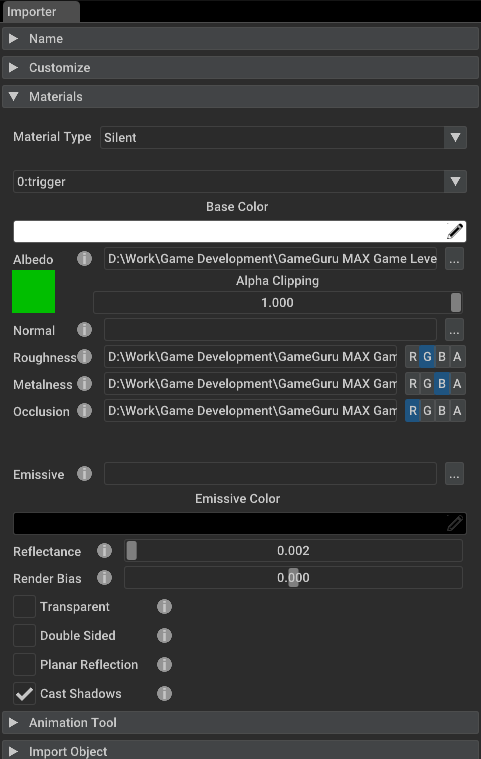
This is great for importing floor tiles for use on indoor levels. However, there is no means to set this up for models that have already been imported into MAX. Therefore, I would like to suggest that the same Material Type be added to the Material Properties tab to the right side when a model is selected in the view port:
Added to this menu:
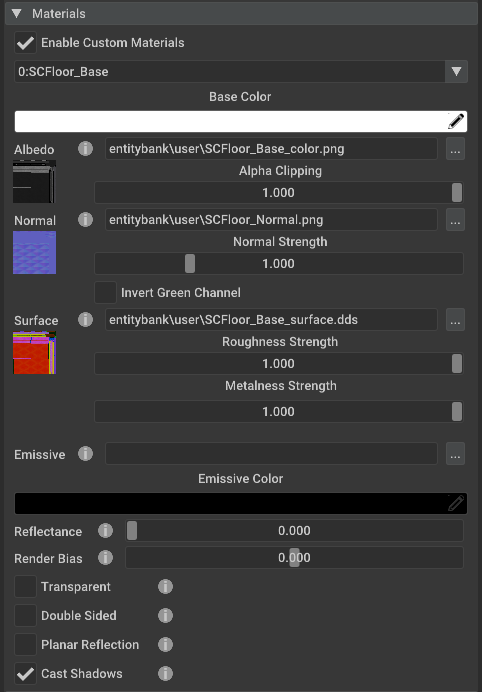
Currently, it doesn't seem that the Material Type works (I've not been able to get it to work on my imported models), but I am guessing it's in the plans to work at some point. Someone who is creating a level may have imported a model and forgotten to set up the material type and would need to do that. They would not have easy access to do this unless Material Type were added to the Material properties tab ... or they may have set it initially when importing their model, but now want to change it to another type.


Currently, when you import a model, you can select a Material Type to associate a sound with it:
This is great for importing floor tiles for use on indoor levels. However, there is no means to set this up for models that have already been imported into MAX. Therefore, I would like to suggest that the same Material Type be added to the Material Properties tab to the right side when a model is selected in the view port:
Added to this menu:

Currently, it doesn't seem that the Material Type works (I've not been able to get it to work on my imported models), but I am guessing it's in the plans to work at some point. Someone who is creating a level may have imported a model and forgotten to set up the material type and would need to do that. They would not have easy access to do this unless Material Type were added to the Material properties tab ... or they may have set it initially when importing their model, but now want to change it to another type.