Modern JUCE-based replication of the D&R Cinemix VST Automation Bridge. This plugin bridges MIDI automation between D&R Cinemix professional analog film/TV mixing consoles (with motorized faders) and modern DAW automation systems.
Original Project: https://github.com/ZioGuido/CinemixAutomationBridge
License: MIT (consistent with original)
- D&R Cinemix Console (1998-1999 professional film/TV mixing console)
- 36 channel strips (24 LOW + 12 HIGH sections)
- Motorized faders: 36×100mm ALPS for MIX + 36×60mm for CHANNEL = 72 total
- MIDI Interface: 2 pairs of MIDI ports (one for LOW section, one for HIGH + Master)
- LOW section: Channels 1-24 (Port 1)
- HIGH section: Channels 25-36 + Master (Port 2)
- Configuration: "LO=24 HI=12 MSTR=hi"
- Framework: JUCE 8.0.12
- C++ Standard: C++17/20
- Primary Target: macOS (Xcode) with AudioUnit
- Secondary Targets: Windows (Visual Studio) with VST3, Linux (Makefiles) with VST3
- Plugin Type: Audio plugin (instrument/MIDI effect hybrid)
Layout:
[0-71]    Faders (72 total)
          - Channels 1-24 (LOW, Port 1): indices 0-47 (upper/lower pairs)
          - Channels 25-36 (HIGH, Port 2): indices 48-71 (upper/lower pairs)

[72-143]  Mutes (72 total)
          - Channels 1-24: indices 72-119
          - Channels 25-36: indices 120-143

[144-153] AUX Mutes (10 total)

[154-160] Master Section (7 total)
          154: Joystick 1 X
          155: Joystick 1 Y
          156: Joystick 1 Mute
          157: Joystick 2 X
          158: Joystick 2 Y
          159: Joystick 2 Mute
          160: Master Fader
Parameter Types:
- Faders/Joysticks:
juce::AudioParameterFloat(0.0-1.0, default 0.754 for faders, 0.5 for joysticks, 1.0 for master) - Mutes:
juce::AudioParameterBool(default false)
State Management:
- Use
AudioProcessorValueTreeStatefor automatic parameter management - Use
SliderAttachmentandButtonAttachmentfor GUI binding - Save/restore MIDI port selections in plugin state
- Port 1 (LOW section): Channels 1-24, MIDI Channels 1 & 3
- Port 2 (HIGH section): Channels 25-36 + Master, MIDI Channels 2, 4, 5
- Upper (Chan): CC# 0-47 (pairs), Channel 1
- Lower (Mix): CC# 0-47 (pairs), Channel 1
- Resolution: 14-bit (2 CCs per fader for smooth movement)
- Values: 0-127
- Upper/Lower: CC# 0-23 (pairs), Channel 2
- Same dual-CC encoding
- CC#: 0-47, Channel 3
- Values: 2=OFF, 3=ON (NOT 0/127!)
- CC#: 0-23, Channel 4
- Values: 2=OFF, 3=ON
- CC#: 64-111, Channel 3
- Values: 6=TOUCH, 5=RELEASE
- Auto-switching: In AUTO mode (3), touch switches to WRITE (2), release returns to AUTO (3)
- CC#: 64-111, Channel 4
- Same behavior
- CC#: 64-111, Channels 3 & 4
- Values: 0=ISO, 1=READ, 2=WRITE, 3=AUTO
- Master SEL: CC# 64, Channel 5 (controls all channels)
- CC#: 96, Channel 5
- Special encoding:
- AUX 1: Val 2 (off) / 3 (on)
- AUX 2: Val 4 (off) / 5 (on)
- AUX 3: Val 6 (off) / 7 (on)
- ...
- AUX 10: Val 20 (off) / 21 (on)
- Master Fader: CC# 0+1, Channel 5 (dual CC)
- Joystick 1 X: CC# 48, Channel 2
- Joystick 1 Y: CC# 50, Channel 2
- Joystick 1 Mute: CC# 24, Channel 4, Val 2/3
- Joystick 2 X: CC# 52, Channel 2
- Joystick 2 Y: CC# 54, Channel 2
- Joystick 2 Mute: CC# 26, Channel 4, Val 2/3
- Activate Remote Control: CC# 127, Val: 127, Channel 5 (both ports)
- Deactivate: Single byte 0xFF (255) - System Reset
- Console Init Sequence:
- CC# 127, Val: 127, Ch. 5
- CC# 65, Val: 1, Ch. 5
- Reset all SEL and Touch Faders
- CC# 127, Val: 127, Ch. 5
- CC# 65, Val: 15, Ch. 5
Responsibilities:
- Manage 161 parameters via
AudioProcessorValueTreeState - Handle MIDI I/O (2 input ports, 2 output ports)
- Implement MIDI protocol translation
- Provide console control methods (activate, reset, snapshot, etc.)
- Process audio (passthrough, output silence)
Key Methods:
void activateConsole();
void deactivateConsole();
void resetAll();
void toggleAllMutes();
void sendSnapshot();
void setTestMode(bool enable);Responsibilities:
- Main UI container (920×560 fixed size)
- Host 36 channel strips + master section + control panel
- Use parameter attachments for automatic binding
- Default JUCE LookAndFeel (no custom styling initially)
Layout:
┌─────────────────────────────────────────────────┐
│ [36 Channel Strips 792px]  │ Master │ Controls │
│ ┌─┬─┬─┬─... (22px each)    │ Joy1   │ ACTIVATE │
│ │F││F││F││F│  Upper Row     │ Joy2   │ DEACTVT  │
│ │M││M││M││M│                │ M.Fdr  │ MIDI ▼   │
│ └─┴─┴─┴─...                 │ AUXs   │ SNAPSHOT │
│ ┌─┬─┬─┬─...                 │        │ TESTMODE │
│ │F││F││F││F│  Lower Row     │        │ RESETALL │
│ │M││M││M││M│                │        │ ALLMUTES │
│ └─┴─┴─┴─...                 │        │          │
└─────────────────────────────────────────────────┘
Responsibilities:
- Reusable component for each of 36 channels
- Contains: 2 faders + 2 mute buttons + label
- Uses
juce::Slider(LinearVertical, NoTextBox) - Uses
juce::TextButton(toggle mode for mutes) - Uses
SliderAttachmentandButtonAttachment
Dimensions per strip:
- Width: 22px
- Height: ~540px (two rows with faders + mutes + labels)
Responsibilities:
- Custom XY pad for joystick control
- Manages X/Y parameters independently
- Includes mute button
- Simple crosshair and circle position indicator
- Mouse drag interaction
Dimensions:
- Approximately 90×120px each (two joysticks stacked)
Responsibilities:
- Encapsulate all MIDI communication logic
- Translate parameters to MIDI CC messages
- Translate incoming MIDI to parameter changes
- Manage port connections and error handling
- Prevent duplicate MIDI sends (track previous values)
Key Data Structures:
struct MidiMapping {
    int channel;      // MIDI channel (1-16)
    int controller;   // CC number
    int controller2;  // Second CC for faders (14-bit)
    int portIndex;    // Which output port (1 or 2)
};
std::array<MidiMapping, 161> parameterMappings;
std::array<int, 161> previousMidiValues;Responsibilities:
- UI component for selecting MIDI devices
- PopupMenu-based interface (button that opens menu with submenus)
- Four submenus: MIDI Input 1, MIDI Input 2, MIDI Output 1, MIDI Output 2
- Save/restore selections in plugin state
Tasks:
- Create Projucer project with settings
- Configure plugin formats (AU, VST3, Standalone)
- Add JUCE modules
- Create basic file structure (empty classes)
- Build and verify it loads in DAW
Deliverable: Empty plugin that loads in DAW
Files Created:
- CinemixBridge.jucer
- Source/PluginProcessor.h/.cpp
- Source/PluginEditor.h/.cpp
- README.md
- LICENSE (MIT)
Tasks:
- Implement
createParameterLayout()with all 161 parameters - Add
AudioProcessorValueTreeStateto processor - Generate parameter IDs and names programmatically
- Implement
getStateInformation()/setStateInformation() - Test parameter automation in DAW
Deliverable: Plugin with 161 automatable parameters visible in DAW
Key Implementation:
juce::AudioProcessorValueTreeState::ParameterLayout createParameterLayout()
{
    std::vector<std::unique_ptr<juce::RangedAudioParameter>> params;

    // Faders: 0-71
    for (int i = 0; i < 72; ++i)
        params.push_back(std::make_unique<juce::AudioParameterFloat>(
            "fader_" + juce::String(i), generateFaderName(i),
            0.0f, 1.0f, 0.754f));

    // Mutes: 72-143
    for (int i = 0; i < 72; ++i)
        params.push_back(std::make_unique<juce::AudioParameterBool>(
            "mute_" + juce::String(i), generateMuteName(i), false));

    // AUX Mutes: 144-153
    for (int i = 0; i < 10; ++i)
        params.push_back(std::make_unique<juce::AudioParameterBool>(
            "aux_mute_" + juce::String(i), "AUX " + juce::String(i+1), false));

    // Master Section: 154-160
    params.push_back(std::make_unique<juce::AudioParameterFloat>(
        "joy1_x", "Joystick 1 X", 0.0f, 1.0f, 0.5f));
    // ... (remaining 6 parameters)

    return { params.begin(), params.end() };
}Tasks:
- Create
MidiRouterclass - Implement MIDI device enumeration
- Build parameter-to-MIDI mapping tables
- Implement basic MIDI send/receive
- Test sending single CC message to console
Deliverable: Can enumerate MIDI devices and send basic MIDI messages
Files Created:
- Source/MidiRouter.h/.cpp
Key Features:
- Use
juce::MidiInput::getAvailableDevices()for enumeration - Use
juce::MidiInput::create()for input ports - Use
juce::MidiOutput::openDevice()for output ports - Handle port connection/disconnection gracefully
Tasks:
- Implement all MIDI encoding functions:
- Fader encoding (dual CC with values 0-127)
- Mute encoding (values 2/3, NOT 0/127)
- AUX mute encoding (CC#96 with offset values)
- Joystick encoding (single CC per axis)
- Implement incoming MIDI handling (console → DAW)
- Implement special commands (activate, reset, snapshot)
- Add duplicate message prevention
- Test bidirectional communication
Deliverable: Full MIDI protocol working, console responds to all commands
Critical Implementation Details:
// Fader: Send both CCs for smooth movement
void sendFaderValue(int faderIndex, float value) {
    int midiVal = (int)(value * 127.0f);
    sendMidiCC(channel, cc1, midiVal, portIndex);
    sendMidiCC(channel, cc2, midiVal, portIndex);
}

// Mute: Use values 2 (off) and 3 (on)
void sendMuteValue(int muteIndex, bool muted) {
    int midiVal = muted ? 3 : 2;
    sendMidiCC(channel, ccNum, midiVal, portIndex);
}

// AUX Mute: CC#96 with special offset encoding
void sendAuxMute(int auxIndex, bool muted) {
    int midiVal = (auxIndex * 2) + (muted ? 3 : 2);
    sendMidiCC(5, 96, midiVal, 2); // Always Ch5, Port 2
}

// Prevent duplicates
void sendParameterUpdate(int paramIndex, float value) {
    int midiVal = floatToMidiValue(value);
    if (midiVal != previousMidiValues[paramIndex]) {
        // Send MIDI
        previousMidiValues[paramIndex] = midiVal;
    }
}Tasks:
- Implement
ChannelStripComponent - Create two
juce::Slider(vertical, no textbox) - Create two
juce::TextButton(toggle mode) - Add
juce::Labelfor channel number - Add
SliderAttachmentandButtonAttachment - Test with first channel strip only
- Verify parameter binding works
Deliverable: One working channel strip with all controls functional
Files Created:
- Source/ChannelStripComponent.h/.cpp
UI Styling:
- Use default JUCE LookAndFeel
- Simple, functional layout
- No custom graphics initially
Tasks:
- Instantiate all 36 channel strips in editor
- Implement
JoystickComponent(custom XY pad) - Add master section:
- Master fader (
juce::Slider) - 10 AUX mute buttons (
juce::TextButton)
- Master fader (
- Add control buttons:
- ACTIVATE, DEACTIVATE
- RESET ALL, ALL MUTES
- SNAPSHOT, TEST MODE
- Implement
MidiPortSelectorComponent - Layout all components in
resized()method - Test full UI layout
Deliverable: Complete UI with all 161 parameters visible and functional
Files Created:
- Source/JoystickComponent.h/.cpp
- Source/MidiPortSelector.h/.cpp
JoystickComponent Features:
void paint(juce::Graphics& g) override {
    // Draw background
    g.fillAll(juce::Colours::darkgrey);
    g.drawRect(getLocalBounds(), 1);

    // Draw crosshair
    // Draw position indicator (circle at X/Y position)
}

void mouseDown/mouseDrag(const juce::MouseEvent& e) {
    // Update X and Y parameters from mouse position
    xParameter->setValueNotifyingHost(normalizedX);
    yParameter->setValueNotifyingHost(normalizedY);
}Tasks:
- Wire up button callbacks to processor methods
- Implement
activateConsole():- Open MIDI ports
- Send CC#127 activation command
- Set all channels to WRITE mode
- Send snapshot
- Set all channels to AUTO mode
- Implement
deactivateConsole():- Send System Reset (0xFF)
- Reset all channel modes
- Implement
resetAll():- Set all faders to 0 (except master to 1.0)
- Set all mutes to OFF
- Send snapshot
- Implement
toggleAllMutes():- Toggle global mute state
- Apply to all 72 mutes + 10 AUX mutes + 2 joystick mutes
- Implement
sendSnapshot():- Send all current parameter values to console
- Use rate limiting to avoid MIDI buffer overflow
- Test all control functions
Deliverable: All control buttons functional, console responds correctly
Activation Sequence:
void activateConsole() {
    // 1. Open MIDI ports
    midiRouter.openAllPorts();

    // 2. Send activation command
    sendMidiCC(5, 127, 127); // Both ports

    // 3. Set all channels to WRITE mode
    for (int i = 0; i < 48; ++i) {
        sendMidiCC(3, 64 + i, 2); // Port 1
        sendMidiCC(4, 64 + i, 2); // Port 2
    }

    // 4. Send snapshot
    sendSnapshot();

    // 5. Set all channels to AUTO mode
    for (int i = 0; i < 48; ++i) {
        sendMidiCC(3, 64 + i, 3); // Port 1
        sendMidiCC(4, 64 + i, 3); // Port 2
    }

    // 6. Set master section to AUTO
    sendMidiCC(5, 64, 3);
    sendMidiCC(4, 88, 3); // Joy1
    sendMidiCC(4, 90, 3); // Joy2
}Tasks:
- Implement test mode animation:
- Animate all faders with sine wave pattern
- Randomize mutes
- Calculate frame rate to avoid MIDI flooding
- Handle touch sensor events:
- Detect touch (CC value 6)
- Auto-switch to WRITE mode if in AUTO
- Detect release (CC value 5)
- Return to AUTO mode
- Implement MIDI port save/restore:
- Save port selections in
getStateInformation() - Restore on
setStateInformation() - Handle case where saved port no longer exists
- Save port selections in
- Add error handling:
- Gracefully handle disconnected ports
- Show error messages to user
- Allow reconnection without restart
Deliverable: All special features working, robust error handling
Test Mode Implementation:
void setTestMode(bool enable) {
    testModeEnabled = enable;
    if (enable) {
        resetAll();
        setAllChannelsMode(1); // Set to READ

        // Calculate animation rates
        faderAnimRate = sampleRate / 25;  // 25 Hz
        muteAnimRate = sampleRate / 10;   // 10 Hz

        // Initialize animation phase offsets
        for (int i = 0; i < 72; ++i)
            animPhase[i] = -2.0f + (4.0f / 72) * i;
    } else {
        resetAll();
        setAllChannelsMode(3); // Set to AUTO
    }
}

// In processBlock():
if (testModeEnabled) {
    sampleCounter++;
    if (sampleCounter >= faderAnimRate) {
        sampleCounter = 0;
        animateFaders();
    }
    if (sampleCounter % muteAnimRate == 0) {
        animateMutes();
    }
}Tasks:
- Test all 161 parameters individually:
- Move each fader, verify console responds
- Toggle each mute, verify console responds
- Move console controls, verify DAW updates
- Test automation recording/playback:
- Record automation for multiple parameters
- Playback, verify console follows
- Test in multiple DAWs (Logic, Cubase, Reaper)
- Test MIDI port disconnection/reconnection:
- Disconnect cable during use
- Verify error handling
- Reconnect, verify recovery
- Test edge cases:
- Rapid parameter changes
- Simultaneous multi-parameter updates
- Console power cycle during connection
- Performance testing:
- Monitor CPU usage
- Monitor MIDI latency
- Optimize if needed
- Fix bugs and edge cases
- Code cleanup and documentation
Deliverable: Stable, tested plugin ready for production use
Test Checklist:
- All 72 faders respond bidirectionally
- All 72 mutes respond bidirectionally
- All 10 AUX mutes respond
- Both joysticks respond (X, Y, mute)
- Master fader responds
- ACTIVATE command initializes console correctly
- DEACTIVATE releases console
- RESET ALL returns to default state
- ALL MUTES toggles all mutes
- SNAPSHOT sends current state
- TEST MODE animates without errors
- MIDI port selection persists across sessions
- Automation records and plays back correctly
- Plugin loads in Logic Pro
- Plugin loads in Cubase
- Plugin loads in Reaper
- No crashes on MIDI disconnect
- No MIDI buffer overflows
Tasks:
- Write comprehensive README.md:
- Project overview
- Hardware requirements
- MIDI cable wiring instructions
- Installation instructions
- Usage guide (activation, automation workflow)
- Troubleshooting section
- Document MIDI protocol:
- Complete CC mapping reference
- Special command reference
- Add inline code comments:
- Document complex MIDI encoding logic
- Explain parameter mapping
- Create usage guide:
- Step-by-step setup instructions
- Screenshot/diagram of MIDI port selection
- Example DAW session workflow
Deliverable: Complete, documented project ready for distribution
README Structure:
# CinemixAutomationBridge

## Overview
[Description of plugin and hardware]

## Requirements
- D&R Cinemix console with MIDI automation
- MIDI interface with 2 input + 2 output ports
- Custom MIDI cable (see wiring below)
- DAW with AU or VST3 support

## MIDI Cable Wiring
[DB25/DB9 pinout diagram]

## Installation
[Platform-specific instructions]

## Usage
1. Connect console via MIDI cable
2. Load plugin in DAW
3. Select MIDI ports (click MIDI button)
4. Click ACTIVATE
5. Record automation...

## Troubleshooting
- Console not responding: Check MIDI ports...
- Faders moving erratically: Reset console...Project Name: CinemixAutomationBridge
Project Type: Audio Plugin
Version: 1.0.0
Company Name: GSi (or TBD)
Company Website: (TBD)
Company Email: (TBD)
Plugin Code: Cmxb (4-char unique ID)
Plugin Manufacturer Code: GSi (4-char)
Plugin AU Identifier: com.gsi.cinemixbridge (TBD)
Plugin AAX Identifier: com.gsi.cinemixbridge (TBD)
Plugin Formats:
✓ VST3
✓ AU
✓ Standalone (for testing)
☐ VST (deprecated)
☐ AAX (optional)
Plugin Characteristics:
✓ Plugin is a Synth
✓ Plugin MIDI Input
✓ Plugin MIDI Output
☐ Plugin Wants MIDI Input (not needed - using direct MIDI)
Audio Channels:
Input: Stereo
Output: Stereo (passthrough/silence)
C++ Language Standard: C++17 (or C++20)
juce_audio_basics
juce_audio_devices (for MIDI)
juce_audio_formats
juce_audio_plugin_client
juce_audio_processors
juce_audio_utils
juce_core
juce_data_structures
juce_events
juce_graphics
juce_gui_basics
juce_gui_extra
CinemixBridge/
├── CinemixBridge.jucer         # Projucer project file
├── PLAN.md                     # This file
├── README.md                   # User documentation
├── LICENSE                     # MIT License
├── .gitignore                  # Git ignore file
├── Source/
│   ├── PluginProcessor.h       # Main audio processor
│   ├── PluginProcessor.cpp
│   ├── PluginEditor.h          # Main UI editor
│   ├── PluginEditor.cpp
│   ├── MidiRouter.h            # MIDI communication layer
│   ├── MidiRouter.cpp
│   ├── ChannelStripComponent.h # Individual channel UI
│   ├── ChannelStripComponent.cpp
│   ├── JoystickComponent.h     # XY pad component
│   ├── JoystickComponent.cpp
│   ├── MidiPortSelector.h      # MIDI port selection UI
│   └── MidiPortSelector.cpp
└── Builds/                     # Generated by Projucer
    ├── MacOSX/                 # Xcode project
    ├── VisualStudio2022/       # VS project
    └── LinuxMakefile/          # Linux build (optional)
| Phase | Description | Hours |
|---|---|---|
| 1 | Project Setup | 2-3 |
| 2 | Parameter Infrastructure | 3-4 |
| 3 | MIDI Router Foundation | 4-6 |
| 4 | MIDI Protocol Implementation | 6-8 |
| 5 | Basic UI - Single Channel | 4-5 |
| 6 | Complete UI Layout | 5-6 |
| 7 | Control Logic Integration | 3-4 |
| 8 | Test Mode & Special Features | 3-4 |
| 9 | Testing & Refinement | 6-8 |
| 10 | Documentation | 2-3 |
| Total | 38-51 hours |
- Framework: JUCE 8.0.12
- UI Approach: Default JUCE LookAndFeel (no custom styling initially)
- Parameter Management: AudioProcessorValueTreeState
- MIDI Library: JUCE's built-in MIDI API (not RtMidi)
- Window Size: 920×560 fixed (not resizable initially)
- Plugin Formats: VST3 + AU (no VST2)
- Console Configuration: 36 channels (24 LOW + 12 HIGH)
- License: MIT (consistent with original)
- Company Name: GSi or custom?
- Bundle Identifier: com.gsi.cinemixbridge or custom?
- Plugin Code: "Cmxb" or alternative?
- Primary Platform: macOS or Windows?
- Custom Graphics: Add later if desired
- Resizable UI: Add later if desired
- LookAndFeel Customization: Add vintage styling later if desired
- Faders: Always send BOTH CCs (controller and controller+1) for smooth movement
- Mutes: Use values 2 (off) and 3 (on), NOT 0 and 127
- AUX Mutes: Use CC#96 with offset values (2-21), not individual CCs
- Duplicate Prevention: Always check previous value before sending
- Rate Limiting: Avoid sending more than ~100 messages/sec per port
- Touch Sensors: Only relevant for auto-mode switching on the console side
The console requires a specific initialization sequence:
- Send CC#127 value 127 on Channel 5 (both ports)
- Send CC#65 value 1 on Channel 5
- Reset all SEL and Touch Fader states
- Send CC#127 value 127 on Channel 5 again
- Send CC#65 value 15 on Channel 5
- Send single byte 0xFF (255) for System Reset
- This releases the console from MIDI control
- Parameter value conversion (float ↔ MIDI int)
- MIDI encoding functions (faders, mutes, AUX mutes)
- Port connection/disconnection handling
- State save/restore
- Load plugin in DAW → verify no crashes
- ACTIVATE → verify console responds
- Move console fader → verify parameter updates in DAW
- Automate parameter in DAW → verify console follows
- RESET ALL → verify all controls return to default
- ALL MUTES → verify all mutes toggle
- SNAPSHOT → verify current state sent to console
- TEST MODE → verify animation works without errors
- Build on macOS (Xcode)
- Build on Windows (Visual Studio)
- Build on Linux (Makefiles) - optional
- Test AU in Logic Pro
- Test VST3 in Cubase
- Test VST3 in Reaper
- Test Standalone for debugging
- Test with actual D&R Cinemix console
- Verify all 72 faders respond correctly
- Verify all 72 mutes respond correctly
- Verify joysticks work smoothly
- Verify master fader and AUX mutes work
- Test automation recording and playback
- Test MIDI cable disconnection during use
- Fixed window size (920×560)
- Default JUCE styling (not vintage console aesthetic)
- No configuration for different console sizes (fixed 36 channels)
- No VST2 support (SDK deprecated)
- Custom LookAndFeel for vintage console aesthetic
- Resizable UI with responsive layout
- Support for different console configurations (32-channel, etc.)
- Preset/snapshot system (save multiple console states)
- MIDI learn functionality
- Console configuration auto-detection
- Sidechain input for external MIDI control
- Touch OSC / iPad remote control
- Undo/redo for console movements
- Keyboard shortcuts for common operations
If you need to add/remove parameters:
- Update
createParameterLayout()in PluginProcessor.cpp - Update parameter index constants/enums
- Update MIDI mapping tables in MidiRouter
- Update UI component count in PluginEditor
- Test thoroughly!
To support different console sizes:
- Make channel count configurable (add to plugin state)
- Dynamically generate parameter layout
- Dynamically generate MIDI mappings
- Adjust UI layout algorithm
- Add configuration UI (dropdown for console type)
To add vintage look:
- Create
CinemixLookAndFeelclass extendingLookAndFeel_V4 - Override
drawLinearSlider()for fader appearance - Override
drawButtonBackground()for LED mute buttons - Create background image or procedural background
- Add brushed metal textures, shadows, gradients
- Apply with
setLookAndFeel()in editor constructor
- Use MIDI monitor software (MIDI Monitor on Mac, MIDI-OX on Windows)
- Enable MIDI logging in MidiRouter
- Check MIDI cable wiring (see pinout in README)
- Verify console is in correct mode (not using PowerVCA simultaneously)
- Check MIDI port selection in plugin
- Verify MIDI interface drivers are up to date
- GitHub: https://github.com/ZioGuido/CinemixAutomationBridge
- Website: https://www.genuinesoundware.com/?a=page&p=TheCinemixProject
- Reference Image: https://www.genuinesoundware.com/pages/CinemixProject/CVAB_680px_2.png
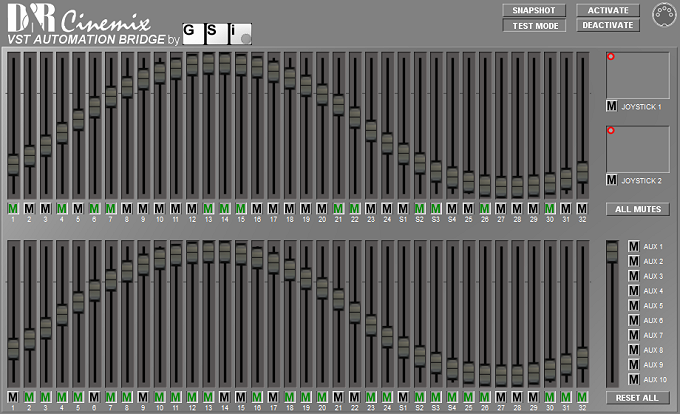
- JUCE Tutorials: https://juce.com/learn/tutorials
- AudioProcessor: https://docs.juce.com/master/classAudioProcessor.html
- AudioProcessorValueTreeState: https://docs.juce.com/master/classAudioProcessorValueTreeState.html
- MidiInput/Output: https://docs.juce.com/master/classMidiInput.html
- Console Manual: (if available from D&R)
- MIDI Implementation: See MIDI_Cinemix.txt in original project
- Schematics: Page 34 of console schematics book (AS Con./DigPower)
- Initial JUCE 8.0.12 implementation
- Full MIDI protocol support
- 161 parameters (72 faders, 72 mutes, 10 AUX mutes, 7 master section)
- Default JUCE UI styling
- VST3 and AU plugin formats
- macOS and Windows support
- Complete documentation
MIT License (consistent with original project)
Copyright (c) 2012 Guido Scognamiglio (original VST 2.4 version)
Copyright (c) 2026 [Your Name] (JUCE 8.0.12 replication)
Permission is hereby granted, free of charge, to any person obtaining a copy of this software and associated documentation files (the "Software"), to deal in the Software without restriction, including without limitation the rights to use, copy, modify, merge, publish, distribute, sublicense, and/or sell copies of the Software, and to permit persons to whom the Software is furnished to do so, subject to the following conditions:
The above copyright notice and this permission notice shall be included in all copies or substantial portions of the Software.
THE SOFTWARE IS PROVIDED "AS IS", WITHOUT WARRANTY OF ANY KIND, EXPRESS OR IMPLIED, INCLUDING BUT NOT LIMITED TO THE WARRANTIES OF MERCHANTABILITY, FITNESS FOR A PARTICULAR PURPOSE AND NONINFRINGEMENT. IN NO EVENT SHALL THE AUTHORS OR COPYRIGHT HOLDERS BE LIABLE FOR ANY CLAIM, DAMAGES OR OTHER LIABILITY, WHETHER IN AN ACTION OF CONTRACT, TORT OR OTHERWISE, ARISING FROM, OUT OF OR IN CONNECTION WITH THE SOFTWARE OR THE USE OR OTHER DEALINGS IN THE SOFTWARE.
For questions, issues, or contributions:
- GitHub Issues: [repository URL]
- Email: [contact email]
- Original Developer: Guido Scognamiglio - www.GenuineSoundware.com
This plan is a living document and may be updated as development progresses.