| layout | default |
|---|---|
| title | New Student Info |

- Setup your ASU student account
- Meet with your advisor
- Register for classes
- Install R
- Install R Studio
- Create a GitHub account
<iframe width="560" height="315" src="https://www.youtube.com/embed/QVadZl2zXOA" title="YouTube video player" frameborder="0" allow="accelerometer; autoplay; clipboard-write; encrypted-media; gyroscope; picture-in-picture" allowfullscreen></iframe>
Upon admissions to the program you will receive information about activating your ASU student account. This account is important because it gives you access to:
- Registration for courses
- Your ASU email account
- Free software licenses such as MS Office and Zoom
- Access to courses on Canvas
Note that your default ASU email address serves as your ASURITE ID (minus the @asu.edu part).
Make sure you are checking your ASU email account regularly, as it is the official mode of communication with instructors and advisors.
Be sure to schedule a meeting with your academic advisor early in the process. They are your best resource for questions about the program structure (sequence of classes, electives, the capstone project), tuition, graduation requirements, etc.
Crystal Ramirez is the Academic Advisor for PEDA students.
She can be reached at idpadvising@asu.edu or 602-496-1019. Please include your ASURITE ID for a faster response.
The program handbook is your official guide for the program and explains all of the degree requirements in detail, including:
- Required program courses and concentration options
- Pace of program and recommended first semester classes
- Sample schedules
- How to Register for classes
- Transfer Coursework
- Important ASU and College Policies
Search for courses on the ASU Course Catalog page: https://webapp4.asu.edu/catalog/
MS-PEDA students are limited to ASU Online classes, so be sure to select that filter.
The ASU Academic Calendar will list important dates and deadlines such as semester start dates, registration deadlines, withdrawl deadlines, religious holidays and mid-semester breaks:
You MUST enroll in at least one class during the semester you were admitted in order to remain in the system.
If you are unable to begin right away please contact your advisor as soon as possible so that you are not withdrawn from the program for non-registration.
Consult the Graduate Student Handbook for ongoing registration requirements to remain in good standing. They will depend upon your status (full-time or part-time) with some additional considerations for international students (see page 8).
There are occassional changes, but the core PEDA courses will be offered according to the following schedule:
| COURSE | _ FALL-A _ | FALL-B _ | SPR-A _ | SPR-B _ | SUM-A _ | SUM-B _ |
|---|---|---|---|---|---|---|
| CPP 526 Data Science I | X | X | X | X | ||
| CPP 527 Data Science II | X | X | ||||
| CPP 528 Data Science III | X | X | ||||
| CPP 523 Program Eval I | X | X | X | |||
| CPP 524 Program Eval II | X | X | X | |||
| CPP 525 Program Eval III | X | X | ||||
| CPP 529 Community Analytics | X | X | ||||
| CPP 593 Applied Project | X | X | X | X | X | X |
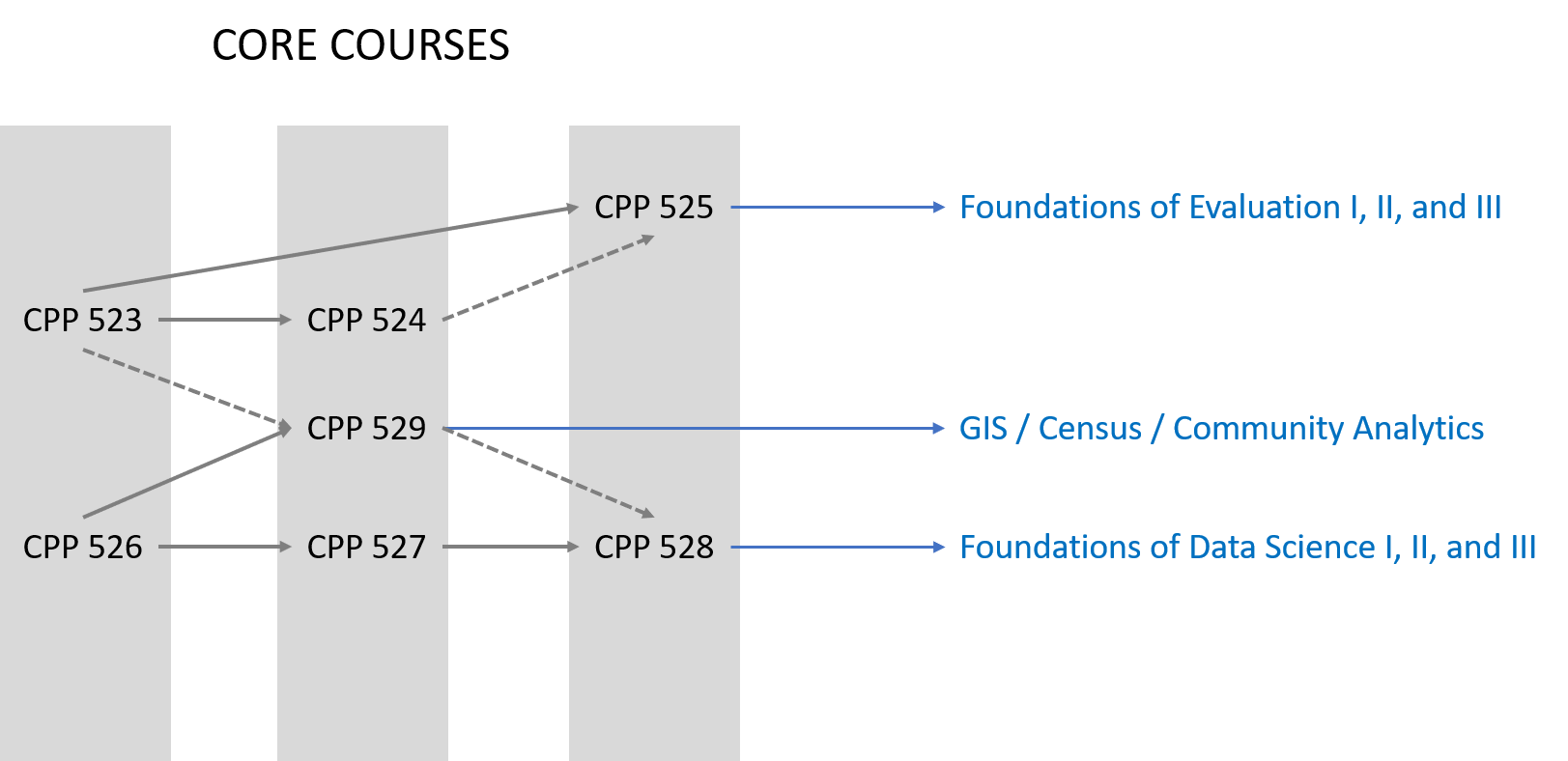
These core courses represent 8 of your 11 course requirements. You are also required to take PAF 541 or SWG 623 to fulfill the Applied Program Evaluation requirement. Check the course catalog for current offerings.
Your two electives can be selected from across the university. ASU is a huge institution with many course options and new ones being added constantly. Availability will depend entirely upon the home departments that offers the elective. Consult with your academic advisor or classmates for recommendations. Some examples of electives PEDA students have taken include:
- BMI 601 Health Informatics
- HED 607 Visualization and Presentation
- TWC 546 Technical & Scientific Reports
The ASU academic catalog will have the most up-to-date information on course offerings and availability.
You should have a reliable laptop or desktop computer for coursework. A tablet is not suitable for the work because it will not be able to suport software you will use in classes.
We don't have specific hardware requirements but we recommend the following minimum specs to work with the types of data files or computational procedures you will encounter in the program:
- At least 8 Gigs of RAM
- At least 50 GB of storage available for labs and projects
- High-speed internet
- Any operating system is fine (Windows or Apple) but no support will be provided for Linux and Apple machines require more time configuring software
R is a memory-intensive program, so more RAM is better. You can find a solid laptop with 8GB of RAM and 256 GB of storage for about $750, or 16GB-32GB of RAM and 5000 - 1,000 GB of storage for about $1,000. The ASUS ZenBook, for example, is a good benchmark for affordable but reliable options.
Desktops will typically offer you more power for the same price since it doesn't require miniturized components and doesn't have to withstand the abuse a laptop does. The Dell Inspiron is a good benchmark for affordable yet reliable options.
If you are on a budget consider buying a refurbished machine from a licensed supplier. You can find nice desktop towers for $250. Note that the quality-assurance testing requirements for refurbished machines are often higher than for new computers, so many refurbished machines are inexpensive but reliable. Often times large companies or schools have contracts where machines are replaced each year, so buying a refurbished computer is like buying a used car from a rental company - a steep discount on something that is low miles and well-maintained. Other times a refurbished computer might be a product that was opened and then returned to a retailer, in which case it is essentially new. Just make sure to buy from a reputable vender that has a good track record (good reviews) and a good warranty on their work (one year maintenance or replacement). I also recommend buying something off of a marketplace like Amazon since they will cover shipping costs if you have to return anything and if the vender is not responsive Amazon will be able to settle a dispute and can refund your purchase, offering additional protection if you do run into problems.
Prior to your first class make sure you have the following software installed on your computer:
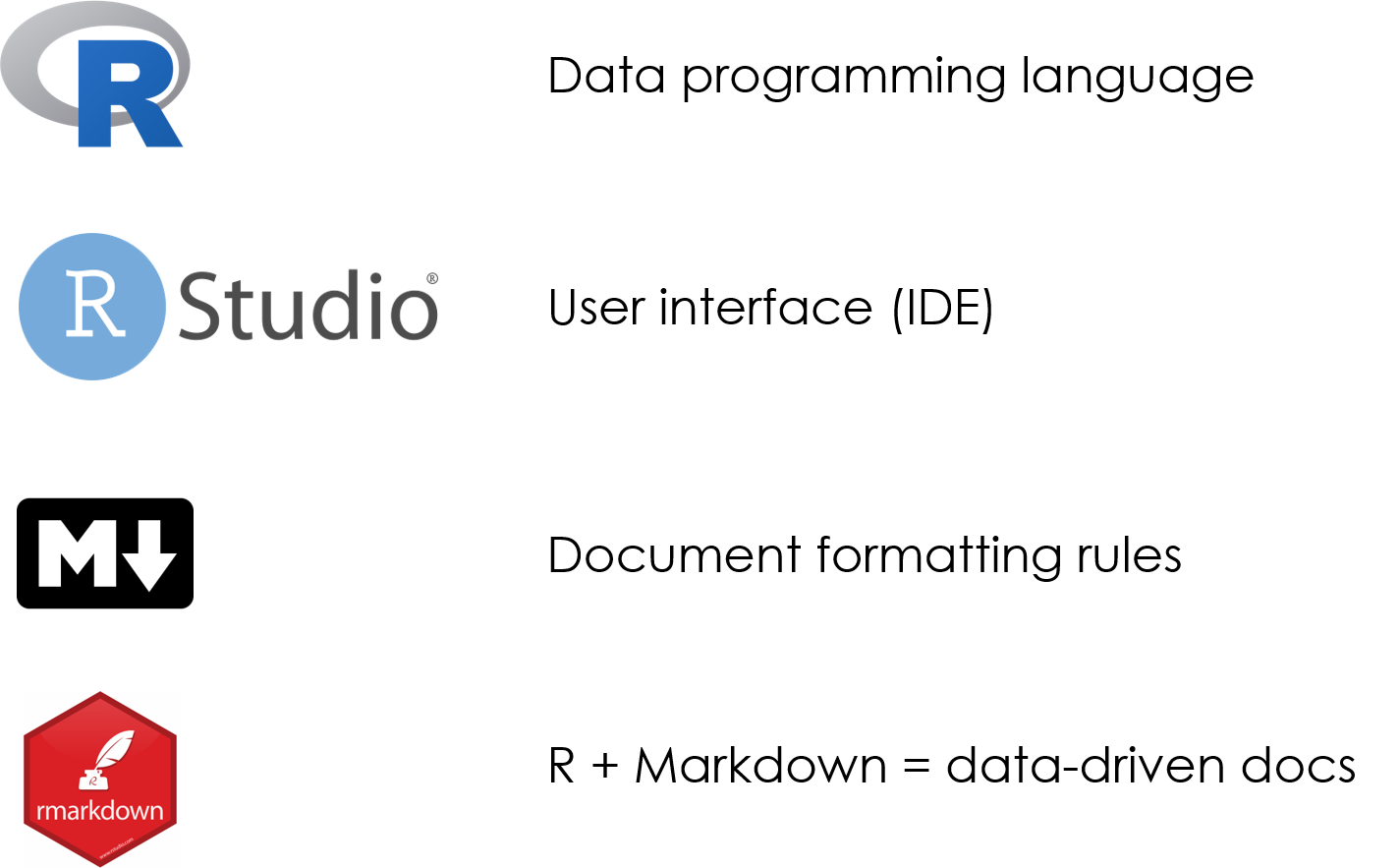
We will be using R extensively for core courses in the program. R is a free open-source program developed specifically for statistics and data analytics.
R Studio provides a nice user interface and some powerful tools to extend R including a publishing platform that allows you to create professional data-driven reports, websites, dashboards, and more.
GitHub is a collaboration tool for data analytics. We will use the platform for distributing course materials and hosting review sessions. You will need a GitHub account for some course work.
NOTE that GitHub is a professional platform that will be visible to future employers and you cannot change your username once your account is created, so select your username accordingly.
<iframe src="https://player.vimeo.com/video/180644880" width="400" height="280" frameborder="0" allow="autoplay; fullscreen" allowfullscreen></iframe>
Data-driven documents are the new standard way to document analysis and create professional reports. A document is data-driven if it not only includes tables, models, or graphics from your analysis, but also the code used to produce the results.
They are the gold standard for modern analytics because it makes the process transparent and reproducible. The author not only reports the results of the analysis, but also how the results were achieved. They are becoming standard practice for teams working on projects, managers that need to inspect work of junior analysts, and scholars that would like to publish in top journals.
Markdown is a small set of text formatting rules used to create data-driven documents. R Markdown is an extension of Markdown that allows you to combine code and text in the same document.
Learn more about data-driven documents here: Introducing Data-Driven Docs
Learn more abour R Markdown here: Getting Started with R Markdown
Join the MS-PEDA groups on Linked-In or Facebook to meet alumni and stay connected to the program.
If you have successfully installed all of the software and you have time before the first course you can explore some of the tools through the videos below.
RStudio helps you manage projects by organizing files, scripts, packages and output. Markdown is a simple formatting convention that allows you to create publication-quality documents. R Markdown is a specific version of Markdown that allows you to combine text and code to create data-driven documents.
-
Chapter 1: Core R: Learning the basics of R
-
Chapter 2: RStudio: RStudio's functionality and features
-
Data-Driven Docs: How R Markdown is used for interactive and dynamic reports
-
A Guide to Markdown: How to use Markdown - the easy-to-learn formatting syntax
<style> h2 { font-family: "Century Gothic", CenturyGothic, AppleGothic, sans-serif; font-size: 30px; font-style: normal; font-variant: small-caps; font-weight: 100; line-height: 26.4px; color: maroon; } h1 { font-size: 36px; } h3 { color: maroon; } img { display: block; margin-left: auto; margin-right: auto; } th { text-align: left; font-size: 20px; } em { color: black; } </style>