-
Notifications
You must be signed in to change notification settings - Fork 0
Expand file tree
/
Copy path0_30-data-driven-docs.qmd
More file actions
261 lines (148 loc) · 5.66 KB
/
0_30-data-driven-docs.qmd
File metadata and controls
261 lines (148 loc) · 5.66 KB
1
2
3
4
5
6
7
8
9
10
11
12
13
14
15
16
17
18
19
20
21
22
23
24
25
26
27
28
29
30
31
32
33
34
35
36
37
38
39
40
41
42
43
44
45
46
47
48
49
50
51
52
53
54
55
56
57
58
59
60
61
62
63
64
65
66
67
68
69
70
71
72
73
74
75
76
77
78
79
80
81
82
83
84
85
86
87
88
89
90
91
92
93
94
95
96
97
98
99
100
101
102
103
104
105
106
107
108
109
110
111
112
113
114
115
116
117
118
119
120
121
122
123
124
125
126
127
128
129
130
131
132
133
134
135
136
137
138
139
140
141
142
143
144
145
146
147
148
149
150
151
152
153
154
155
156
157
158
159
160
161
162
163
164
165
166
167
168
169
170
171
172
173
174
175
176
177
178
179
180
181
182
183
184
185
186
187
188
189
190
191
192
193
194
195
196
197
198
199
200
201
202
203
204
205
206
207
208
209
210
211
212
213
214
215
216
217
218
219
220
221
222
223
224
225
226
227
228
229
230
231
232
233
234
235
236
237
238
239
240
241
242
243
244
245
246
247
248
249
250
251
252
253
254
255
256
257
258
259
---
title: ""
output:
html_document:
theme: readable
highlight: tango
toc: false
number_sections: true
self_contained: false
css: textbook.css
---
# Data-Driven Docs
## What Are Data-Driven Docs?
Data-driven documents are formats that combine text and analysis (data+code).
In doing so, they promote transparency and reproducability. For any given table, figure, or model in the document you should be able to easily discern how it was created, from what data, and what analysis was used.
Popular formats include things like [R Markdown](https://rmarkdown.rstudio.com/lesson-1.html) documents and [Jupyter notebooks](https://jupyter.org/try).
<br>
------------
<br>
## How Do Data-Driven Docs Work?
All of the document formats build from a simple text formatting convention called [**markdown**](https://github.com/adam-p/markdown-here/wiki/Markdown-Cheatsheet).
To create an R Markdown document, you need three things:
1. A header to specify the document type.
2. Some text (formatted in markdown).
3. Some code (inside a "code chunk").
You can download a sample template [HERE](https://cdn.rawgit.com/DS4PS/Data-Science-Class/c464d527/TEMPLATES/MarkdownTemplateSimple.Rmd).
<br>

<br>
<br>
[](../gifs/NewRmarkdownFile/NewRmarkdownFile.html)
<br>
------------
<br>
## What is Markdown?
Markdown is a simple set of rules used to format text. It has been adopted broadly by the data science community and is used on GitHub, Stackoverflow, and now in R Studio.
To give just a couple of examples of how it works:
**Unordered Lists**
```
* First item
* Second item
* Third item
* First nested item
* Second nested item
```
* First item
* Second item
* Third item
* First nested item
* Second nested item
**Hyperlinks**
Create links by wrapping the link text in square brackets [ ], and the URL in adjacent parentheses ( ).
```
I find that [Google News](https://news.google.com) over-curates my media diet.
```
I find that [**Google News**](https://news.google.com) over-curates my media diet.
<br>
**Tables**
```
| Title 1 | Title 2 |
|------------------|------------------|
| First entry | Second entry |
| Third entry | Fourth entry |
| Fifth entry | Sixth entry |
```
| Title 1 | Title 2 |
|------------------|------------------|
| First entry | Second entry |
| Third entry | Fourth entry |
| Fifth entry | Sixth entry |
You can see a full list of **markdown rules** [HERE](https://ds4ps.org/data-driven-management-textbook/markdown/).
<br>
------------
<br>
## Knitting R Markdown Files
Code is placed inside of "chunks" in the documents:
[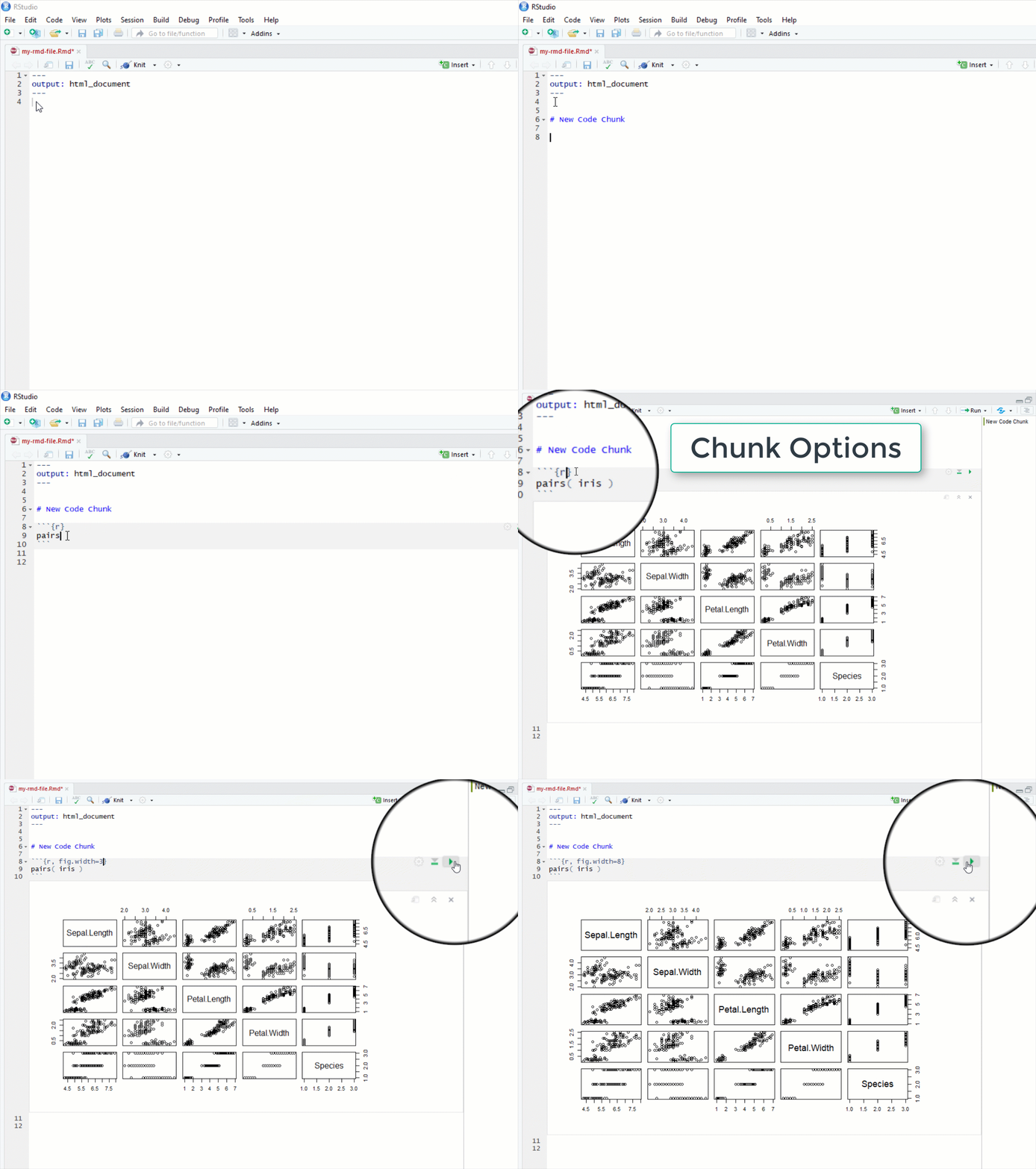](../gifs/NewCodeChunk/NewCodeChunk.html)
When you "knit" a file R Studio will run all of code, embed the output into your document, and then convert the file to whichever type you have specified in the file header.
<br>

<br>
------------
<br>
## Output Types
You can select from many different document types, including HTML pages, Microsoft word, presentation formats, or dashboards.
<br>
<span style="display:block;text-align:center">

</span>
**Check out these examples:**
[R Markdown Formats](https://rmarkdown.rstudio.com/formats.html)
[R Markdown Gallery](https://rmarkdown.rstudio.com/gallery.html)
<br>
------------
<br>
### HTML Pages
```r
---
output: html_document
---
```
[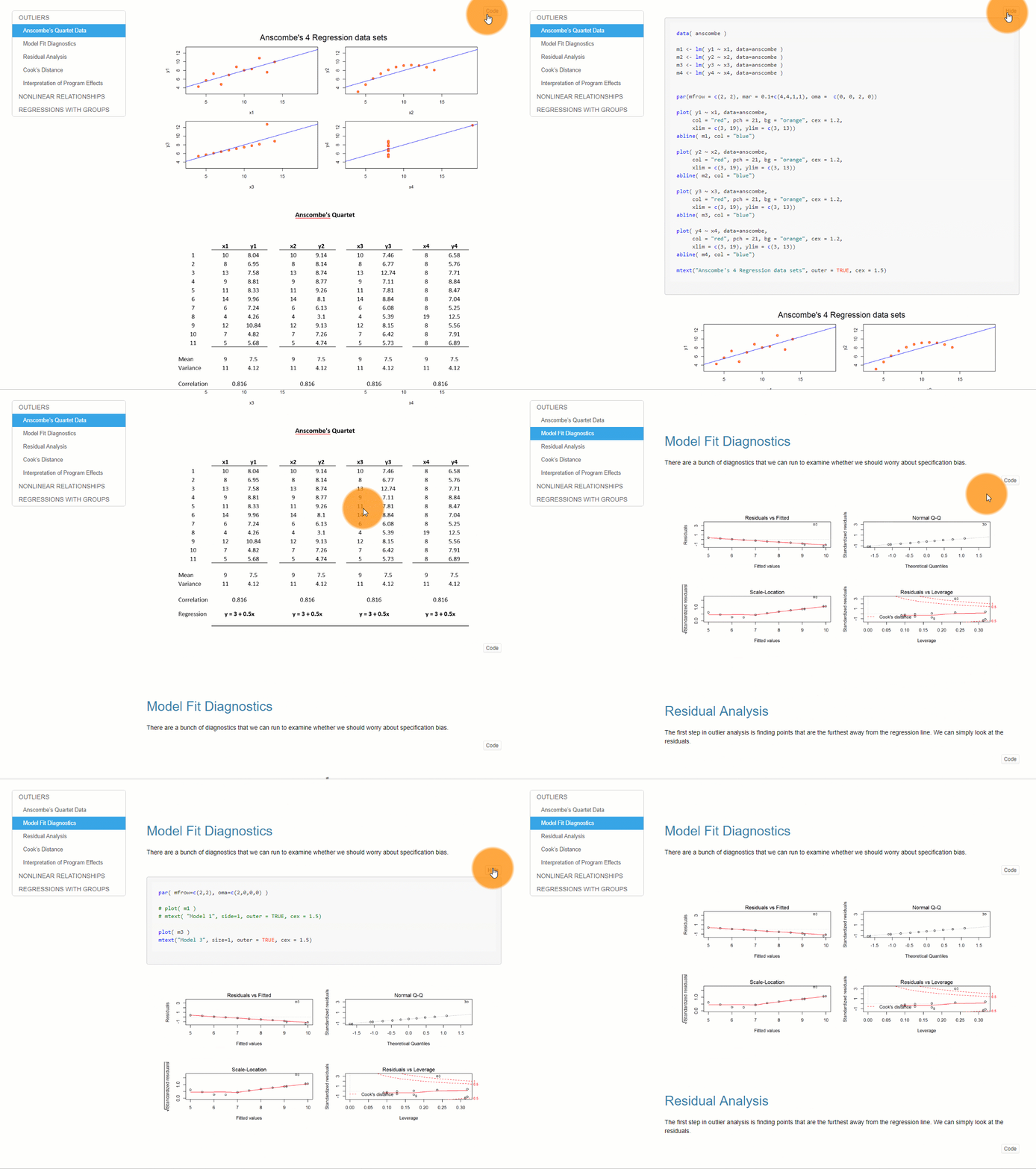](../gifs/html_format/html_format.html)
<br>
### Dashboards
```r
---
output: flexdashboard::flex_dashboard:
---
```
[](../gifs/DashboardExample/DashboardExample2.html)
[ [dashboard example](https://cultureofinsight.shinyapps.io/crypto_tracker/) ] [ [source code](https://cultureofinsight.shinyapps.io/crypto_tracker/) ] [ [blog about the tracker](https://www.cultureofinsight.com/blog/2018/01/22/2018-01-22-building-a-cryptocurrency-tracker-with-r/) ]
<br>
### PDFs
```r
---
output: pdf_document
---
```
<br>
------------
<br>
## Installation
You will need the following programs to generate data-driven documents in R:
* Base R installation [CRAN](https://www.r-project.org/)
* R Studio [download page](https://www.rstudio.com/products/rstudio/download/#Installers)
* Pandoc ([comes with R Studio by default](https://blog.rstudio.com/2014/06/18/r-markdown-v2/))
When you first try to knit a file, you might get a message that you need the following packages:
* rmarkdown
* knitr
These can be installed in the usual manner:
```r
install.packages( "rmarkdown" )
install.packages( "knitr" )
```
**PDFs:**
If you would like to knit to PDF you need one additional program. TeX creates publication-quality PDF files. The open-source version is called MiKTeX [download page](http://miktex.org/download).
If you have problems, you can find some nice tutorials like this one:
<https://www.reed.edu/data-at-reed/software/R/r_studio_pc.html>
**Specialized packages:**
Some document output formats require specific R packages. For example:
* journal templates
* dashboards
* r websites
* books in bookdown
You can find many of these packages on the [R Markdown templates page](https://rmarkdown.rstudio.com/formats.html).
<br>
<br>
<br>